
How to connect your booking system to iglooHome Locks
March 2, 2026 · 11 min read
How to connect your booking system to iglooHome Locks
Want to simplify your rental business? Connecting your booking system to IglooHome locks automates access, eliminates manual key exchanges, and saves time. Here's how it works:
- Automated PIN Codes: Unique, time-sensitive codes are generated and sent to customers via email or SMS, even in offline locations.
- Two Integration Options: Use IglooConnect for a direct setup or Zapier for broader app compatibility.
- Offline Code Features: IglooHome locks use algoPIN technology, enabling offline functionality without WiFi.
- Limitations: Offline codes have constraints like expiration within 24 hours if unused and limited remote management without a WiFi bridge.
This integration streamlines operations, helps reduce costs and scale faster, and enhances customer convenience, making it easier to manage rentals across multiple locations.
Key Benefits:
- Manage up to 20 handovers daily (vs. 2–3 with manual keys).
- Cut check-in costs by $30–$40 per instance.
- Offer 24/7 self-service access for customers.
Whether you use IglooConnect, Zapier, or platforms like Lockii, this guide walks you through setup and troubleshooting to ensure a smooth, automated rental process.
How IglooHome Locks and Offline Codes Work
Understanding the mechanics of offline codes is key to effectively integrating a contactless rental system.
The algoPIN System Explained
IglooHome locks use algoPIN, a system that generates time-sensitive codes capable of functioning offline. This makes them a great choice for locations without WiFi, like public parking lots, remote storage units, or outdoor bike racks.
Here's how it works: when a booking is made, IglooHome's servers create a PIN for a specific time frame. The lock, using a synchronized algorithm, verifies the PIN locally - no internet connection required. Customers receive their access codes immediately after booking or identity verification, and these codes work seamlessly even in areas without cellular or WiFi coverage [1].
Before generating offline codes, each lock must be paired with your IglooHome account via the mobile app (within Bluetooth range). This process provides an exchange code and the lock's Bluetooth ID [4].
Now, let’s look at some important technical constraints tied to offline codes.
Offline Code Limitations to Consider
While offline codes are dependable, they come with specific limitations. For example, codes that are active for more than 24 hours must still be used within the first 24 hours of their scheduled start time. If not, the code becomes permanently invalid [6]. It's essential to include this detail in booking confirmations.
Another limitation is that offline codes can't be remotely deleted or modified. If a cancellation occurs, the code must be manually removed via Bluetooth [6]. For businesses with frequent cancellations, installing a WiFi bridge can allow for remote code management [5].
Each IglooHome lock has a capacity of up to 199 total PINs. Hourly-bound codes are limited to a maximum of 672 hours (28 days) [6]. For rentals lasting between 29 and 367 days, daily-bound codes are required, and their start and end times must align precisely. Additionally, the system restricts you to 3 hourly-bound codes per hour slot and 5 one-time-use codes per start date [6].
Without a WiFi bridge, you won't receive real-time notifications about code usage or access to live activity logs [5]. If detailed tracking is a priority, pairing offline codes with GPS tracking can offer an additional layer of verification for pickups and returns [1].
These insights lay the groundwork for the integration methods discussed in the following sections.
2 Ways to Connect Your Booking System to IglooHome Locks
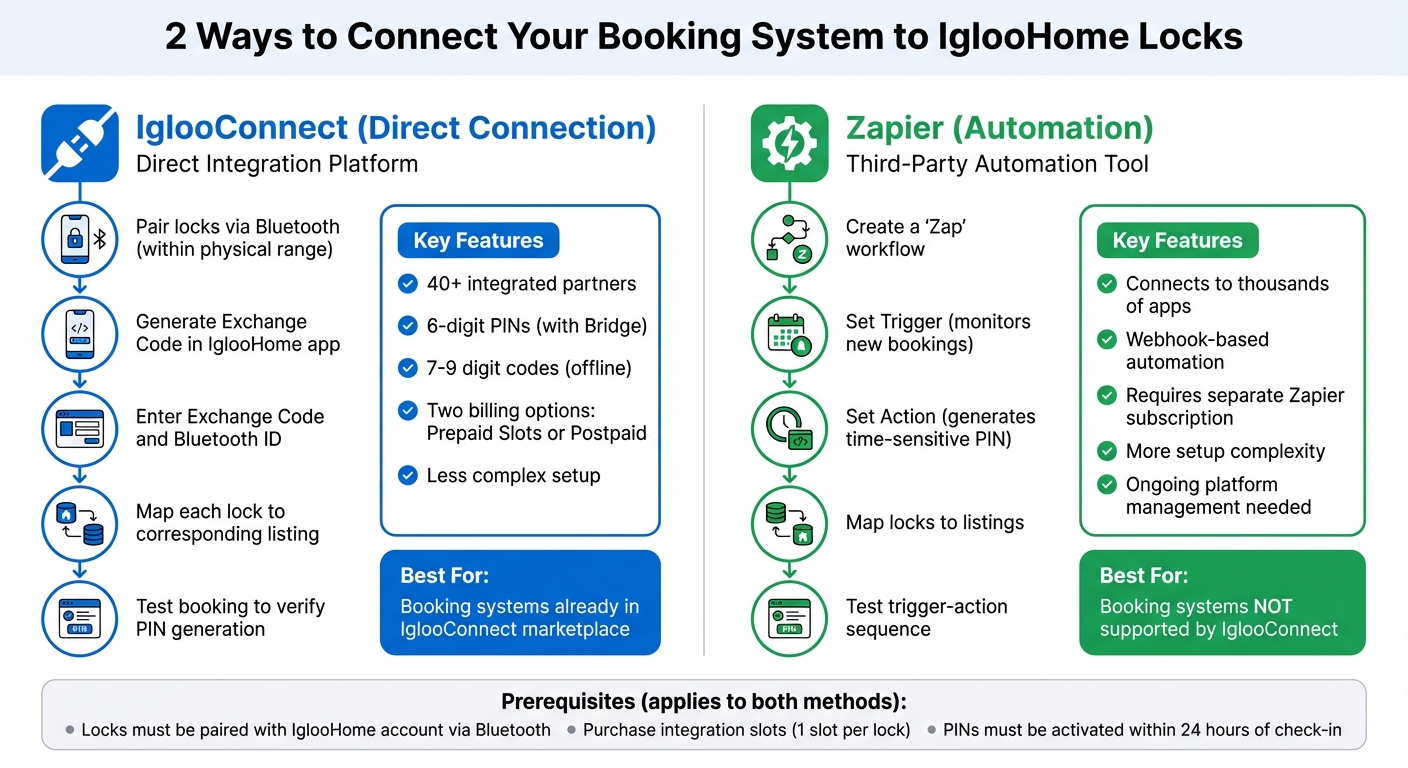
Once your locks are paired and you've reviewed offline code limitations, it's time to decide how to integrate your booking system. Before starting, ensure your locks are connected to your IglooHome account via Bluetooth - it’s a necessary first step [4].
You have two integration options: IglooConnect for a direct connection or Zapier for building automated workflows.
IglooConnect is IglooHome’s in-house integration platform designed for property management, vacation rentals, and facility bookings. This setup allows for staffless rental operations across various industries. It features a marketplace with over 40 integrated partners [7]. If your booking system is listed, this is usually the easiest option. Integration involves using "Exchange Codes" and "Integration Slots" to link locks to your listings. Each lock requires one integration slot [4]. IglooConnect offers two billing options: a prepaid "Slot System", where you purchase slots in advance, or a "Postpaid" model, which charges based on usage after linking your payment method [4].
Zapier, on the other hand, serves as a third-party tool that connects IglooHome locks to thousands of apps not supported by IglooConnect [2]. Using Zapier, you create "Zaps" - automated workflows that generate PIN codes when a new booking is made. While Zapier offers broader compatibility, it requires more setup and ongoing management within the platform. Keep in mind that Zapier’s subscription fees are separate from IglooHome’s integration costs [2].
Before deciding, check if your booking system is already supported by IglooConnect. If it is, a direct connection is typically less complex. Once you’ve chosen a method, run a test booking to make sure everything works correctly, ensuring the trigger from your booking system aligns with the PIN generation process to prevent delays.
Method 1: Direct Connection Through IglooConnect
IglooConnect offers a direct link between your locks and your booking platform, simplifying the rental process and reducing the need for manual intervention. After pairing your locks via Bluetooth (within physical range), you’ll generate an Exchange Code to establish the connection between the IglooHome app and your booking system [4].
"iglooconnect is a platform for you to integrate your locks with a myriad of services. Whether it's managing facility booking, property management or vacation rental hosting, Iglooconnect lets you simplify the workflows." - igloohome Support [4]
To complete the setup, you’ll need the Exchange Code and your lock’s Bluetooth ID. Map each lock to its corresponding listing to make sure PINs are sent to the right guests [8]. Many platforms allow you to manage access and generate PINs directly from their dashboard, so you won’t need to juggle multiple apps.
If you’re using an IglooHome Bridge, the system can generate 6-digit custom PINs. Without a bridge, you’ll receive offline codes that are typically 7–9 digits long [8]. Some integrations even allow up to three devices per reservation, such as a main door, room door, and locker.
Method 2: Automation Through Zapier
Zapier connects your booking system to IglooHome by creating automated workflows, or "Zaps", that use webhooks to generate PINs when new bookings are made [2]. This method is ideal for booking systems not directly supported by IglooConnect.
Each Zap has a "Trigger" that monitors your booking system for new reservations and an "Action" that generates a time-sensitive PIN. Map each lock to its corresponding listing to ensure the correct PIN is delivered [8].
Timing is key here. Use the IglooHome app to set how far in advance the PIN email should be sent before check-in. Always test your setup to confirm the trigger-action sequence works as expected. Keep in mind that automated PINs must be activated within 24 hours of the scheduled check-in time or they will expire [9].
While Zapier provides flexibility by working with thousands of apps, managing workflows within its platform adds an extra layer of complexity compared to IglooConnect’s direct integration. For more advanced automation options that align with Lockii’s self-service features, check out the next section.
How to Connect IglooHome Locks with Lockii
Lockii offers a seamless way to integrate IglooHome locks, making it easier to manage PIN generation, bookings, and customer communications - all from one platform. For just $12 per month per locked item (plus the standard IglooConnect slot fees), you can take advantage of features like 24/7 self-service pickups without the need for manual intervention. Unlike using Zapier or IglooConnect on their own, Lockii combines lock integration with identity verification and automated messaging into one streamlined system. Here’s how to set it all up.
Connect IglooHome to Lockii
Before you start, make sure your locks are already paired with your IglooHome account. You'll also need to purchase integration slots through the IglooConnect portal (https://connect.igloocompany.co/), with one slot required for each lock.
To link IglooHome with Lockii, follow these steps:
- Open the IglooHome app and go to the "iglooconnect" section.
- Select "Connected Services", add your lock, and generate an exchange code.
- In Lockii’s integration settings, input the exchange code from the IglooHome app.
- Map each lock to its corresponding rental item within Lockii. For instance, you might assign Lock #1 to Trailer #5 or Lock #2 to Kayak #12.
This step establishes the connection between your IglooHome locks and the Lockii platform, allowing for automated management.
Setting Up Automated PIN Code Delivery
Once your locks are connected and mapped in Lockii, you can configure how and when customers receive their PIN codes. Lockii lets you schedule code delivery based on your preferences: immediately after booking, two hours before check-in, or at a custom time of your choosing.
For sending PIN codes, Lockii supports third-party SMS providers like Twilio, TextBelt, and MessageBird, as well as email services like SendGrid. This flexibility ensures smooth communication with your customers.
To enhance security, you can enable identity verification through Stripe Identity. This requires customers to upload an ID before they receive their PIN code, helping to reduce risks like fraud and theft. The typical automated workflow looks like this:
Online Booking → Identity Verification → Automated PIN Delivery → GPS-tracked Pickup → Photo-verified Return.
"Since switching to Lockii, things have gotten so much easier. I was juggling three different systems before, and now it's all in one place." - Matt Cole, Owner, Empire Trailer Hire [1]
sbb-itb-eb44693
Testing Your Integration and Fixing Common Problems
Running Test Bookings
To ensure everything is working smoothly, try running a test booking with a short lead time - say, starting in two hours. This helps confirm that the correct PIN format is being generated and delivered as planned. For Bridge-connected locks, the PIN should be 6 digits, while offline codes typically range from 7 to 9 digits. Check that the PIN arrives on time through your configured SMS or email system and successfully unlocks the device on the keypad.
Double-check that the PIN matches the expected format for your lock's configuration and that it arrives at the scheduled time you set. This could be immediately after booking, two hours before check-in, or at any custom trigger point you’ve configured. For properties with multiple locks, make sure every mapped device generates a working PIN. If you encounter any issues during testing, move on to the troubleshooting steps in the next section.
Fixing Common Integration Issues
If your test booking doesn’t go as planned, here are some common problems and how to address them:
Lock not showing up in Lockii? Make sure the lock is paired using the IglooHome app while within Bluetooth range. Additionally, confirm that you’ve purchased an integration slot via the IglooConnect portal - each lock requires its own slot [4].
PIN codes not generating? Check that the Lock ID in the IglooHome app matches exactly with what’s configured in Lockii. Even a small mismatch, like a single character, can cause the system to fail [3]. Also, make sure the booking start time is in the future. IglooHome’s algoPIN system doesn’t support codes with start dates in the past.
Code works, but the door stays locked? This could be due to low battery power. Signs of this include beeping, flickering keypads, or the lock motor failing even when the correct PIN is entered. For most models, you can temporarily jumpstart the lock using a 9V battery [10].
| Issue | Cause | Fix |
|---|---|---|
| PIN rejected as "Invalid" | Timezone mismatch between booking system and lock | Verify the lock’s timezone in the IglooHome app matches your location |
| No PIN generated | Missing integration slot | Purchase and assign a slot for the lock in IglooConnect |
| Keypad unresponsive | Dead battery | Jumpstart using a 9V battery (most models) or USB-C for Padlock 2 |
| Code correct but door locked | Low battery or door misalignment | Replace batteries or check the door frame alignment |
Conclusion
Integrating IglooHome locks with your booking system can completely change how you manage your rental business. Forget the hassle of coordinating key handoffs or sticking to business hours - this setup allows you to offer 24/7 self-service access. With automatically generated PIN codes that deactivate at the end of each rental period, the risks tied to physical keys are a thing of the past.
This integration aligns technology with what your customers need, making operations smoother and the rental experience better. For example, renters can extend bookings or complete payments online, cutting down on support calls. Plus, identity verification ensures that only verified renters receive access codes, adding an extra layer of security. With everything automated, scaling your business across multiple locations becomes more manageable - no need for extra staff or expensive storefronts.
Lockii takes it a step further by combining your booking system, smart locks, GPS tracking, and identity verification into a single platform. It also resolves potential offline code issues by automating workflows that manage the 24-hour activation window and PIN capacity, ensuring seamless access for your customers.
This integration creates a fully contactless rental process. Customers can book online or scan a QR code, verify their identity, and instantly receive their access code - all without requiring staff involvement. Meanwhile, you stay in control with digital audit logs that track when codes are used and items are returned, giving you oversight without the extra manual effort.