
How Digital Locks Work with Rental Software
March 1, 2026 · 9 min read
How Digital Locks Work with Rental Software
Digital locks combined with rental software are reshaping the rental industry by automating rental business operations and management. Here's how it works:
- Customers receive temporary access codes via SMS or email after booking.
- APIs connect rental software with digital locks, syncing booking details in real-time.
- Features include identity verification, GPS tracking, and automated code generation.
- Businesses can manage multiple locations remotely, with 95% of bookings handled without human input.
This system improves efficiency, reduces labor costs, and enhances security by eliminating manual key exchanges and using time-sensitive access codes. Tools like Lockii streamline the entire process, offering self-service rentals that operate 24/7.
Want to know how to set it up and maintain it? Keep reading.
How Digital Locks Connect with Rental Software
API Integration Basics
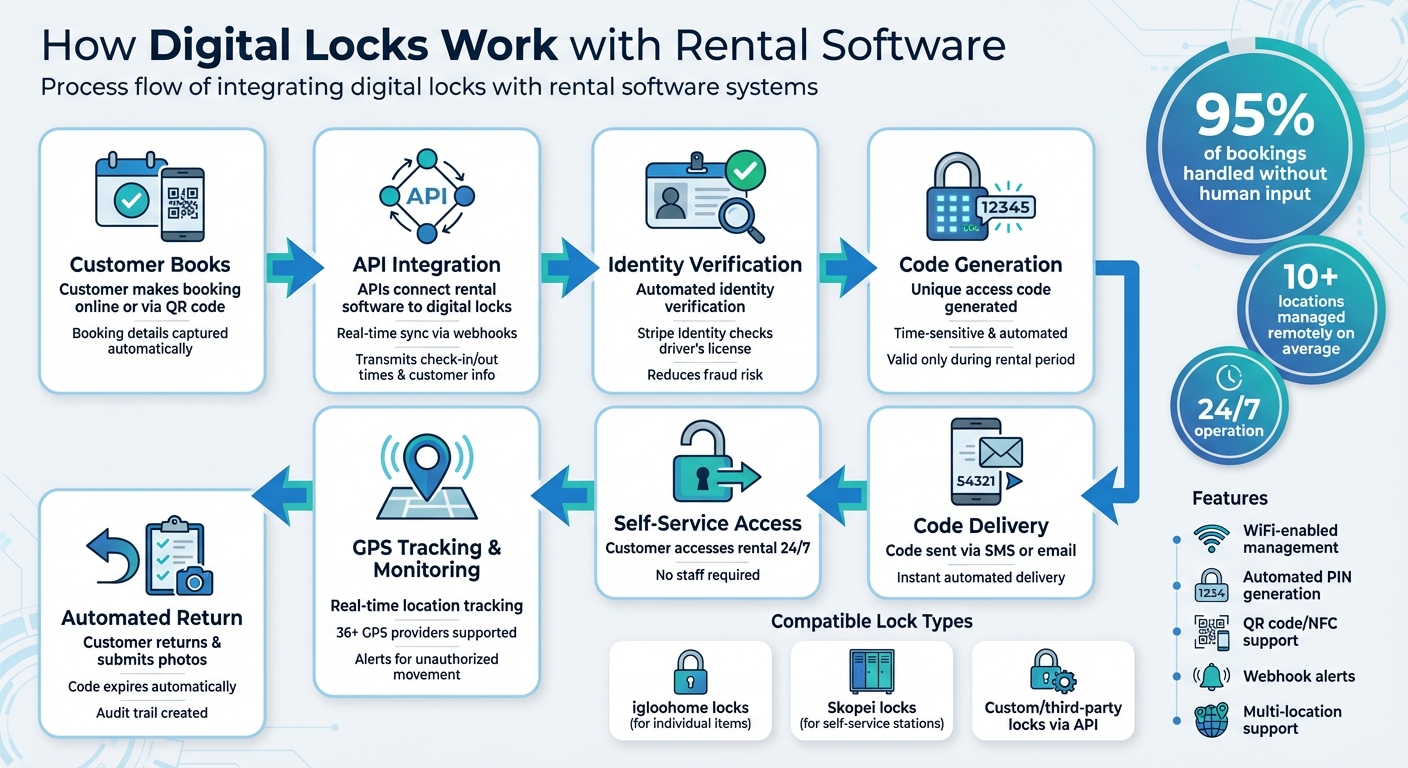
APIs act as the bridge between rental software and digital lock hardware. They transmit crucial booking details - like check-in and check-out times, along with customer information - to create temporary PINs for access. Real-time communication through webhooks ensures that access codes update automatically whenever bookings change. This means you can manage locks remotely and efficiently across multiple locations with minimal manual effort. Webhooks also send instant alerts for specific events, such as when a customer unlocks an item, returns it late, or triggers a security warning. For example, Lockii uses webhooks to integrate with custom or third-party locks, automating workflows about 95% of the time without human involvement [1].
Once this API communication is set up, the system can handle a variety of digital lock types designed for different rental scenarios.
Compatible Lock Types and Capabilities
Lockii supports a range of lock types to cater to different rental needs. For instance, igloohome locks are ideal for individual items, while Skopei locks work well for self-service stations handling trailers, bikes, equipment, and vehicles.
Here’s what these locks can do:
- WiFi-enabled management: Control locks remotely via the cloud.
- Automated PIN generation: Create secure, time-limited access codes.
- Secure identity verification: For example, Lockii integrates with Stripe Identity to verify drivers' licenses, reducing the risk of fraud.
Many locks also support QR codes or NFC tags, allowing customers to unlock items by simply scanning a code. This makes the checkout process almost instant and incredibly user-friendly.
Lockii’s API and webhook support also allow businesses to connect custom or third-party locks, all while keeping the system fully automated.
Core Integration Features
These integrations bring a host of automated features that simplify every step of the rental process.
When a booking is confirmed and identity verification is complete, the system automatically generates a unique access code. This code is sent directly to the customer via SMS or email using built-in communication tools.
Access is tightly controlled by the booking details - codes are only valid during the rental period. If a rental is extended, the system updates the pricing and extends the lock’s access time automatically.
Additionally, digital locks can be paired with GPS tracking. Lockii works with over 36 GPS tracker providers [2], enabling businesses to maintain a detailed audit log of every unlock, pickup, and return. GPS data adds another layer of security, sending alerts if an item moves unexpectedly or isn’t returned on time. The system can even block items needing maintenance, ensuring no access codes are generated for equipment flagged for repair.
| Integration Type | Key Capability | Business Benefit |
|---|---|---|
| Smart Locks | Automated PIN generation & webhook alerts | 24/7 access without staff |
| GPS Tracking | Real-time location syncing & return logging | Instant theft/late return alerts |
| Identity Verification | Automated license & insurance checks | Reduced fraud risk |
| Communication | Automated SMS/email code delivery | No manual customer contact needed |
sbb-itb-eb44693
Setting Up Digital Locks with Lockii: Step-by-Step
Installing and Connecting Your Digital Locks
Start by securely mounting your digital locks on your rental items or storage units. Lockii supports integration with igloohome and Skopei smart locks, which connect via WiFi or Bluetooth for remote management. Follow the lock's setup guide to connect it to your network through its dedicated app. Once online, the lock can communicate directly with Lockii, enabling automated access code generation and remote control.
For added functionality, install GPS trackers like Digital Matter or Fleet Complete on your rental items to enable real-time location tracking.
After setting up your locks and trackers, the next step is configuring Lockii for seamless operation.
Configuring the Integration in Lockii
Log into your Lockii dashboard and head to the integrations section. Here, you’ll input your API credentials to sync all connected locks with Lockii’s inventory system.
Next, set up Stripe Identity within Lockii to streamline customer verification. This feature verifies customer IDs automatically, helping reduce fraud risks. Then, configure your communication tools - Lockii integrates with platforms like SendGrid, Twilio, MessageBird, or TextBelt to send lock codes via SMS or email as soon as a booking is confirmed.
Assign each lock to a specific rental item in your inventory. When a customer books through the website widget or scans a QR code on-site, Lockii handles everything: it allocates available stock, generates a unique access code, and delivers it to the customer. Impressively, 95% of customer bookings are completed without any manual intervention [1].
This setup ensures your digital locks are perfectly aligned with Lockii’s operational system.
Testing and Expanding to Multiple Locations
Once you’ve configured everything, it’s time to test your setup.
Run a test booking through your website or by scanning a QR code on a rental item. Check the entire booking process - confirm stock assignment, code generation, and code delivery. Then, input the code on the digital lock to confirm that it communicates correctly with Lockii.
Complete the test by submitting a return confirmation through the customer portal. Ensure the rental item’s status updates to "available" and that any GPS tracker logs the return accurately. This full-cycle test ensures all automated processes are working as intended.
When you’re ready to scale, Lockii’s multi-location support makes it easy. You can manage multiple locations remotely while guiding customers to the nearest available item. As Matt Cole, Founder of Empire Trailer Hire, shared:
Since switching to Lockii, things have gotten so much easier. I was juggling three different systems before, and now it's all in one place.
On average, companies using Lockii manage 10 or more locations remotely, all without needing to add extra staff [1].
How to Set Up and Manage Smart Locks with Lodgify
Benefits of Digital Locks with Lockii
Lockii's digital locks simplify access and verification processes while delivering clear advantages for businesses.
Improved Security and Fraud Prevention
Traditional key systems come with risks - lost keys, unauthorized duplicates, and untraceable access can compromise security. Lockii eliminates these vulnerabilities by using unique, time-sensitive access codes that only activate at check-in and expire at checkout.
Before any access code is issued, Lockii verifies customer identities using Stripe Identity, which checks details like drivers' licenses and insurance policies during booking. On top of that, GPS tracking from over 36 providers, including Digital Matter and Fleet Complete, ensures you’re immediately alerted to unauthorized movements, late returns, or theft. Plus, mandatory return photos and digital forms create a detailed audit trail for every transaction, making insurance claims and fraud investigations much easier.
These features work together to provide a secure, automated system that minimizes risks and simplifies operations.
24/7 Self-Service Rentals
Manual handovers are one of the biggest pain points in rental operations, but Lockii’s digital locks solve this by enabling round-the-clock self-service. Customers can pick up and return items anytime - no staff required. Once a booking is confirmed, the system generates access codes automatically. Customers can scan QR codes on rental items for instant checkout, extend bookings online, and submit return documentation through the customer portal - all without needing to contact support.
This flexibility eliminates scheduling headaches and long wait times, creating a seamless experience for customers.
Lower Labor Costs and Easier Scaling
By automating processes like key exchanges, identity verification, and booking extensions, Lockii significantly cuts down on labor costs. Customers handle everything themselves through the platform, freeing up staff for other priorities.
This streamlined approach also makes it easier to scale your rental business to multiple locations. Without the need for physical offices or on-site personnel, businesses can set up operations in public parking lots or remote areas with minimal investment. Many Lockii users manage over 10 locations remotely, all from one dashboard. Ben Keep, owner of Hatoza Hire, shared his experience:
"Lockii has significantly reducing complexity and allows me to focus more on running my business."[1]
Lockii’s digital locks make scaling efficient and cost-effective while maintaining smooth operations.
Troubleshooting and Best Practices
Common Problems and How to Fix Them
Delayed code syncing is a typical issue with digital lock integrations. If access codes aren’t being created on time during bookings or fail to expire after checkout, try running a batch update to sync all pending bookings. This often resolves the problem [3].
WiFi connectivity problems can disrupt the lock’s ability to receive commands. During the initial setup, make sure to evaluate WiFi coverage at all entry points. If connectivity issues arise after installation, check the signal strength for your locks. In areas with weak coverage, adding WiFi extenders can help maintain a stable connection.
API errors usually occur due to incorrect property mapping. Double-check that each lock is properly linked to its corresponding property in your dashboard. Remember, only one lock system can be integrated per property, but you can use different systems across multiple properties [3].
Addressing these issues head-on ensures your integration stays dependable and functional.
Tips for Maintaining Reliable Integration
To keep your system running smoothly, stick to these best practices.
Thoroughly test access code generation before rolling out to additional locations. Start by installing locks on primary entry points, linking them to Lockii, and simulating various booking scenarios, such as same-day rentals, multi-day stays, or cancellations. This helps identify and resolve configuration issues early on.
Make it a habit to monitor Lockii’s audit logs and schedule regular maintenance. This ensures all lock activity and booking events are accurately tracked. For extra verification, consider using GPS tracking as a backup. It can confirm whether an item was picked up or returned if a lock’s status seems unreliable.
Conclusion
Digital lock integration is changing the game for rental operations. By streamlining the technical process - like API connections and automated code generation - it eliminates manual tasks and supports 24/7 self-service rentals. When properly set up, tested, and fine-tuned, it creates a seamless system for automated pickups and returns.
Lockii takes things a step further. It pairs digital locks with tools like identity verification, GPS tracking, and automated workflows. This makes it possible to expand to multiple locations without hiring extra staff or investing in expensive storefronts. On average, businesses using Lockii operate in 10+ locations, with about 95% of customer bookings handled without any human involvement [1].
Features like time-limited access codes, identity verification, and detailed audit logs keep your assets secure. Customers benefit, too, with instant bookings, QR code checkouts, and self-service extensions - all accessible through their phones. Together, these elements create a reliable and secure system tailored to modern rental businesses.
Whether you’re managing trailers, equipment, or vehicles, integrating digital locks with Lockii sets the stage for scalable and efficient operations. With lower labor costs, stronger security, and an improved customer experience, your business is well-positioned to grow and stay competitive.