FAQs on IglooHome Locks for Rentals

How IglooHome locks and integrations enable offline PIN access, automated code delivery, and audit logs to streamline rental operations and improve security.

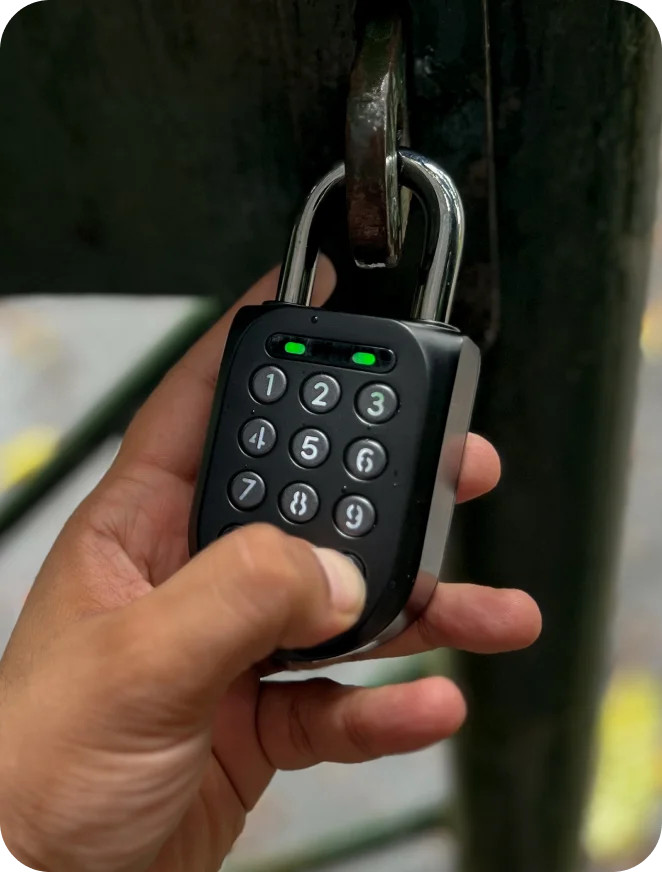
IglooHome locks simplify rental property access by replacing traditional keys with temporary, offline PIN codes. These locks work without WiFi and integrate with systems like Lockii to automate code generation and delivery, aligning with rental schedules. Key benefits include reduced labor costs, streamlined operations, and improved security through audit logs and advanced algoPIN™ technology.

Key Highlights:

  • Offline PIN Codes: Secure access without internet.
  • Automation: Systems like Lockii handle bookings, payments, and code distribution.
  • Flexibility: Support for one-time, recurring, or duration-based PINs.
  • Scalability: Manage multiple locations and locks from one account.
  • Security: Audit logs track access and incorrect attempts.

These features make IglooHome locks a practical solution for rental businesses, ensuring efficient, contactless operations.

Property Management with the igloohome Smart Keybox

igloohome

Setting Up IglooHome Locks for Rentals

IglooHome Lock Setup Guide for Rental Properties - 3 Step Process

IglooHome Lock Setup Guide for Rental Properties - 3 Step Process

Creating Your Account and Installing the App

Start by downloading the IglooHome app from the Apple App Store or Google Play. Once installed, tap "Create New Account" and register using your company email. Be sure to verify your account promptly to avoid any pairing issues. Using a company email is key - this ensures the account remains tied to your business, even if there are staffing changes down the line.

After verification, enable Biometric Login under the Profile tab. This feature lets you use fingerprint or facial recognition, making it much quicker to handle frequent access requests or review audit logs.

Before pairing any locks, set up "Properties" in the app. Each property needs a name and region, helping you organize locks by location. This setup is especially helpful as your rental operation grows and spans across multiple sites.

With these steps complete, you're ready to pair and configure your locks.

Pairing and Configuring Your Locks

Make sure you have a stable internet connection and that Bluetooth is turned on. Stand close to the lock to ensure proper pairing.

Open the app and go to Add and Manage or Configuration, then select Add Lock and choose the model you’re working with. Assign the lock to a Property you’ve already created or create a new one. Activate the lock by pressing any key on its keypad. Once the lock’s Product ID appears in the app, select it and wait for the blue blinking light on the lock, which signals that pairing is in progress. Finally, give the lock a name to keep your rental system organized.

Keep in mind, each IglooHome lock can only be paired with one account. However, a single account can manage an unlimited number of locks and can also be accessed from multiple devices, making it easy for your team to share management responsibilities.

Once your locks are paired, connect them to your rental management system to automate access codes.

Connecting IglooHome to Your Rental Management System

IglooHome integrates with rental management systems through the iglooconnect platform. For example, it works seamlessly with systems like Lockii, automating PIN code generation based on your booking schedule and enabling fully contactless rental operations.

To set this up, go to Connected Services in the IglooHome app, select your provider, and copy the unique exchange code. Make a note of the lock’s Bluetooth ID as well. Enter these details into your rental management system’s integration portal to complete the process. Keep in mind that some systems may require one integration slot per lock.

Once connected, systems like Lockii automatically generate time-limited PIN codes whenever a booking is made. These codes are sent to customers via email or SMS, activating at check-in and expiring at checkout. This eliminates the need for manual code creation, keeping your rental operations running smoothly and efficiently.

Managing Access Codes and Security

How algoPIN Technology Works

IglooHome's algoPIN technology operates with the same level of security you'd expect from online banking. It allows your smartphone to communicate with secure cloud servers to create unique access codes with a set validity period - all without needing WiFi. Here's the clever part: the physical lock uses the same algorithm as the cloud server, so it can "translate" the entered PIN and grant access.

This method sidesteps risks like WiFi hacking or internet outages. The lock can store up to 199 PIN codes, making it ideal for handling multiple bookings simultaneously. Keep in mind, remotely generated algoPIN codes need to be activated within 24 hours.

Setting Code Expiration Times and Access Rules

Duration PINs are designed to match your booking schedule. You can set a specific start date and time for check-in and an end date and time for checkout. Once configured, the code automatically activates and expires as planned - no manual updates required.

Need access for maintenance visits or deliveries? Generate a "Once" PIN that expires immediately after use. For cleaning crews, you can create recurring PINs that work only on designated days during specific hours. If you're using a rental management system like Lockii, these codes are automatically generated and sent with each booking, ensuring renters get their access codes exactly when they need them.

This level of control over access codes pairs seamlessly with the detailed tracking offered by audit logs.

Using Audit Logs to Track Access

Audit logs add another layer of security by keeping a detailed record of lock activity. They track every unlock, relock, PIN creation, settings change, and even incorrect PIN attempts. To keep these logs updated, sync the lock within Bluetooth range.

For permanent PINs and Bluetooth keys, the logs provide information on who accessed the property and when. Reviewing these logs regularly can help identify security concerns, like repeated incorrect PIN entries, or troubleshoot user errors. If you need real-time updates, you can issue Bluetooth keys to your staff.

When you visit the property, syncing the lock ensures your activity logs, battery status, and lock time settings are all up to date, keeping your security system running smoothly and accurately.

Troubleshooting IglooHome Lock Issues

Effective troubleshooting is key to maintaining secure and seamless access to your rental properties.

Fixing Pairing and Connection Problems

Start by pressing any button on the keypad to activate the lock, ensure Bluetooth is enabled on your phone, and switch to mobile data if Wi-Fi interference is suspected.

If the automatic search doesn't locate your lock, opt for the "Pair Manually" option in the app. Select your specific lock model and follow the on-screen instructions. Be sure to choose the correct Product ID displayed within the app[7,8]. Keep in mind that each lock can only be paired with one email account at a time, so double-check that it hasn’t been linked to another account already.

Still having trouble? Try logging in on a different phone using the same credentials to rule out device-related issues. Also, make sure both your phone's operating system and the IglooHome app are updated to the latest versions.

If pairing issues persist, it may be time to investigate potential code generation errors for further troubleshooting.

Fixing Code Generation Errors

Access codes must be used within their 24-hour validity period. If this time frame is missed, simply generate a new code.

A flickering keypad or beeping sounds often indicate low batteries. Replace them as needed; instructions for battery replacement can be found in the unpairing section below.

When within Bluetooth range, navigate to the Logs section in the app and tap "Sync" to update the lock's clock and settings. This quick step often resolves code-related problems[3,4]. Additionally, check the activity logs for signs of "Incorrect PIN attempts", which could indicate guests are entering codes incorrectly or that the lock isn't recognizing valid entries.

If timing and battery checks don’t solve the issue, you may need to unpair and reset the lock to start fresh.

Unpairing and Resetting Locks

To unpair a lock, ensure you are within Bluetooth range. Open the IglooHome app, go to the property associated with the lock, select the lock, and choose the unpair option[4,8].

For locks that are unresponsive or have flickering keypads, replace the batteries promptly. If the lock remains unresponsive, jumpstart it using a 9V battery before replacing the internal batteries[2,16]. After replacing the batteries, perform a quick sync in the Logs section to update the lock’s clock, battery status, and access methods. This often resolves most operational issues[3,4].

How Lockii Works with IglooHome Locks

Lockii

Lockii takes rental operations to the next level by seamlessly integrating with IglooHome locks. Using IglooHome's algoPIN™ technology, Lockii allows customers to book rentals directly online. Whether through embeddable website widgets or by scanning QR codes on equipment like trailers, kayaks, or bikes, users receive a unique access code - completely eliminating the need for staff involvement.

Simplifying Lock Management Across Locations

Every IglooHome lock can be assigned to a specific rental item, no matter how many locations you manage. Lockii centralizes this process, ensuring smooth, 24/7 operations. When a booking is made, Lockii generates a Duration PIN that aligns with the rental period. This system works offline at the lock’s location, thanks to algoPIN™ technology, which functions like a one-time banking password. This eliminates the risk of downtime from internet outages and avoids vulnerabilities tied to WiFi-based systems. The result? A hassle-free experience for both operators and renters.

Enabling 24/7 Contactless Rentals

For walk-up customers, renting equipment is as easy as scanning a QR code or tapping an NFC tag on the item. Lockii takes care of everything - identity verification, payments via Stripe, and delivering access codes through SMS or email. Customers can also modify bookings or extend rental periods through a self-service portal, cutting down on support calls. Unlike Bluetooth systems that require a dedicated app, Lockii provides users with a simple 7- to 9-digit PIN to enter into the IglooHome keypad, making the process straightforward and app-free.

Monitoring Maintenance and Security

Lockii doesn’t just manage access - it ensures every rental is tracked from start to finish. By combining access logs, GPS tracking, and return verification, Lockii creates a complete audit trail for each rental. The system logs when codes are created, when locks are opened and closed, and even tracks failed PIN attempts. For mobile assets like cars or trailers, GPS monitoring tracks movement to and from designated areas. Before completing a return, customers are required to upload photos and fill out digital checklists confirming the equipment’s condition. This data feeds into Lockii’s maintenance tracking system, helping you monitor damage, schedule repairs, and maintain detailed records - all accessible through a single dashboard.

Summary

Main Benefits of IglooHome for Rentals

IglooHome locks offer a truly contactless way for customers to access rental assets, thanks to the innovative algoPIN™ technology. With this system, users can unlock assets using unique 7- to 9-digit codes - no app downloads or account registration required. These codes are generated remotely and work offline, eliminating risks like WiFi hacking and ensuring reliability even during internet outages.

The locks also provide flexible access options, including one-time, permanent, duration-based, and recurring weekly codes, making them adaptable to various rental needs. They can store up to 199 PIN codes at once and feature advanced security measures like decoy PINs and automatic lockouts after multiple incorrect attempts.

How Lockii Improves Rental Operations

Lockii takes the benefits of IglooHome locks to the next level by turning them into a fully automated, 24/7 rental management system. This platform streamlines operations by handling everything from bookings and identity verification to code distribution and return tracking - all from a single dashboard.

Customers receive their unique access codes via SMS or email after verifying their driver’s license. GPS tracking ensures mobile assets are monitored throughout the rental period, helping to minimize fraud. Plus, renters can extend their rental period through a self-service portal, cutting down on support calls. Centralized activity logs provide a clear record of all transactions.

At just $12 per month per item, Lockii offers a cost-effective way to expand rental services without increasing staffing needs.

FAQs

How does IglooHome keep locks secure without needing internet access?

IglooHome locks are powered by algoPIN™ technology, a system that ensures security without depending on internet connectivity. The lock generates unique PIN codes on its own, using advanced algorithms much like the one-time passcodes (OTPs) used in banking. This means you can create and share PIN codes remotely, all without needing WiFi. It's a practical and dependable solution, especially for rental businesses looking to streamline access management.

What can I do if my IglooHome lock isn’t pairing with the app?

If your IglooHome lock isn't connecting to the app, start by ensuring Bluetooth is turned on and your phone has a stable internet connection (mobile data is recommended). Then, try these steps:

  • Open the IglooHome app and tap Pair New Lock or go to Configuration > Add Lock.
  • Confirm the lock is powered on and positioned within Bluetooth range of your phone.
  • If the lock seems inactive, press any key to wake it up.
  • Choose your lock model in the app and follow the on-screen prompts to finish the pairing process.

Still having trouble? Try switching to another mobile device using the same account. You can also restart your phone's Bluetooth and internet connections or update both your phone's operating system and the IglooHome app to their latest versions. For ongoing issues, refer to the troubleshooting guide or reach out to customer support for assistance.

Can IglooHome locks be used for various types of rental properties?

IglooHome locks work well for various rental properties, from short-term rentals to vacation homes and beyond. With different lock models available, there's an option to fit nearly any property type or requirement.

What sets these locks apart is their compatibility with automation platforms. This feature simplifies access management and helps rental businesses run more efficiently. With their blend of security and ease of use, IglooHome locks are a smart choice for managing access across different rental setups.

Related Blog Posts

Make The Switch,
To Purpose Built