
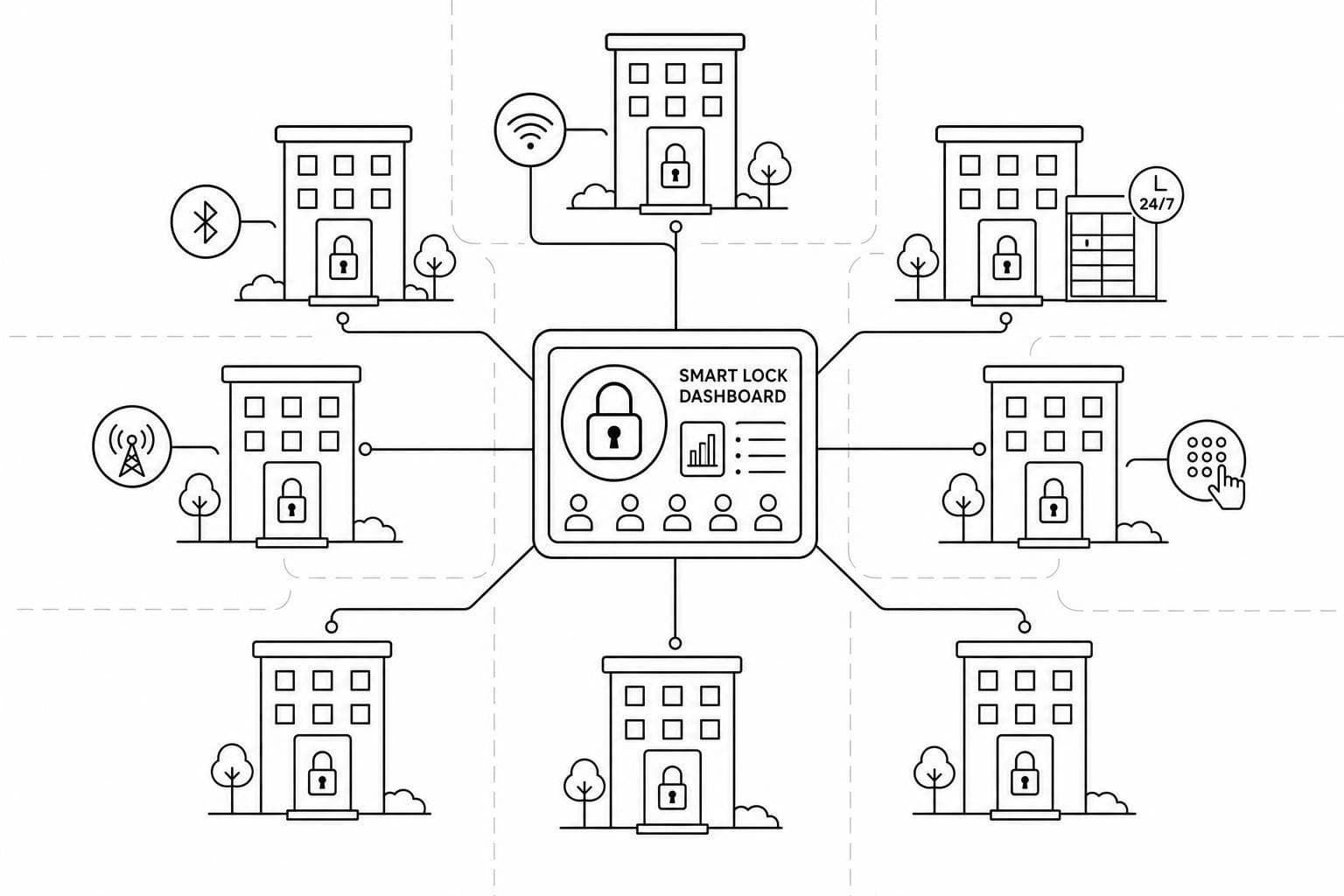
Smart Lock Options For Growing Rental Networks
August 8, 2026 · 17 min read
Smart Lock Options For Growing Rental Networks
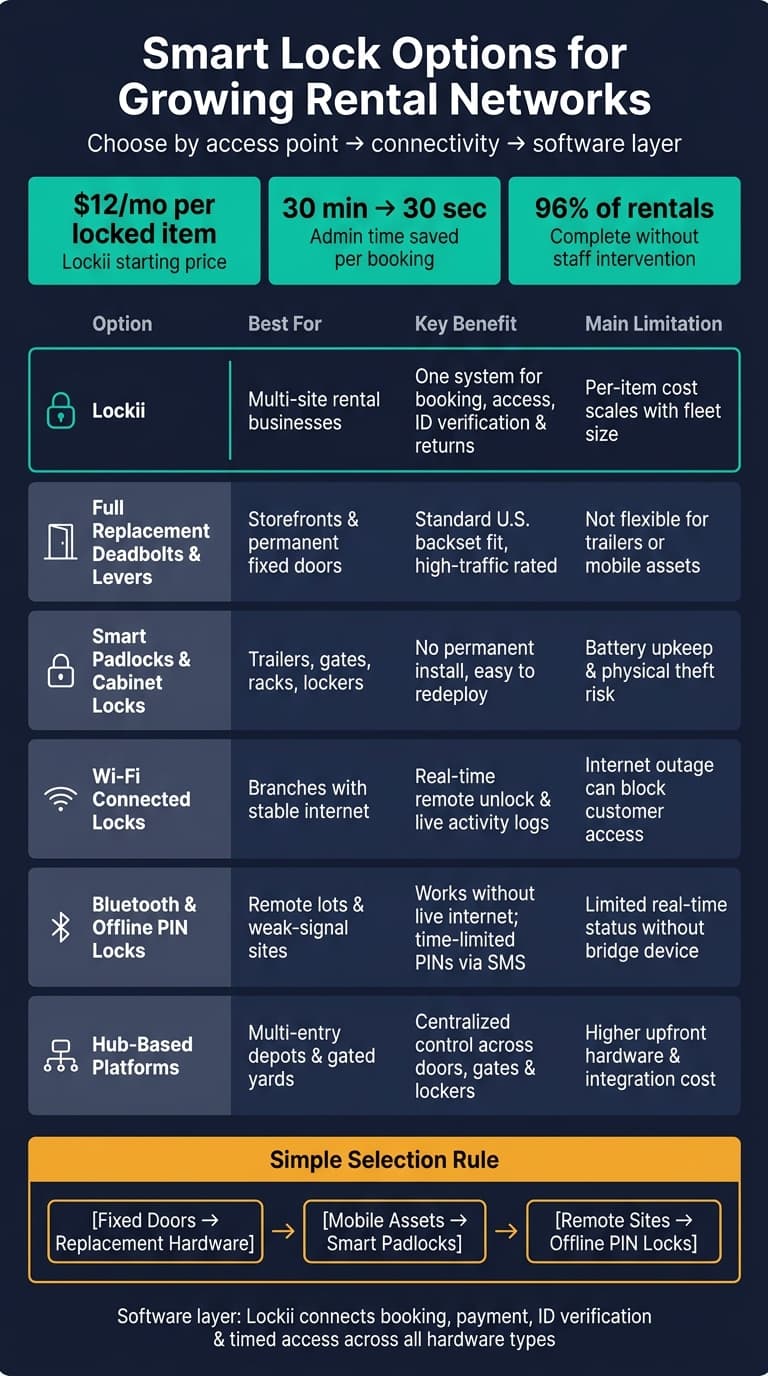
If you run more than one rental location, your lock setup can turn into a staffing and access problem fast, requiring you to automate rental business operations. The short answer is this: _fixed doors usually need deadbolts or lever locks, trailers and yards usually need smart padlocks, weak-internet sites usually need offline PIN access, and larger depots often need a hub system on top._
I’d boil the article down to four buying checks:
- Hardware fit: door, gate, trailer, cabinet, locker, or yard
- Connection type: Wi‑Fi, Bluetooth, offline PIN, or hub
- Access control: one dashboard, branch permissions, and booking-linked codes
- 24/7 pickup: code delivery, ID checks, remote help, and return tracking
The software layer matters just as much as the lock. In this article, Lockii is the booking-to-access system that connects payments, ID checks, timed PIN delivery, and return records. Its pricing starts at $12 per locked item per month, and the article says automated pickup can cut admin work from 30 minutes to about 30 seconds per booking. It also notes that about 96% of rentals in this type of flow can finish without staff help.
Anthony Chow: From Airbnb Hustle to Global Smart Locks & the Rise of the Rental Economy – E676
sbb-itb-eb44693
Quick Comparison
| Option | Best for | Main upside | Main limit |
|---|---|---|---|
| Lockii | Multi-site rental businesses | One system for booking, access, and returns | Cost grows per locked item |
| Retrofit locks | Existing cabinets, trailers, enclosures | Keep current hardware | Some remote features need a bridge |
| Deadbolts / lever locks | Storefronts and fixed doors | Good fit for branch entrances | Not ideal for mobile assets |
| Smart padlocks / cabinet locks | Trailers, racks, lockers, sheds | Works where door locks do not | Battery and physical lock upkeep |
| Wi‑Fi locks | Branches with stable internet | Live remote control and event logs | Internet loss can affect remote actions |
| Bluetooth / offline PIN locks | Remote lots and weak-signal sites | Access still works without internet | Fewer live updates without extra gear |
| Hub-based platforms | Depots with many doors, gates, and lockers | One control point for mixed hardware | Higher setup cost |
If I were choosing, I’d keep it simple: pick hardware by access point first, then choose the connection type based on internet reliability, then make sure the software can send timed codes and log every pickup and return. That is the whole article in plain English.
1. Lockii
Lockii is the software layer behind contactless rental pickup. It ties booking, payment, identity verification, and access code delivery into one system across a single site or many locations. For multi-site operators, the big issue is simple: can one access setup handle hardware, branch oversight, and 24/7 pickup without turning into a mess? Pricing starts at $12 per locked item per month, with no booking commissions. [7]
Hardware fit
Lockii works with IglooHome padlocks, smart keyboxes, and deadbolts. It also supports custom IoT locks through a public API. [5]
Connectivity reliability
With supported locks such as IglooHome, Lockii uses offline-capable, time-limited PINs. So if the lock loses internet, the customer can still get access. If something goes wrong, operators can send a remote unlock from the admin dashboard or the operator app without going on-site. [4][3]
Multi-location access control
Operators can manage assets, locks, roles, and permissions for each branch from one account. They also get booking records and item audit logs across the full network. In plain English, that means you can grow from one location to several without juggling separate systems or logins. Everything runs through a single admin console. [3][6]
24/7 pickup automation
The pickup flow is built to run with little manual work. Customers can book online or on-site through a QR code or NFC tag, pay through Stripe, complete identity verification if needed, and then get a timed PIN code or unlock link during the scheduled pickup window. Returns are confirmed with GPS tracking and customer-submitted photos. According to Lockii, this cuts admin time per booking from 30 minutes to as little as 30 seconds. [1][3]
That makes Lockii the control layer. The next sections look at the lock hardware and connection models it can sit on top of.
2. Retrofit Interior Smart Locks
When the current enclosure or door already does the job, retrofit locks are the easiest hardware move. Retrofit-style systems such as igloohome are used to automate access for equipment cabinets, trailers, and storage access [2][4].
Hardware fit
Retrofit locks work best with supported hardware. If the setup isn’t supported, you may need an IoT API connector [1][5].
For growing rental networks, the upside is simple: you keep the hardware you already have, add contactless pickup, and skip the cost of replacing everything. You can also use a contactless rental efficiency analyzer to calculate potential savings. If branches use similar enclosure types, retrofit locks also make rollout much easier. You can repeat the same setup across sites without big changes.
Connectivity reliability
Retrofit locks use time-limited PIN codes that expire after the booking window [4]. Features like remote unlock, code revocation, and live monitoring usually need a Wi-Fi bridge or IoT connector [1][3].
24/7 pickup automation
Customers get a time-limited PIN by SMS or email that works only during their booking window, with no staff handoff [2][4]. That makes retrofit locks a strong option for branches that need 24/7 pickup without replacing every door or cabinet.
When something goes off script, operators can deal with it remotely through a mobile app instead of driving to the site [1][3].
If the current door or enclosure can’t support a retrofit, the next step is a full replacement lock.
3. Full Replacement Deadbolt and Lever Locks
When a retrofit lock won’t work, full replacement locks are usually the cleanest fix for worn, mismatched, or outdoor doors. This matters most when the door is old, exposed to rain and sun, or just doesn’t match the lock you want to install.
Hardware fit
Full replacement locks are a strong fit for exterior doors, shed entrances, and yard gates. Lever models make more sense for storefront and interior access points, while deadbolts are the better pick for exterior doors.
In U.S. rental locations, standard door prep usually means a 2 1/8-inch bore and a 2 3/8-inch or 2 3/4-inch backset. That’s why models like the Schlage Encode WiFi Deadbolt and Igloohome Deadbolt 5S will often fit without major carpentry.
If you’re managing more than one branch, it helps to standardize on one or two lock models. That makes installs simpler and cuts down on spare parts headaches. It also makes staff training a lot easier across sites.
Connectivity reliability
For connectivity, you’ve got two common paths: built-in Wi-Fi for direct cloud access, or hub-based Z-Wave/Zigbee for larger properties. Some locks also support offline PINs during outages, which can save the day when internet service drops. The main goal is simple: pick a network setup that supports the same access process at every location.
Multi-location access control
A central cloud dashboard lets you group locks by site and set access by role. That matters when different teams need different levels of entry.
The Yale Assure Lock 2 supports up to 250 unique access codes in Z-Wave mode [9][10]. The Schlage Encode stores up to 100 schedulable codes [8].
On top of that hardware layer, Lockii handles code delivery and access control. It automates code delivery and keeps branch-level audit logs across unlimited locations [3].
24/7 pickup automation
This setup makes unmanned pickup much easier. The system sends a time-bound PIN by SMS or email, then revokes it when the rental ends. That means no manual code resets and no staff handoff.
For higher-value assets, require ID verification before sending the code [3].
4. Smart Padlocks and Cabinet Locks
When the asset itself is the point of entry, padlocks and cabinet locks solve the problem. That matters for trailers, racks, bikes, and shed storage, where standard door hardware just doesn’t fit.
Hardware fit
The right lock depends on what you’re securing. Smart padlocks attach straight to hasps, chains, hitch receivers, or rack anchors, which makes them a good match for mobile and outdoor assets. Cabinet locks mount inside cupboards or locker panels. That setup works well for centralized key pickup walls or small gear bays at low-footprint urban sites.
Before you standardize on one or two padlock SKUs and one cabinet lock, measure:
- Shackle clearance
- Hasp thickness
- Overall fit
For outdoor U.S. sites, look for IP65+ weather resistance, sealed keypads, corrosion-resistant shackles, and low-battery alerts.
Once the hardware matches the asset, the next call is simple: should the lock stay offline-first, or should it connect through a network?
Connectivity reliability
Most commercial-grade smart padlocks use Bluetooth plus offline PIN codes, and that combo is chosen on purpose. Bluetooth handles app-based unlock when the customer is close enough to the lock. Offline PINs, generated ahead of time, let the lock open even when there’s no network signal at the asset itself.
Multi-location access control
You can manage padlocks by site or asset group, assign time-limited access for each booking, and set role-based permissions. That means regional managers, field techs, and cleaners only get the access they need.
A clear naming system also saves a lot of headaches. Something like PHX-Yard-TrailerRowA-Lock03 makes devices much easier to identify and manage as your network grows.
Lockii connects this layer straight to booking and audit workflows. When integrated with IglooHome padlocks, every unlock event ties back to a specific booking, with timestamps and user identity logged automatically [3].
24/7 pickup automation
This is where smart padlocks and cabinet locks shine for satellite locations. A trailer rental business, for example, can place padlocks on hitch locks in a grocery store parking lot. Customers book online, verify their identity, and get a time-bound PIN by SMS or email. No staff needed.
For multi-site operators, the key test is simple: can each lock be assigned, audited, and reset from one dashboard?
For gear or key-based rentals, cabinet locks add another layer. A small weather-protected locker can hold helmets, documents, or physical keys, with each compartment controlled digitally. Lockii handles booking, payment, ID checks, and timed access so pickups can run 24/7 without staff. Approximately 96% of rentals using this kind of automated setup finish without any staff intervention [3].
5. Wi-Fi Connected Lock Setups
Wi-Fi connected locks solve a different problem than the padlocks and cabinet locks covered above. They give you live remote management, which is a big deal if your team needs to watch doors across several branches in real time. But there’s a tradeoff: they rely on network access.
For growing rental networks, Wi-Fi is a good fit when live branch oversight matters more than offline-first access.
Hardware fit
Wi-Fi locks work best on fixed indoor doors with stable network coverage. Use them where staff need live visibility at branch entrances, not where the main goal is fully offline pickup.
Connectivity reliability
Wi-Fi locks depend on an active internet connection. If the router reboots or your ISP goes down, remote unlock features can stop working.
The practical workaround is simple: pick hardware that supports time-limited PINs the lock can check locally. That way, customers can still get in even if the internet drops [3][4].
Multi-location access control
This is where Wi-Fi setups start to pay off. Because the lock stays connected, unlock events and access windows can appear in one dashboard. That matters most when a single team runs multiple branches from one central desk.
With that setup, operators can:
- assign inventory to specific locations
- set booking-based access windows so locks open only during the scheduled rental period
- remotely unlock the door when a customer gets stuck [1][3]
Lockii syncs access windows with bookings, logs every unlock, and lets operators re-issue codes or trigger remote unlocks from one dashboard [3].
24/7 pickup automation
Customers get their PIN code or digital lock link automatically by SMS or email at the time of booking or pickup, after identity verification [1][3].
When a site needs more offline resilience and less dependence on a live network, Bluetooth and offline PIN locks are the next comparison point.
6. Bluetooth and Offline PIN Code Locks
Bluetooth and offline PIN code locks check access on the lock itself, so they keep working even when a site loses internet. That changes the whole setup: you don't need site internet for the lock to do its job. The main thing to look at is simple - _will access still work when the property is offline?_
Hardware fit
These locks come in a few common form factors, including smart padlocks, deadbolts, cabinet locks, and gate or site-entry locks. For trailer, equipment, and bike rentals, smart padlocks are often a good match because they attach without changing the asset itself.
If you're rolling out hardware across more than one site, look for IP65+ protection and battery life you can plan around. That makes upkeep easier to manage from one location to the next.
Connectivity reliability
Some systems create time-bound PINs that the lock can verify locally. So if the site's Wi-Fi drops, customers can still get in. That's a big deal for parking lots, storage yards, and remote depots that need 24/7 pickup without on-site IT.
Multi-location access control
Local validation doesn't mean giving up central control. Each booking can get its own PIN, while staff and contractors use separate codes limited to specific locks. The lock may work offline, but unlock events can still be stored on the device and synced to the cloud once the connection comes back. That gives operators an audit trail for every site.
Lockii connects this to the booking lifecycle. Once a customer pays and passes identity verification, a time-bound credential is generated and sent automatically. Booking and item audit logs then record the access event across all locations from one dashboard.
24/7 pickup automation
This is why offline PIN locks work well for unmanned pickup at remote sites or places with a lot of turnover. Customers get access by SMS or email, often with no app needed, so pickup stays self-serve at any hour.
For trailer, equipment, and bike rentals, offline PIN locks help keep pickup moving when connectivity is unreliable.
7. Hub-Based Access Control Platforms
For branches with several doors, gates, and lockers, hub control keeps access rules in sync. A hub-based platform puts access control in one place for sites with many locks, gates, and lockers. Offline PIN locks handle access at the device level. Hub-based platforms move that logic up a layer by linking multiple locks, gate controllers, and lockers to the cloud through one gateway.
Hardware fit
Hub-based platforms are made to support different hardware in one system: smart padlocks, door strikes, gate controllers, key boxes, and smart lockers. For rental businesses, this matters most at flagship depots, gated yards, and branches with several entry points.
Outdoor equipment needs weather-rated hardware, and hubs should sit in protected enclosures. One hub can manage mixed hardware across the same site, which makes setup much easier when you have more than one type of entry to control.
Multi-location access control
This is where hub-based platforms give you the most control from one place. Instead of setting up each site's locks one by one, you can define role-based access templates and push a single policy across many locks and branches at the same time.
When someone offboards, their access is removed across all sites instantly. Audit logs from every lock and branch flow into one reporting interface. That makes incident review easier and helps keep day-to-day operations aligned as you add more locations.
Lockii fits this setup by handling the booking and customer side while the hub platform manages the physical access layer. When a booking is confirmed and identity verification passes, Lockii can trigger time-bound credential generation through its integrated lock platforms, including IglooHome, while the hub layer handles access logs and monitoring.
24/7 pickup automation
Once a site needs unmanned pickup, the connection method matters just as much as the lock. Hub-based setups work well for securing contactless rentals at high-volume or gated sites, but connectivity planning is a big deal.
- Ethernet is the most reliable primary connection for permanent branches.
- Wi-Fi can work for smaller sites with strong local coverage.
- Cellular (LTE/5G) is key for remote yards or standalone kiosks where wired internet isn't practical.
A per-site connectivity plan should also cover failover and battery backup. That helps prevent outages that can block after-hours pickup. Build in backup power and backup connectivity for each site to protect after-hours pickup.
How These Options Compare Across Hardware, Connectivity, Access Control, and 24/7 Pickup
The deciding factors come down to four things: hardware fit, connectivity, access control, and whether 24/7 pickup works without staff stepping in.
Hardware Fit by Access Point
Start with the entry point. A storefront door needs different hardware than a trailer yard, locker, or depot. If you get this part wrong, everything after it gets harder.
| Access Point | Recommended Hardware Category | Key Hardware Consideration |
|---|---|---|
| Storefront door | Full replacement deadbolt / lever lock | Standard U.S. backset and handleset compatibility, high-traffic rated |
| Trailer yard / gate | Weather-rated smart padlock or outdoor lock | Suitable for chain-link gates, storage cages, or hitch locks |
| Storage cage / equipment room | Smart padlock or cabinet lock | No structural modification needed |
| Locker / pickup box | Smart cabinet lock or retrofit kit | Fits standard parcel locker doors and supports centralized management |
| Main depot (multi-entry) | Hub-based platform with mixed hardware | Centralized control across doors, gates, and lockers |
Hardware defines the physical setup. Connectivity decides if that setup keeps working from site to site.
Connectivity and Reliability Trade-offs
Wi-Fi works well for storefronts with steady internet. Bluetooth cuts down on network reliance, but it can add friction for one-time renters who need to use an app.
Offline PIN locks, like some IglooHome models, validate access locally with no live internet required [3]. That makes them a better fit for trailer yards, rural equipment lots, or any site with spotty coverage. Hub-based setups can also help here, since they route multiple locks through one gateway instead of forcing every device to connect to Wi-Fi on its own.
Access Control Across Branches
Once hardware and connectivity are in place, the next pain point is scale. More branches usually mean more people, more devices, and more chances for access headaches.
What matters most here is:
- Branch grouping
- Role-based staff permissions
- Booking-linked code lifecycle management
When access control sits in the software layer instead of inside each lock, adding a branch is much simpler. You don't have to manage every device one by one. Lockii ties code generation directly to confirmed bookings, so codes activate at pickup time and expire at return, automatically, across every location [3].
24/7 Pickup Automation
This is where the whole setup either works or falls apart. For 24/7 pickup to run cleanly, the flow has to move on its own: payment confirmation triggers identity verification, identity verification triggers code generation, and code generation triggers SMS and email delivery [3].
For unattended returns, the process needs the same kind of closed loop. GPS confirms the asset is back on-site, the customer submits end-of-hire photos, and a return checklist records the handoff. That gives operators documented proof of condition without needing to be there in person.
Pros and Cons of Each Option for Rental Businesses Adding Locations
This summary helps line up each option with the site type, how it connects, and how customers get in.
| Option | Key Benefit | Main Drawback | Best-Fit Scenario |
|---|---|---|---|
| Lockii | Automates booking, access, verification, tracking, and returns in one system. | Per-item pricing scales with fleet size. | Operators scaling to multiple locations who want one system managing bookings, access, and returns. |
| Full Replacement Deadbolts and Levers | Good fit for fixed doors at permanent locations. | Less flexible for trailers, yards, and other mobile assets. | Permanent doors and storefronts. |
| Smart Padlocks | No permanent install and easy to redeploy across trailers, gates, and equipment. | Battery management across many sites and some physical theft risk in unsecured areas. | Trailers, gates, and equipment lots. |
| Wi-Fi Connected Lock Setups | Real-time remote unlock and instant activity logs. | Connection drops can block customer access. | Branches with stable internet and live oversight. |
| Bluetooth and Offline PIN Code Locks | Works without a live internet connection; time-limited PINs can be sent automatically by SMS or email, supporting 24/7 pickup. [1][4] | Limited real-time status updates without a bridge device. | Remote sites with weak or unreliable internet. |
| Hub-Based Access Control Platforms | Centralized control across doors, gates, and lockers from one dashboard. | Higher upfront hardware and integration cost. | Multi-branch networks with mixed entry points. |
The basic rule is pretty simple:
- Fixed doors usually work best with replacement hardware.
- Mobile assets usually make more sense with padlocks.
- Remote branches usually need offline access.
Conclusion
The best smart lock setup depends on your site type, connectivity, access rules, and how much 24/7 pickup you need. So the choice isn’t just about the lock itself. It’s about how the hardware, software, and pickup flow work together across every site.
For early single-site operators, a lean setup often does the job. A smart padlock on a gate or trailer, paired with booking software that sends PIN codes by SMS, covers the basics. The key is picking hardware that can grow later with multi-location management and booking-linked access.
When a second site opens, the problem changes. It’s no longer just about getting the lock installed. Control becomes the main issue. For multi-branch operators, standardized hardware and automated code delivery help avoid the mess of tracking codes by hand across sites.
At true self-service scale, the full access flow needs to work from start to finish without staff stepping in. For fully unattended 24/7 operations, that means combining offline-capable locks, identity verification, time-bound access, and return tracking.
Before you add another location, standardize your hardware, automate booking-linked access, and centralize audit logs. The setup that wins is the one that scales without adding staff, extra site visits, or code chaos.