
Rental SEO Checklist for Multi-Location Growth
August 4, 2026 · 11 min read
Rental SEO Checklist for Multi-Location Growth
If I run rentals in more than one city, I do not win local search with one website alone. I win branch by branch. Each location needs its own page, Google Business Profile data, reviews, phone routing, and booking flow.
Here’s the short version:
- I track SEO by location, not just total site traffic
- I use a clean
/locations/hub and one URL pattern for every branch - I build one page format, then write local page details for each branch
- I keep name, address, and phone data the same across my site, Maps, and directories
- I connect each branch to the right services, reviews, calls, and bookings
- I check pages, schema, reviews, and routing every quarter
Why this matters: local search drives action. In many local intent searches, users click, call, ask for directions, or book within the same session. And Google search results with local intent often show Maps results first, which means weak branch data can cost leads even if my main site looks fine.
A simple way to think about it:
| Area | What I need in place |
|---|---|
| Site setup | Locations hub, clean URLs, internal links, sitemap |
| Local pages | Local copy, NAP, hours, directions, photos, booking widget |
| Data cleanup | Matching branch info, local schema, no copy-paste pages |
| Lead flow | Branch reviews, local phone numbers, branch booking paths using automated rental software |
The main point is simple: if one branch has thin content, bad hours, mixed phone numbers, or poor review flow, that branch can lose rankings and bookings on its own. So I treat multi-location rental SEO like a repeatable branch launch process, then I check it on a set schedule.
Local SEO: Website Architecture For Multiple Location Service Businesses
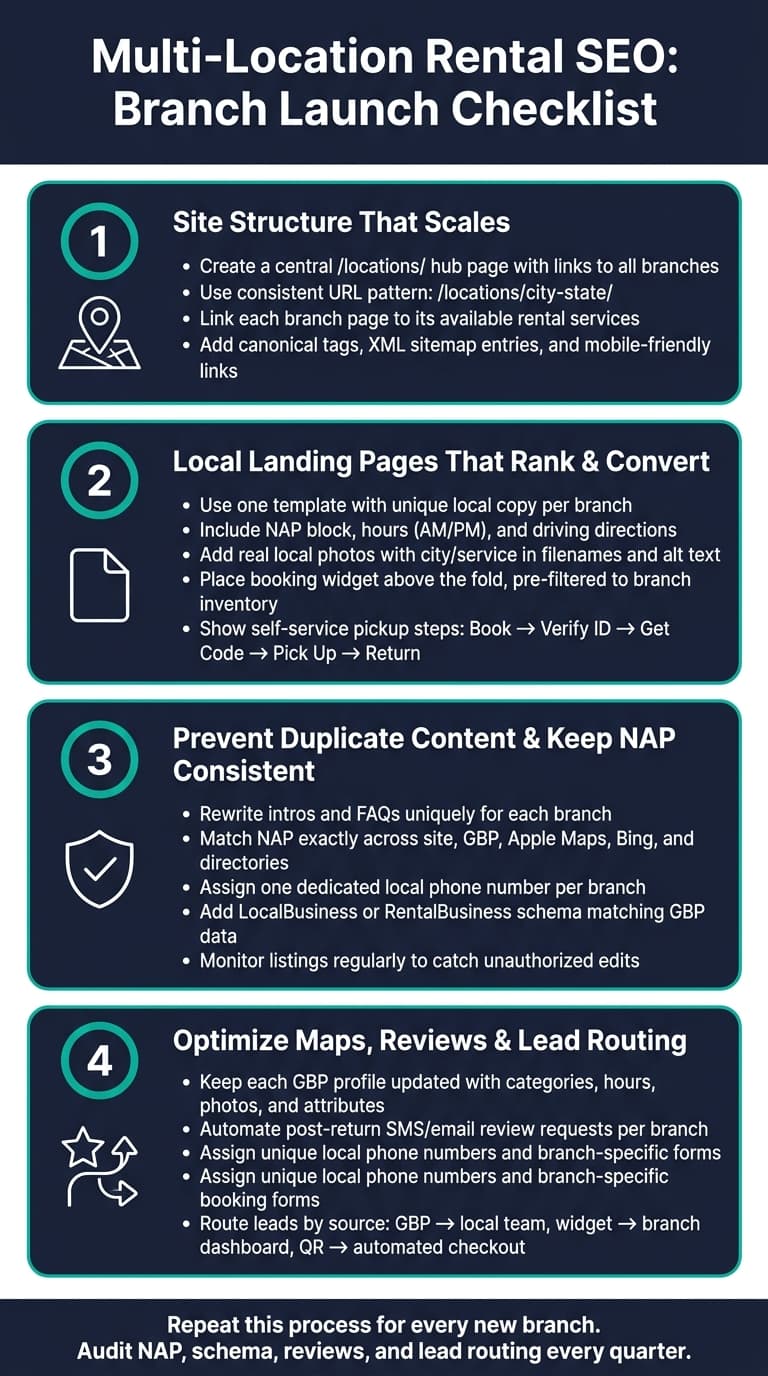
Checklist 1: Build a Site Structure That Scales
Start with structure. Every branch page depends on it.
If your site setup is messy, every new location gets harder to crawl, harder to map, and harder for people to book from. A clean setup fixes that from day one.
Set Up a Locations Hub and Consistent URL Pattern
Every multi-location rental site needs a central /locations/ hub page.
Use /locations/ as the main place for every branch. That page should include links to each location, a map, and simple filters by state or service if you have enough branches to justify them.
Then give each branch its own page with the same URL format across the site:
/locations/phoenix-az//locations/austin-tx//locations/miami-fl/
If two branches are in the same city, add a neighborhood label to keep things clear. For example, use /locations/phoenix-downtown-az/ and /locations/phoenix-west-az/.
The main thing is consistency. Pick one pattern and stick with it for every new branch.
Link Each Location Page to the Right Rental Services
Once the hub is live, connect each branch page to the services that branch actually offers.
Each location page should link straight to the rental categories available there, like trailers, bikes, equipment, or scooters. Use clear anchor text such as "Trailer rentals in Phoenix, AZ."
Then do the reverse on your service pages. Each rental category page should show the branches where that service is available, with links back to those location pages.
In short, link branches to their services, and link services back to the branches they belong to.
A few technical details matter here too:
- Add self-referencing canonical tags on every location page.
- Include all active location URLs in your XML sitemap.
- Update the sitemap any time you add or redirect a branch.
- On mobile, make sure links and buttons are easy to tap, since many local rental searches happen on smartphones close to booking time.
Lockii can keep each location page connected to live inventory, pickup instructions, and branch-specific booking.
Checklist 2: Build Local Landing Pages That Rank and Convert
Once your site structure is set, the next step is building pages that bring in local traffic and turn visits into bookings. A local landing page has to do both.
Use One Page Template With Unique Local Details Per Branch
Now that the structure is in place, each page needs local proof and a clear path to book.
Use one repeatable template, then tailor each page with branch-level details. Here’s what each page should include:
- Title tag: Target _service + city + state_ (for example, "Trailer Rental in Phoenix, AZ | 24/7 Self-Service Pickup"). Keep it short.
- Meta description: Add a local angle and USD pricing, such as "Book trailer rentals in Phoenix, AZ from $39/day. 24/7 contactless pickup near I-17 with digital lock access and instant booking."
- H1: Match the main phrase without repeating the title tag word for word, like "Phoenix, AZ Trailer Rentals – 24/7 Pickup Near Downtown."
- Body copy: Mention actual neighborhoods, nearby highways, ZIP codes, and common local use cases. A page for North Austin, TX should talk about Lake Travis weekend trips or contractor jobs in the area, not generic filler.
- NAP block: Show the full branch address in U.S. format, such as "456 Oak Ridge Blvd, Dallas, TX 75211, (214) 555-7890." Put it near the top of the page and repeat it in the footer.
- Hours: Use AM/PM format - "Mon–Fri: 8:00 AM–6:00 PM, Sat: 9:00 AM–4:00 PM, Sun: 24/7 self-service pickup only."
- Driving directions: Mention main roads and landmarks in miles, for example, "Located 0.5 miles west of I-35 on Main St, across from the Chevron gas station."
- Local photos: Use real photos of the branch, parking lot, and signage. Add the city and service to image filenames and alt text.
- Branch-specific trust signals: Show ratings and review snippets tied to that branch, such as "4.8/5 based on 127 rentals in Denver, CO."
Simply swapping city names isn’t enough. Google tends to treat that kind of page as thin content. Each location page should have a solid share of copy that is plainly tied to that branch.
Add Booking and Pickup Elements That Reduce Friction
Once the page lines up with local search intent, make booking easy.
Ranking is only half the job. The booking path needs to be fast, simple, and built for mobile.
Put your booking widget above the fold and pre-filter it to that branch’s inventory. If someone lands on your Phoenix page, they shouldn’t need to pick Phoenix again. Add a second CTA in the middle of the page and another near the FAQs for people who want a bit more detail before they book.
For contactless and self-service rentals, lay out the pickup process right on the page. A short sequence works well:
- book online
- verify ID
- receive access code by SMS and email
- pick up
- return by 8:00 PM
That kind of plain-English flow cuts pre-arrival confusion and helps reduce support calls.
Lockii supports this branch-level setup with location-specific booking and pickup tools. Lockii supports this setup with branch-specific booking widgets, SMS and email code delivery, identity verification, and self-service pickup for 24/7 rentals.
Checklist 3: Prevent Duplicate Content and Keep NAP Consistent
Duplicate content can drag down multi-location rental SEO. If you use the same service description on every city page and just swap out the location name, search engines can read those pages as near copies. When that happens, rankings can slip.
Add Real Local Information to Each Page
Each branch page should feel tied to that branch, not like a reused template.
Rewrite the intro for every location with details that belong to that branch only. That can include the equipment available there, local inventory notes, and pickup instructions that apply to that site. If a customer could only learn it from that page, you're on the right track.
Branch-level FAQs help too. Use them to cover exceptions, policies, or pickup details that apply only at that location. And avoid repeating the same service copy across cities. Even strong copy turns into a problem when it's pasted word-for-word across dozens of pages.
Audit NAP and Schema Across Every Branch
Local rankings rely on consistent branch data, not just page-level copy.
Treat Google Business Profile as the main record for hours, address, and phone. NAP - name, address, and phone number - should match everywhere it appears: your location pages, site footer, Google Business Profile, Apple Maps, Bing, and any directories that list your branches. Small mismatches can cause trouble. Something as minor as "Ste 200" in one place and "Suite 200" in another can throw search engines off and weaken local trust.
When you change hours, a phone number, or a pickup address in GBP, that update should carry across every directory. This matters even more for unstaffed rental locations. Implementing automation and contactless systems can help manage these sites more effectively. If someone shows up at the wrong address or during the wrong hours, there may be no one there to fix the mistake.
Each location page should also include a LocalBusiness or RentalBusiness schema block that matches the GBP data exactly. That gives search engines a clear signal about the identity and location of each branch.
Here’s a quick reference for common NAP-related risks and what to do about them:
| SEO Risk | Impact | Fix |
|---|---|---|
| Duplicate copy | Search engines may filter out near-identical city pages | Rewrite intros; add branch-specific FAQs and local inventory notes |
| Inconsistent NAP | Reduces local trust and confuses search algorithms | Standardize name, address, and phone across all directories |
| Multiple phone numbers | Routing errors and tracking gaps | Assign one dedicated local number per branch; sync via GBP |
| Duplicate addresses | Google may filter out one listing entirely | Confirm unique suite or unit numbers per branch |
| Unapproved listing edits | Hours or addresses can change without your knowledge | Monitor listings regularly and block unauthorized changes |
Unapproved edits become a headache fast when you manage a lot of branches. Data aggregators and user-suggested changes in Google Maps can quietly overwrite branch details. Regular listing reviews help catch that drift before it spreads across your network.
Once your branch data matches everywhere, move on to Maps signals, reviews, and lead routing.
Checklist 4: Optimize Maps, Reviews, and Lead Routing
Now that your branch data is clean, the next step is simple: get each location into Maps and make sure every lead lands with the right branch.
Build Local Signals for Each Branch
Use each branch’s Google Business Profile to improve Maps visibility. Keep every profile up to date with the right categories, hours, attributes, and recent photos or videos of the pickup point, inventory, and signage.
Add branch-level details where they fit, such as _"24/7 access"_ or _"contactless pickup."_ If you offer online booking, turn on Reserve with Google so people can start booking right from the map listing.
Reviews need the same branch-level treatment. Don’t manage them only at the site level. Set up automated SMS or email prompts after a successful return so customers land on the correct branch review page. Then respond to every review, including the negative ones. That kind of follow-through shows people there’s an actual team on the other side.
Route Calls, Forms, and Bookings to the Right Location
Once reviews are coming in, connect every inquiry path to that same branch.
Each branch lead should go to a specific local number, form, or booking widget. Shared numbers and generic inboxes make branch demand hard to read.
Give every branch a unique local phone number so calls route cleanly and you can track which locations bring in the most inbound interest. Use branch-specific booking forms so each inquiry shows up in the right depot dashboard. Lockii routes bookings to the correct depot and sends branch-specific confirmations, pickup instructions, and return reminders.
Use this routing map for every branch:
| Lead Source | Location Identifier | Routing Destination | Tracking Method |
|---|---|---|---|
| Google Maps / GBP | Branch-specific phone or URL | Local branch team | Unique tracking lines / call tracking |
| Website booking widget | Depot or pickup point selection | Branch dashboard | Lockii multi-location inventory |
| QR code on asset | Asset ID or geofence | Automated checkout flow | GPS tracking & lock logs |
| Local landing page | Branch-specific URL / slug | Local depot dashboard | Unique embed snippet ID |
Conclusion: Apply One SEO Checklist Across Every Location
Multi-location rental SEO doesn’t reward one-off effort. It rewards consistency at scale.
Put these steps together, and multi-location SEO becomes a repeatable branch-launch process. Every branch should go live with the same base in place: a clean location URL, local content that isn’t copied, steady NAP, matching schema, strong Maps signals, and branch-level lead routing.
Treat a location page like a one-time setup, and you end up scaling weak visibility instead of local authority. That’s the trap. A branch may launch, but if the data drifts, reviews slow down, or leads route the wrong way, performance slips.
Quarterly audits help keep everything lined up over time:
- NAP accuracy
- Schema
- Review volume
- Lead routing
That’s what keeps your site structure, local pages, Maps visibility, and lead flow working together over time.
Use one checklist to set up the structure once, standardize local pages, keep branch data clean, and build authority across every location.