
Message Template Tools for Rental APIs
August 14, 2026 · 10 min read
Message Template Tools for Rental APIs
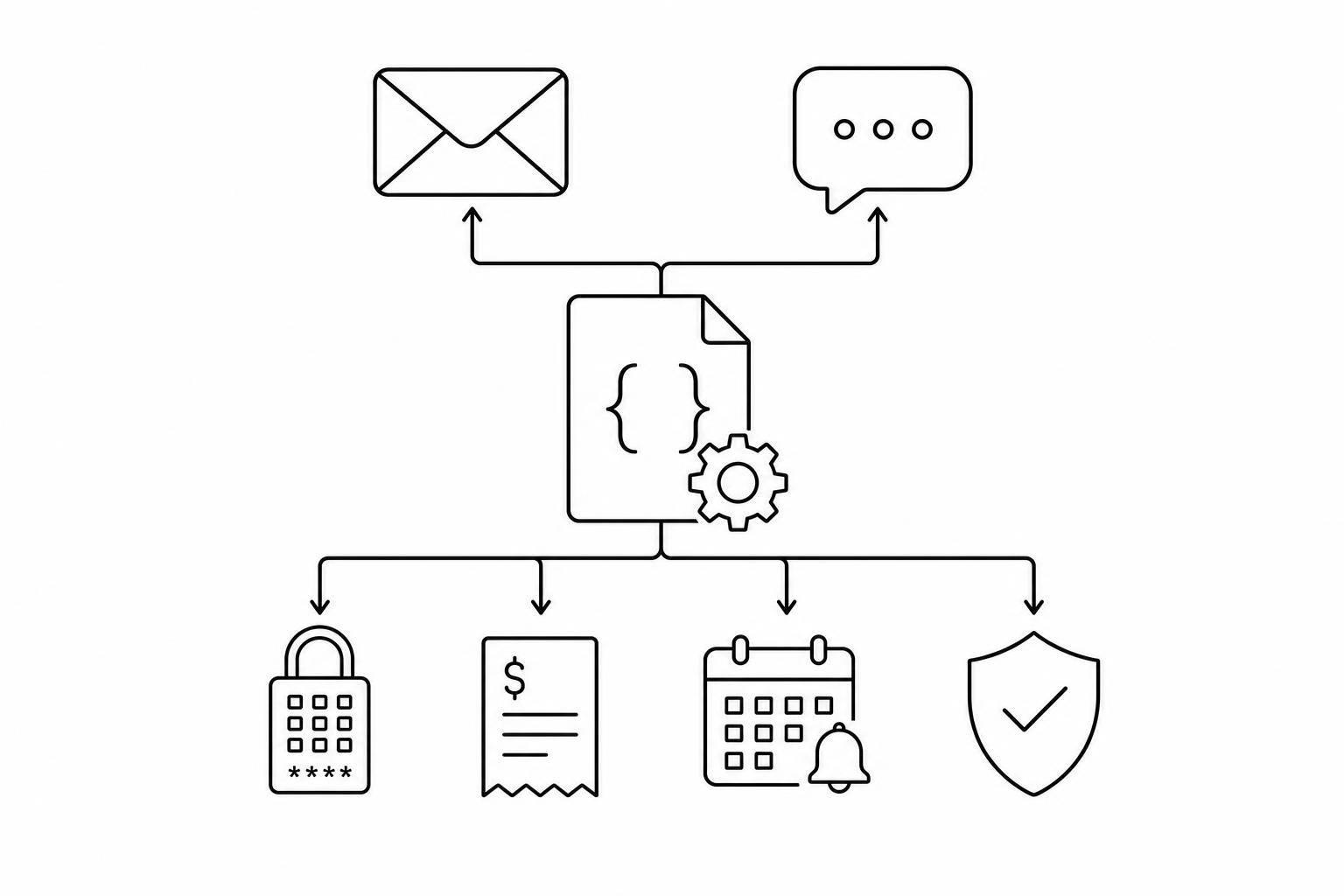
If your rental API can trigger the right message at the right moment, you cut manual work, automate rental business operations, and lower send errors. I’d sum it up like this: email handles records, SMS handles time-sensitive alerts, and workflow tools decide _when_ each message goes out and _what data_ it includes.
Here’s the short version:
- I use email templates for booking confirmations, receipts, and return summaries
- I use SMS templates for access codes, OTPs, pickup reminders, and late notices
- I use workflows and webhooks to connect rental events like
booking.created,payment.succeeded, andreturn.initiatedto those templates - I check for SPF, DKIM, DMARC, 10DLC, toll-free verification, retries, and idempotency before I connect any tool
- I make sure messages pull live fields like customer name, pickup time, trailer ID, lock code, address, and total cost
- In a self-serve flow, messages often need to go out 1–2 hours before pickup, only after payment and ID checks pass
A few numbers and facts stand out:
- U.S. rental businesses sending SMS may need 10DLC registration or a verified toll-free number
- A payment receipt might include a charge like $129.50
- Geofence alerts may show travel distance in miles
- Pickup messages often depend on a time-bound PIN code
Quick comparison
| Tool | Main job | Best for | Trigger examples |
|---|---|---|---|
| Email platform | Sends formatted email templates | Confirmations, receipts, return records | booking_created, payment_succeeded |
| SMS gateway | Sends short mobile messages | Lock codes, OTPs, reminders, overdue alerts | verification_started, lock_opened |
| Workflow/webhook tool | Routes events and maps data | Send timing, channel choice, retries | Any booking or return event |
What this means for you is simple: _one event stream_ can run the full rental message flow from booking to return, as long as your templates, routing rules, and compliance setup are in place.
2. Core Tool Categories for Message Template Sync
Three tool categories usually handle template sync: email platforms, SMS gateways, and workflow/webhook tools. Each one fits a different point in the rental flow, like confirmation, pickup, in-hire updates, and return.
Email template platforms
Email platforms store reusable transactional templates and send them when rental events happen. Instead of building each email inside your app, you point to a stable template ID or alias, like booking_confirmation_v3 or return_summary, and call the email API with that ID plus a data payload.
The platform then fills in merge variables such as {{customer_name}}, {{pickup_time}}, {{lock_code}}, and {{total_amount}} before sending the message.
That setup makes life easier for non-developers. They can update subject lines, legal text, or layout without touching code. Version control also helps when a template needs a change, like a U.S. cancellation policy update or a tax disclosure change. You keep the same alias, so the backend doesn't need extra work. Delivery events can also come back through webhooks, which lets your team retry sends or flag failed messages.
Use email when the customer needs a detailed record. Use SMS when the message needs attention right away.
SMS gateways and verification messaging
SMS tools handle messages that need to go out fast. That includes lock access codes, OTPs for identity verification, pickup reminders, late return alerts, and extension confirmations.
A common setup is simple: store messaging templates for rental businesses in the rental system, then send the rendered message through the gateway API.
For identity verification flows, managed services take care of the OTP lifecycle for you. That includes code generation, expiry, rate limiting, and retry logic. For other cases, the rental backend schedules messages from event timestamps, such as a reminder before pickup or a late notice after the return time.
Because SMS has to follow U.S. carrier and anti-spam rules, transactional templates should stay short, clearly name the rental brand, and avoid promotional wording.
Workflow tools decide when each SMS should go out.
Workflow automation and webhook handlers
Workflow tools are the connective layer between rental events and outbound messages. They listen for events, decide which template to send, choose the channel, and pass the right data.
A simple rule might work like this: when payment_succeeded fires for a self-hire location, call the email API with a booking confirmation template ID and pass the booking ID, customer name, pickup time, lock code, and location address.
These tools also manage routing rules, retries if a delivery API fails, and audit logging. No-code tools work well for standard connections. Custom webhooks are better when the routing logic gets more involved.
| Tool category | Main job | Typical trigger | Data passed | Best use |
|---|---|---|---|---|
| Email template platforms | Store and send reusable transactional emails | booking_created, payment_succeeded, rental_completed | Customer details, booking data, pricing, merge variables | Confirmations and receipts |
| SMS gateways and verification tools | Deliver short, time-sensitive mobile messages | ID_verification_started, lock_opened, late_return_detected | Phone number, lock code, OTP, short text with times | Access codes and alerts |
| Workflow automation / webhook handlers | Listen to rental events and route payloads | Any rental API event | Event JSON, mapped template IDs, personalization variables | Orchestrating sends across channels |
sbb-itb-eb44693
3. How These Tools Work Together in a Self-Hire Rental Flow
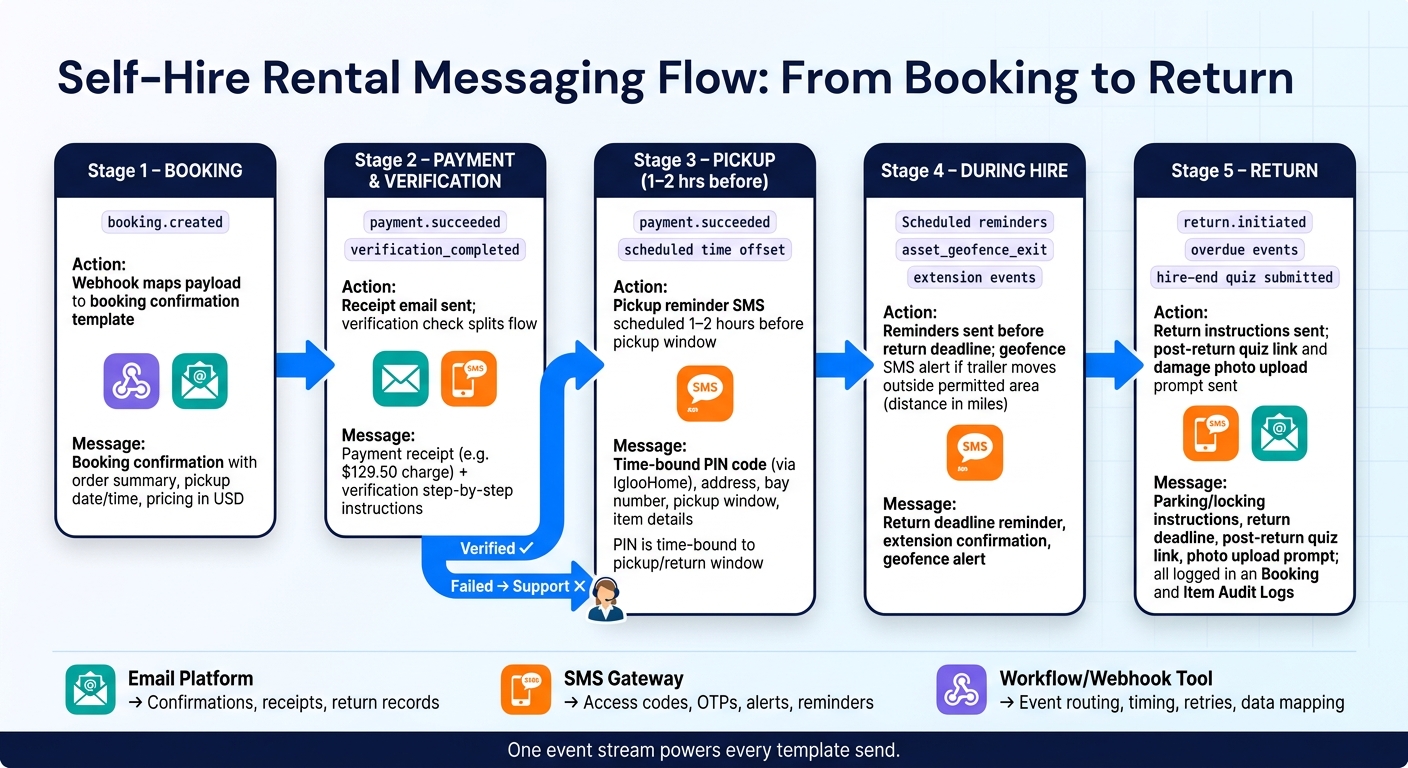
These tools matter most when they pass events and data from one step to the next, without someone having to jump in manually. The flow starts at booking and runs all the way through return. This automated sequence is a cornerstone of self-service rental operations.
From booking to pickup
When booking.created fires, the webhook maps the payload fields to the booking confirmation template. Once payment clears, payment.succeeded sends a receipt and schedules a pickup reminder SMS for 1–2 hours before pickup.
At the same time, verification decides which message goes out next. This is where the flow splits: verified customers move ahead, while failed checks get routed to support. The pickup SMS includes the access code, address, pickup window, and item details.
During hire and at return
After pickup, the message templates switch from access details to reminders and return instructions. During the hire period, scheduled reminders help customers stay on track. For example, a message sent a few hours before the deadline gives the customer a clear window to extend.
At return, return.initiated or overdue events send instructions for parking, locking, and the return deadline. After check-in, the system sends a post-return quiz link and an SMS asking for damage photos.
4. Where Lockii Fits Into Rental Messaging Automation
Lockii is the event source behind the email, SMS, and webhook setup described above. It’s built for contactless self-hire, so booking, payment, access, and return activity can turn into automated email and SMS sends without staff stepping in. In plain terms: automated messaging runs the day-to-day flow.
Lockii events that trigger template sync
Lockii covers the full rental lifecycle through its own event stream. When a customer books through the embeddable widget, confirmation emails and SMS messages go out right away with the order summary, pickup date and time, and pricing in USD.
If identity verification is needed - which is common for trailer or vehicle rentals - events like verification_required, verification_started, and verification_completed trigger step-by-step instructions and secure upload links. Verification completes within minutes.
As pickup gets closer, Lockii sends access instructions and the digital lock code based on the customer’s scheduled slot. During the rental, self-service extension events fire before the return deadline. If a lock or GPS tracker is involved, access rules update automatically.
GPS events such as asset_geofence_exit can trigger an SMS alert if a trailer moves outside a permitted area, with distances shown in miles. At the end of the rental, Lockii sends return instructions, a post-return quiz link, and a photo upload prompt. All of this is logged in the Booking and Item Audit Logs for condition tracking and dispute resolution.
The result is one event stream powering every template send.
Lockii integrations that support message delivery
Those events reach delivery tools through Lockii’s native integrations and webhooks. IglooHome handles smart lock access. Once a booking is confirmed and paid, Lockii generates a time-bound PIN code tied to the pickup and return window, then inserts it straight into the pickup SMS template.
Stripe handles payment events. payment_intent_succeeded sends a receipt with the charge amount, such as $129.50, plus a portal link. payment_intent_failed triggers a secure card-update link so the customer can recover the booking without staff help. Stripe Identity supports verification status messaging.
For external routing, Zapier connects Lockii triggers - such as _New Booking_, _Completed Return_, and _Overdue Rental_ - to SMS gateways and email platforms [1]. For operators managing more than one location, Lockii inserts location-specific address, bay number, and time zone data into each template.
| Integration | Role in Messaging Flow |
|---|---|
| IglooHome | Generates time-bound lock codes; triggers pickup instruction SMS |
| Stripe / Stripe Identity | Fires payment confirmations, failure recovery, and verification status messages |
| Zapier / Webhooks | Routes Lockii booking events to external SMS gateways and email platforms |
| GPS Providers | Triggers geofence alerts, overdue reminders, and return status updates |
5. Choosing the Right Message Template Stack for a Rental API
What to check before connecting tools
Before you connect any tool to a rental API, run it through the moments that matter most: booking, verification, pickup, extension, and return. That gives you a much better read than just clicking around a nice-looking template editor.
Transactional reliability comes first. Your email and SMS tools need strong deliverability controls, including SPF, DKIM, and DMARC, along with clear retry behavior and detailed failure logs. If a pickup PIN doesn't arrive, you can't afford guesswork. You need to see exactly what failed and when. For U.S. operators using SMS, plan for either 10DLC registration or a toll-free number with the required verification from day one. Operational texts like pickup codes, return reminders, and overdue alerts must follow carrier rules, and every automated SMS should include your business name and a clear opt-out option. [2]
Template versioning tends to matter more than operators think. If you update pickup steps, pricing language, or return rules, you need to be sure those edits don't quietly break active bookings. A good setup keeps older versions available and lets you test changes against live booking data before you send anything out.
The stack should also support merge fields and location-based logic. Templates need to pull the right address, hours, access rules, and customer details for each site and booking state. And if your system gets hit with a burst of events, queues and idempotent webhooks help stop duplicate sends during spikes.
Test each stack against the events it needs to handle, not just the editor it comes with.
| Requirement | Why it matters | Best-fit tool category | Rental example |
|---|---|---|---|
| Transactional reliability | Customers can't access items if messages fail silently | SMS Gateway | Sending a time-limited PIN code 15 minutes before pickup |
| Webhook event handling | Routes the right rental event to the right channel | Workflow automation / webhooks | Firing a return confirmation the moment a hire-end quiz is submitted |
| 10DLC / Toll-Free compliance | Prevents carrier blocking of urgent operational texts | SMS Gateway | Delivering a lock code to a customer at a self-serve trailer location |
| Template versioning | Prevents outdated instructions from reaching active bookings | Email / SMS template editor | Updating gate access steps without breaking in-progress hire messages |
| Multi-location variable support | Different sites need different addresses, hours, and access rules | Workflow automation / webhooks | Sending Austin-specific pickup instructions vs. Miami-specific ones |
| OTP / identity verification sync | Prevents access codes from reaching unverified customers | Identity verification tools (e.g., Stripe Identity) | Holding the lock code send until a driver's license upload is confirmed |
Key points to carry forward
Email handles records and branded detail. SMS handles urgent codes and alerts. Workflows send each rental event to the right channel.
Together, they cover the full self-hire message set: access codes, verification steps, pickup reminders, overdue alerts, and return notices. Contactless self-hire works when each layer does one job well and does it every time.