
How to automate rental messaging and emails
December 26, 2025 · 14 min read
How to automate rental messaging and emails
Automating rental messaging saves time, reduces errors, and improves guest communication. By using tools like Lockii, you can streamline repetitive tasks such as booking confirmations, check-in instructions, and follow-ups - allowing you to focus on growing your business. Here's how automation helps:
- Booking Confirmations: Instantly send details like access codes and payment status.
- Pre-Rental Reminders: Share check-in instructions and parking info 1-3 days prior.
- During-Rental Updates: Check in with guests mid-stay to address issues or offer extensions.
- Post-Rental Follow-Ups: Thank guests, request reviews, and offer discounts for future stays.
- Real-Time Alerts: Notify guests and staff about payment issues or maintenance needs.
Automation cuts daily admin time by up to 60%, reduces errors, and boosts guest satisfaction. Tools like Lockii integrate features like smart locks, digital guidebooks, and identity verification for a seamless experience. Whether you're managing a few properties or scaling to dozens, automation ensures efficient operations and happier guests.
What Emails and SMS to Send for Rental Bookings
Automating your messages ensures you cover every step of the rental process. These messages keep customers informed, reduce confusion, and cut down on support inquiries. Here's a breakdown of the key messages to send at each stage of the rental journey.
Booking Confirmation Messages
The moment a booking is made, send a confirmation email or SMS with all the essential details: rental specifics, pickup location, duration, and payment status. If your business uses digital locks for self-service rentals, this is the perfect time to provide access codes or let customers know when they'll receive them.
Pre-Rental Reminders
A few days before the rental begins - ideally 1 to 3 days - send a reminder. Include pickup instructions, parking details, and links for identity verification if required. For after-hours pickups, add step-by-step guidance to make the process smooth and hassle-free. Make sure any necessary links are easy to access.
During-Rental Updates
Touch base 24 to 48 hours after the customer picks up their rental. This is a great time to check in on their experience, remind them of the return deadlines, and offer options to extend their rental if needed. These updates can prevent late returns and quickly address any issues.
Post-Rental Follow-Ups
Once the rental is returned, follow up within 1 to 3 days to thank the customer. Include a link for them to leave a review and consider offering a discount code for their next rental. Keeping these messages brief and sincere can leave a lasting positive impression and encourage repeat business.
Issue and Support Notifications
Automate alerts for problems like payment failures or damage reports. For example, if a customer reports an issue during their rental, send a message with clear instructions on the next steps and ensure your team is notified immediately. For contactless rental models, real-time maintenance tracking is crucial to handle these situations efficiently.
| Message Type | Timing | Key Information Included |
|---|---|---|
| Booking Confirmation | Immediately after booking | Reservation details, pickup location, digital access codes |
| Pre-Rental Reminder | 1–3 days before rental start | Pickup instructions, parking info, identity verification details |
| During-Rental Update | 24–48 hours after pickup | Reminder of return deadlines, extension options, support contact info |
| Post-Rental Follow-Up | 1–3 days after rental end | Thank-you note, review link, promotional offers |
| Issue/Support Alert | Real-time, as triggered | Alerts for payment failures, damage forms, maintenance notifications |
Cost-Benefit Breakdown of Automation
Manual vs. Automated Processes
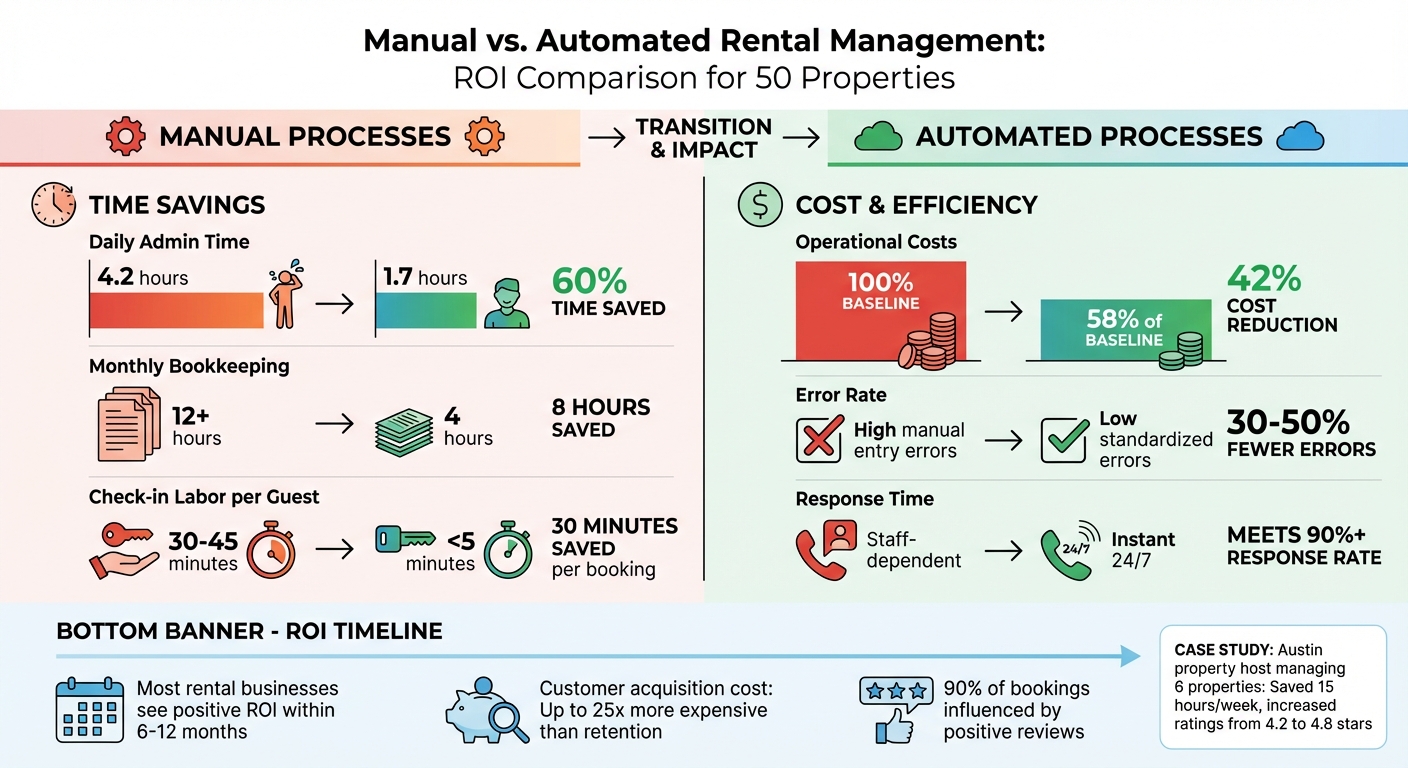
Managing rental properties manually eats up a lot of time. On average, hosts spend 4.2 hours daily on repetitive tasks like answering common questions, sharing Wi-Fi details, or providing check-in instructions [8]. That adds up to over 29 hours every week - time that could be better spent growing the business.
Manual processes also come with a higher risk of errors. Copying and pasting information for multiple bookings can lead to mistakes - wrong check-in dates, outdated parking instructions, or incorrect access codes. These slip-ups often result in guest complaints and negative reviews. Automated systems, on the other hand, significantly reduce these risks. Once templates are proofread and set up, automation can cut operational errors by 30% to 50% [9]. The time saved and fewer mistakes directly contribute to smoother operations and more opportunities for growth.
ROI for Rental Businesses
Automation doesn’t just save time - it delivers real financial benefits. Retaining existing customers is far more cost-effective than acquiring new ones, with studies showing that acquiring a new customer can cost up to 25 times more [4]. This is where automation shines. Features like automated follow-up emails help build stronger relationships with guests, improving retention without extra effort.
For instance, platforms like Airbnb require hosts to maintain a 90% response rate within 24 hours to achieve or retain Superhost status. Automation ensures this standard is met consistently, which directly impacts search rankings and booking volume [2][7].
Take the example of a property host in Austin managing six properties. By using automated messaging, they saved 15 hours per week and boosted guest satisfaction scores from 4.2 to 4.8 stars [8]. Positive reviews are a game-changer, influencing 90% of bookings [1].
Automation also opens doors to additional revenue. For example, property managers can earn commissions - up to 8% - on upsells like local tours or equipment rentals by integrating these offers into automated messages [3]. A Miami vacation rental business saw a 30% increase in guest satisfaction scores and a rise in repeat bookings after streamlining their messaging processes [10]. Most rental businesses see a positive return on their investment in automation within 6 to 12 months [8].
Comparison Table
Here’s a side-by-side look at how automation stacks up for a rental business managing 50 properties:
| Metric | Manual Process | Automated Process | Savings/Impact |
|---|---|---|---|
| Daily Admin Time | ~4.2 hours [8] | ~1.7 hours | 60% time saved [9] |
| Monthly Bookkeeping | 12+ hours | ~4 hours | 8 hours saved [8] |
| Operational Costs | 100% (baseline) | 58% of baseline | 42% cost reduction [8] |
| Error Rate | High (manual entry) | Low (standardized) | 30–50% fewer errors [9] |
| Check-in Labor | 30–45 mins/guest | <5 mins/guest | 30 mins saved per booking [10] |
| Response Time | Staff-dependent | Instant (24/7) | Meets 90%+ response rate [2] |
For a business managing 50 rentals, automation can cut operational costs by 42% and reduce daily admin time from over 4 hours to less than 2 hours [8]. These efficiencies make it easier to scale operations without the need to hire additional staff, keeping the business lean and profitable.
Automation for Standard vs. Self-Hire Rental Businesses
Standard Rental Business Automation
For traditional rental businesses with on-site staff, automation acts as a supportive tool rather than a replacement. The idea is to streamline repetitive tasks, allowing staff to focus on more meaningful activities like welcoming guests, handling unique requests, and fostering personal connections.
Take Invitation Homes, for example. In 2022, they implemented automation to speed up rental processes, cutting processing time by 60% and reducing errors by 40% [14]. Commonly automated tasks include answering routine FAQs - like Wi-Fi passwords, parking instructions, or check-out details - via templated messages. Meanwhile, staff take on more personalized roles, such as helping customers select the right rental or addressing specific concerns. Tools like a unified inbox simplify communication by centralizing guest interactions, making it easier for team members to collaborate seamlessly, even during shift changes [11].
However, automation alone doesn’t address every need. In some markets, 74% of customers still prefer human assistance when making rental decisions, and in-person interactions can boost conversion rates to 73%, compared to just 23% for online-only interactions [15]. This highlights the value of a hybrid approach: let automation handle repetitive tasks, while staff focus on relationship-building and customer satisfaction.
While automation in standard rental businesses enhances staff productivity, self-hire models take automation to an entirely different level.
Self-Hire Rental Business Automation
Self-hire rental businesses operate without on-site staff, so automation is the backbone of their operations. Customers expect a smooth, fully automated experience - whether they’re picking up a rental at midnight or resolving an issue without waiting for human help.
Every step, from booking confirmation to post-rental follow-ups, needs to be automated. Smart locks are a key component here. Platforms like Lockii generate and send unique, temporary access codes automatically, enabling contactless pick-up and return around the clock [2]. When a customer unlocks the door for the first time, the system can even send a welcome message [12].
Digital guidebooks replace the need for staff to answer common questions, offering instant access to directions, Wi-Fi details, and more [2][3]. Automated mid-stay check-in messages, sent the morning after pickup, help identify and resolve issues early, reducing the risk of negative reviews [5][6].
Security is another area where automation plays a critical role. Noise and smoke detectors can send real-time alerts to managers, who can respond remotely without needing on-site security staff [13]. This level of automation can cut an operator's workload by 50% to 80% [13]. Unlike standard businesses, where response times might vary, self-hire models demand instant, 24/7 responsiveness. For instance, delays in delivering a door code could leave a customer locked out - a scenario that’s simply unacceptable in this model [2].
Key Differences Between the Two Models
The primary distinction lies in how each model approaches operations. Standard rental businesses use automation to complement their staff, while self-hire businesses depend on automation to replace staff entirely.
| Feature | Standard (Staffed) Rental | Self-Hire (Contactless) Rental |
|---|---|---|
| Primary Goal | Boost staff efficiency and coordination | Achieve full operational autonomy with 24/7 access |
| Check-in Method | Staff greeting or lockbox | Smart locks with automated code delivery |
| Communication Style | Personalized, staff-driven | Efficient, system-driven |
| Issue Resolution | On-site staff assistance | Digital guidebooks and remote monitoring |
| Key Tools | Unified inbox, team scheduling apps | Smart locks, noise sensors, digital guides |
Standard rental businesses thrive on the human touch - customers often prefer the trust and connection that come from personal interactions [15]. On the other hand, self-hire businesses emphasize speed and convenience, catering to customers who prioritize autonomy and round-the-clock access.
Both models can succeed, but their automation strategies must align with their unique needs. For standard businesses, automation should handle repetitive tasks while preserving personal moments. For self-hire businesses, automation must anticipate and address every customer need without requiring human involvement.
sbb-itb-eb44693
How to Set Up Automation with Lockii
Integrating Lockii with Your Business
Setting up Lockii for rental messaging and email automation is straightforward and can make your operations much smoother. Start by embedding the Lockii booking widget directly on your website, or opt for a Lockii-hosted site. When a customer completes a booking, Lockii takes care of assigning available stock and generating unique digital lock codes. These codes are programmed to work only during the rental period, ensuring secure access.
Lockii works seamlessly with digital locks like IglooHome and GPS tracking systems. To add an extra layer of security, you can integrate Stripe Identity for verifying customer identities before granting access codes. This setup ensures secure, contactless transactions that are both efficient and reliable.
Customizing Message Templates
Lockii makes it easy to personalize your communication with dynamic variables like _[GUEST_FIRST_NAME]_ and _[ARRIVAL_DATE]_. You can use the platform's rich text editor to format messages, add your logo, and include hyperlinks for a professional touch.
For bookings made on the same day or close to the rental date, it’s a good idea to combine confirmation details and pickup instructions into one clear message. This prevents overwhelming your customers with multiple notifications. Behind the scenes, you can organize your workflows with internal template names like "Check-in Instructions." These names remain hidden from guests but help you stay organized. By automating these processes, property managers can reclaim up to 75% of the time spent on repetitive daily tasks [16].
Once your templates are ready, test them thoroughly to ensure they work as intended.
Testing and Monitoring Automation
Before rolling out your automation, use Lockii's dashboard preview to check that all hyperlinks, logos, and dynamic fields are displaying correctly. The preview pulls in real booking data, helping you spot any issues early.
Keep an eye on the delivery history within the control panel to confirm that messages are being sent as scheduled. For event-triggered messages, such as a welcome text sent after a door unlock, consider adding a slight delay - 10 to 15 minutes can give customers time to settle in before receiving the message. During testing, you can pause specific automation rules to avoid sending incorrect messages to live customers. Once everything checks out, reactivate the rules.
Lockii’s built-in audit logs and real-time dashboard are invaluable tools for tracking inventory and monitoring every step of the process. By staying proactive, you can catch potential issues before they disrupt your operations, keeping everything running smoothly and efficiently.
Lockii's Complete Automated Rental Process
Lockii simplifies every step of the rental process - from booking to return - making life easier for both customers and operators.
Customer Journey with Lockii
The customer experience begins the moment they book through Lockii's website widget. Instantly, they receive a confirmation email with all the details of their rental. Next, they’re prompted to verify their identity by uploading an ID and a selfie. Once verified, Stripe processes both the payment and the security deposit. A few days before pickup (typically 1–3 days), the system sends check-in instructions along with a time-sensitive digital lock code. When the customer arrives, they simply use the code to unlock the equipment and start their rental - no human interaction required. At the end of the rental, the customer completes a short end-of-hire quiz and uploads photos via the customer portal. This triggers an automated thank-you message and processes their deposit refund. The entire journey is contactless, efficient, and designed to enhance the overall experience.
Business Operations Benefits
Lockii helps solve labour shortages by eliminating the need for on-site staff, enabling round-the-clock operations without the costs of hourly wages. The platform keeps detailed audit logs, recording actions like lock openings, messages sent, and payments processed, making it easy to resolve any issues. Automated rental properties see a 23% increase in occupancy rates thanks to faster response times[8]. Additionally, automation reduces operational costs per booking by up to 42%[8]. This makes scaling to multiple locations feasible without the burden of hiring extra staff or leasing costly storefronts. These efficiencies are further enhanced through smart integrations.
Integration with Other Tools
Lockii works seamlessly with a range of tools to optimize operations. For instance, it integrates with digital locks like IglooHome, Stripe for secure payments and identity checks, and Zapier to connect with other essential business apps. GPS trackers provide real-time location updates and send alerts for unauthorized movements, saving up to 12 hours of maintenance time each month[8][9]. All this data syncs instantly in Lockii’s dashboard, giving operators a clear, centralized view of their entire operation. It’s a streamlined solution that keeps everything running smoothly and efficiently.
Conclusion
The benefits of automating rental messaging and emails are undeniable. With nearly 25% of operators facing challenges in guest communication [2], automation steps in as a game-changer. It not only eases the workload on staff but also ensures customers consistently receive timely and accurate information.
Lockii simplifies the entire rental process - covering everything from booking confirmations and identity verification to post-rental follow-ups. Every interaction is handled automatically, removing the need for on-site staff while still delivering personalized messages that include customer names and specific booking details. Plus, detailed audit logs offer full transparency, making it easy to track messages, lock events, and payments across multiple locations.
For self-hire businesses, this kind of automation provides a real advantage. Customers appreciate the convenience of a contactless experience, and operators can scale and franchise their operations without adding staff or investing in costly storefronts. The result is a more efficient operation that improves customer satisfaction and supports growth. By automating your rental messaging with Lockii, you can cut down on repetitive tasks and focus on growing your business - an approach that streamlines operations and sets the stage for long-term success.