
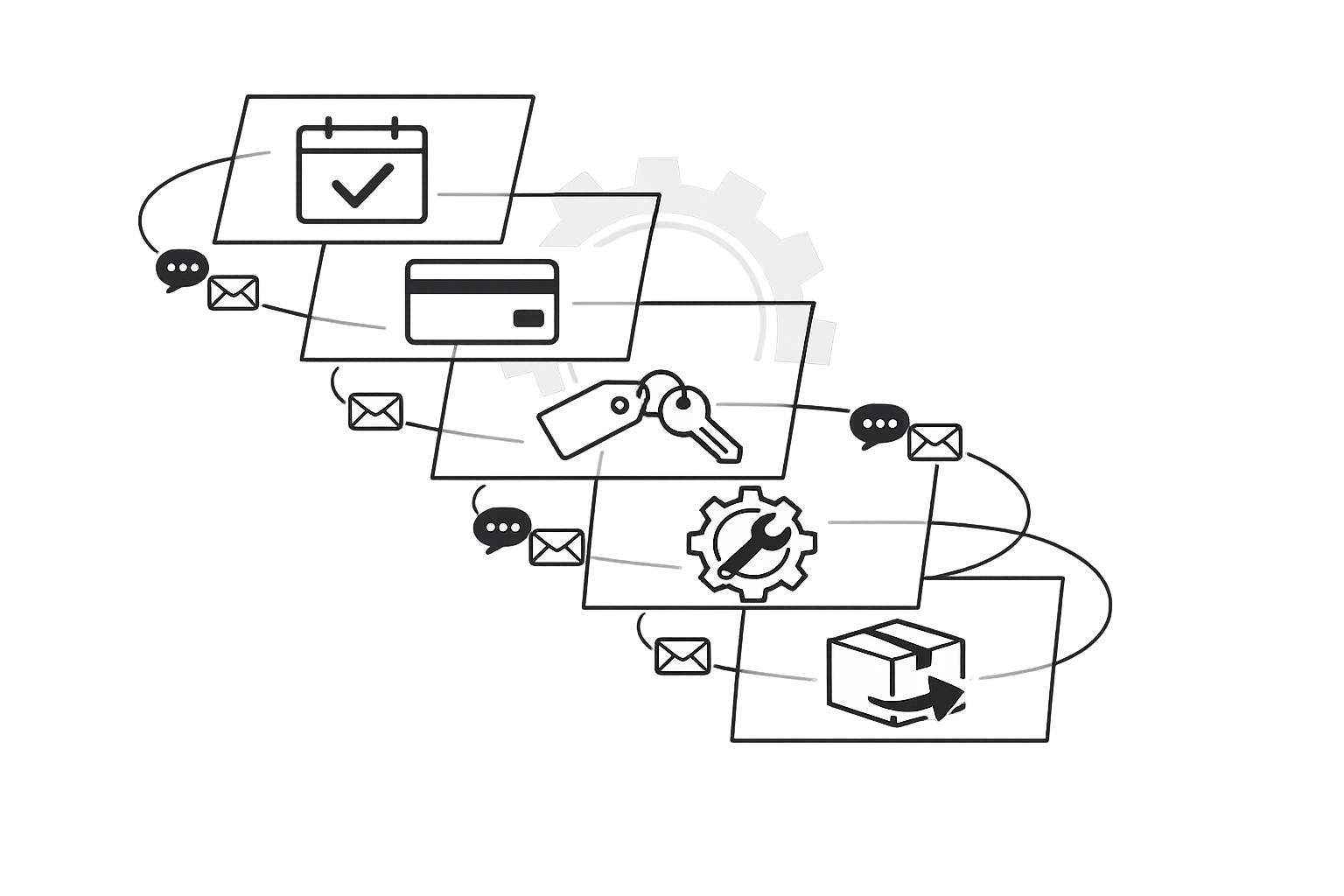
Ultimate Guide to Rental Notification Automation
February 26, 2026 · 13 min read
Ultimate Guide to Rental Notification Automation
Rental notification automation saves time, reduces errors, and improves customer communication by automating SMS and email notifications for tasks like booking confirmations, payment reminders, and return updates. This system operates on triggers (e.g., new bookings, payment deadlines) to handle repetitive tasks without human involvement, allowing businesses to focus on growth.
Key Takeaways:
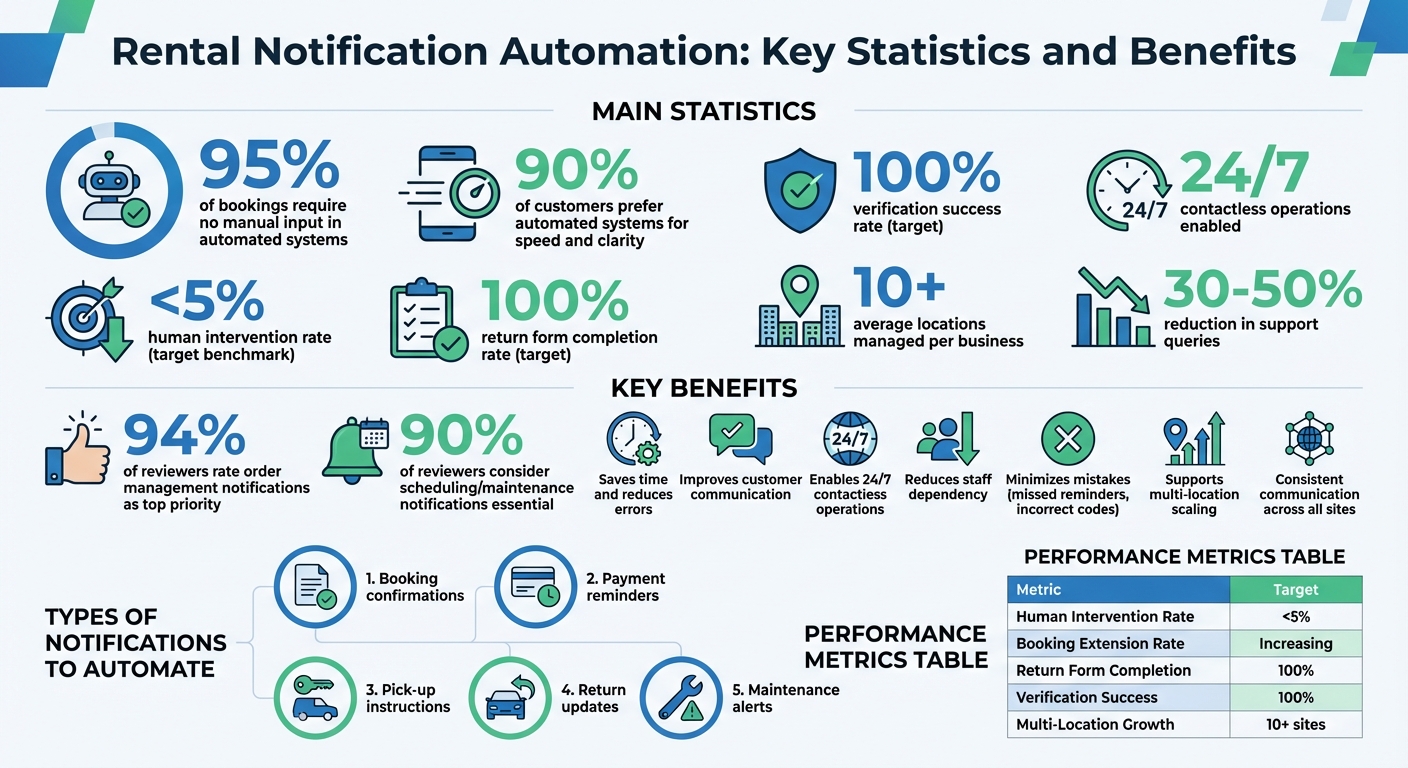
- 95% of bookings in automated systems require no manual input.
- Improves customer satisfaction with 90% preferring automated systems for their speed and clarity.
- Enables 24/7 contactless operations, reducing staff dependency.
- Minimizes mistakes like missed reminders or incorrect lock codes.
- Supports scaling across multiple locations with consistent communication.
Types of Notifications to Automate:
- Booking confirmations: Instantly send details after a reservation.
- Payment reminders: Ensure timely payments and send digital receipts.
- Pick-up instructions: Provide access codes and step-by-step guidance.
- Return updates: Include instructions and follow-ups for feedback.
- Maintenance alerts: Notify customers about scheduled or urgent updates.
Tools & Metrics:
- Platforms like Lockii integrate SMS, email, GPS tracking, and digital lock codes for a fully automated experience.
- Track performance with metrics like human intervention rate (<5%) and return form completion (100%).
Automation simplifies rental operations, reduces workload, and enhances customer trust, making it easier to scale efficiently.
Types of Notifications to Automate
Creating an effective notification strategy starts with identifying the messages that matter most to your customers. This is a key part of broader rental business automation strategies. In the rental industry, certain touchpoints stand out as ideal opportunities for automation. Here’s a breakdown of the notifications you should prioritize.
Booking Confirmations and Reminders
Booking confirmations are a critical first step in building trust and ensuring a seamless rental experience. Once a customer completes a reservation, they should immediately receive an email or SMS with key details - date, time, location, and specifics about the rental item. This instant communication reassures customers and eliminates any guesswork. In fact, 94% of reviewers in rental software studies rate order management notifications as a top priority [7].
To further reduce no-shows, send reminders 24–48 hours before the scheduled pickup. These messages keep the rental top of mind and give customers time to adjust if necessary. According to MCS Rental Software, automated confirmations and reminders not only enhance the customer experience but also significantly minimize missed pickups by providing clear, consistent details like time and location [2]. Adding check-in and pick-up instructions to these notifications can streamline the process even further.
Check-In and Pick-Up Instructions
Pick-up instructions are especially useful for businesses scaling with contactless models. Automated messages can guide customers through every step of the self-service process, from locating the rental to accessing the equipment. For businesses using digital locks, automation can send access codes once identity verification is complete. Lockii, for example, automates GPS directions, lock codes, and step-by-step instructions, making 24/7 pickups possible without staff involvement.
These notifications should include the exact address, parking details, lock codes (if applicable), troubleshooting steps, and a link to a "find my order" page consolidating all rental information. After the pick-up is complete, timely payment notifications ensure smooth financial transactions.
Payment Reminders and Receipts
Payment notifications play a key role in maintaining steady cash flow and reducing payment-related issues. Automated reminders like, "Your rent is due today. Thank you for your prompt payment", help customers stay on track and avoid late fees. RentRedi emphasizes how proactive reminders can prevent disputes and encourage timely payments [3]. Timing is crucial - send reminders a few days before the due date, on the due date itself, and after any grace period.
After payments are made, digital receipts should be sent instantly. For example, "Your payment of $1,200 has been received; transaction ID #56789." These receipts eliminate the need for manual payment verification. According to Salesforce, 90% of customers prefer automated systems for their speed and accuracy [6].
Maintenance Alerts and Emergency Notifications
Maintenance notifications keep customers informed about scheduled services or unexpected issues. Whether it’s a routine equipment check or an urgent repair, automated alerts ensure customers are always in the loop. For emergencies - like equipment failures or facility closures - SMS messages are ideal for delivering quick, actionable updates. For instance, "Water shut off for repairs from 10:00 AM to 2:00 PM" or "Equipment failure - technician arriving this afternoon" can help manage expectations and reduce frustration [4].
Amtelco advises prioritizing notifications based on urgency and using reliable channels like SMS for critical updates [4]. This approach not only demonstrates professionalism but also reinforces a sense of care and reliability. It’s no surprise that 90% of reviewers consider scheduling and maintenance notifications essential in rental software [7].
Return Updates and Follow-Ups
Return notifications help wrap up the rental process smoothly and pave the way for repeat business. Automated messages should include clear instructions on where and how to return items, the condition they should be in, and any necessary documentation. Systems like Lockii even automate the collection of return photos and quizzes, creating a timestamped log for damage documentation, which protects both the business and the customer.
After the return, follow-up messages can request feedback, showing customers that their opinions matter. These messages also give businesses a chance to resolve any issues before they escalate. Additionally, self-service options like automated booking extensions let customers adjust their rentals online without needing manual assistance. Guesty highlights the value of automating follow-ups for completed reservations, including customer confirmations and internal staff alerts [5].
sbb-itb-eb44693
How to Set Up SMS and Email Automation
Setting up automated notifications can be straightforward if you follow three main steps: selecting appropriate triggers, designing effective message templates, and adhering to communication laws. These steps ensure your rental business operates with a smooth, automated communication system.
Selecting Events That Trigger Notifications
Start by identifying key moments in your customer journey that require notifications. These might include booking confirmations, delivery of digital lock codes, identity verification reminders, and return instructions. For example, when a customer books through your website widget or via a QR code, an automatic confirmation should be sent immediately. Once an item is assigned, the system can send digital lock codes automatically.
You can also set up reminders for customers to upload return photos or complete forms, which update the audit log of the item. For businesses managing multiple locations - often averaging 10 or more - notifications can include personalized pickup instructions and GPS directions for multi-location rentals [1]. Automating these essential tasks ensures consistent communication and operational efficiency.
Creating Message Templates
After identifying the triggers, focus on crafting clear and personalized message templates for SMS and email. Use Smart Fields like {{CODE}}, {{LOCATION}}, {{CHECKIN}}, or {{CHECKOUT|-15}} to dynamically pull booking details into your messages without manual input [8]. If specific instructions are needed for an item, custom fields such as {{CUSTOM_FIELD_1}} can be included to provide tailored information or links.
For example, your message might read: "Your trailer is ready at 123 Main St. Use code 4567 to unlock. Need assistance? Reply to this message."
Always include clear sender identification, such as "Sarah at Coastal Rentals", and provide next steps to ensure a seamless experience [12]. Well-structured templates not only save time but also enhance customer satisfaction.
Following Communication Laws and Regulations
Staying compliant with communication laws is essential to maintaining trust and avoiding legal complications. In the United States, SMS messaging requires 10DLC (10-Digit Long Code) registration to ensure messages are verified and successfully delivered [11]. Always obtain customer consent, offer clear opt-out options, and routinely verify contact details to protect their privacy [9].
To keep a reliable record of interactions, use management software to log all automated communications. This creates an audit trail that can support legal and operational decisions [10]. For email, services like SendGrid or Mailgun can improve deliverability and help avoid spam filters. Always include a footer with support contact details or disclaimers to encourage two-way communication [12].
Using Lockii for Notification Automation
Lockii simplifies rental notification automation by combining SMS and email scheduling with tools like digital locks, GPS tracking, and payment processing. It handles everything from booking confirmations to return alerts without manual input, making it perfect for businesses offering 24/7 contactless rentals.
Setting Up Lockii's Automation Features
To get started with Lockii's notification system, you'll first need to connect your communication channels. The platform works seamlessly with providers like Twilio, SendGrid, and MessageBird to send SMS and email notifications automatically. Once integrated, you can set up triggers for key rental events. For example, booking confirmations are sent immediately after a reservation is completed, and digital lock codes (via IglooHome) are delivered automatically once identity verification through Stripe Identity is finalized [1].
Lockii also integrates with over 36 GPS tracker providers, such as Digital Matter and Fleet Complete, to send real-time alerts. Notifications are triggered when equipment is overdue, leaves designated areas, or shows signs of unauthorized use [1]. For instance, a customer might receive a text saying, "Your scooter has exceeded the geofence - extend your rental via the portal or return immediately to avoid additional fees." This ensures customers stay informed, reinforcing Lockii's commitment to hassle-free, contactless operations.
The system also simplifies the end-of-hire process. Customers are prompted to upload return photos and complete digital checklists, creating a clear audit trail without requiring staff involvement [1]. As Matt Cole, Founder of Empire Trailer Hire, puts it:
"Since switching to Lockii, things have gotten so much easier. I was juggling three different systems before, and now it's all in one place" [1].
These features make Lockii a powerful tool for creating a fully automated, self-service rental experience.
Improving Customer Experience with Lockii
Lockii’s customer portal redefines how renters interact with your business by offering self-service access to all rental functions. Automated notifications include direct links to the portal, where customers can view bookings, track GPS locations in real time using the "Find My Order" feature, and extend rentals without needing to contact support. This approach has been shown to reduce support queries by 30–50% [1].
Self-service extensions are another standout feature. When a rental period is nearing its end, Lockii sends an automated reminder with a link to extend the booking online. Customers can pay the difference through Stripe, and the system instantly updates the return time and sends new confirmation details - all without staff involvement [1]. Mario Clewlow, Owner of Hitch Haul, shares:
"We now offer fully automated, contactless rentals. It's streamlined, secure, and exactly what our business needed to jump in front of our competitors!" [1].
Lockii also enables express checkouts through QR codes and NFC tags placed on rental items. Customers can scan these to receive instant pickup instructions and access codes on-site, eliminating waiting times - even for those arriving after hours. Impressively, about 95% of bookings through Lockii require no human intervention [1].
Managing Multiple Locations with Lockii
Lockii’s capabilities extend effortlessly to businesses with multiple sites. On average, companies using the platform manage over 10 locations through a single dashboard [1]. When a customer books, the system automatically includes site-specific details like pickup instructions, GPS directions, and access codes, eliminating the need for separate configurations at each location.
By integrating with Zapier, Lockii connects to thousands of other business tools, enabling complex workflows. For example, you can sync booking data with your CRM, update accounting software when Stripe payments are received, or notify maintenance teams about potential issues detected by GPS tracking. This interconnected system grows with your business as you expand [1].
Yvann Karamoko, Operator of The Trailer Co, highlights the benefits:
"Lockii has been a game-changer for our business. It's allowed us to operate fully automated, 24/7 trailer rentals and scale that side of our operation with confidence" [1].
With multi-location support, Lockii ensures consistent communication through standardized notification templates while allowing for customization when needed. This balance of flexibility and consistency helps businesses maintain seamless operations across all sites.
Measuring and Improving Notification Performance
Once your notification automation is up and running, the next step is to measure its performance and make data-driven adjustments. One critical metric to keep an eye on is the human intervention rate - the percentage of bookings that require manual assistance. For example, Lockii users often achieve a rate below 5% [1]. A higher rate might signal issues like unclear communication or poorly timed notifications.
Tips for Personalizing and Timing Notifications
Timing and personalization are key to effective notifications. Here are some best practices:
- Rental start info: Send it 1–5 days before the booking begins. This gives customers enough time to review care instructions and access codes [13].
- Return reminders: Schedule them 0–3 days before the rental period ends to help reduce late returns [13].
- Follow-up messages: Send these 1–7 days after the rental ends to request reviews or offer discounts on future bookings [13].
Personalization doesn’t have to be complicated. Use message tokens to automatically include details like customer names, order numbers, and pickup locations [13]. Keep SMS messages concise - under 200 characters - to improve deliverability and manage costs [13]. Also, make sure notifications are sent in your local timezone. For instance, sending a lock code at 3:00 AM won’t do much good [13].
Fixing Common Notification Problems
Notification issues often arise from integration failures or calendar sync delays. If you notice duplicate or missing messages, check that your communication channels are properly connected and that triggers aren’t firing multiple times. Double bookings? That’s likely due to delays in syncing availability - Lockii’s direct integrations can help by ensuring real-time updates [1].
Failed deliveries are another common problem, often caused by incorrect or incomplete customer contact details. Adding identity verification to your booking process can help confirm phone numbers and email addresses before sending notifications [1]. For urgent matters like overdue returns or geofence violations, prioritize SMS over email since texts are typically read faster [13].
Tracking Automation Performance Metrics
Once you’ve addressed common issues, it’s time to monitor key metrics to fine-tune your automation. Beyond human intervention rates, here are additional metrics to track:
- Booking extension rate: This measures how many customers use automated links to extend rentals and pay online [1].
- Return form completion: Track whether customers are uploading photos and completing digital checklists. Aim for 100% completion to maintain clear audit trails [1].
- Verification success rate: Ensure identity and insurance verifications reach 100% before releasing lock codes [1]. If customers are dropping off during verification, consider simplifying the process or clarifying instructions in your notifications.
Charlie Haddad, Operator of Trailer 4 Hire, highlights the impact of automation:
"Lockii has made our business efficient in managing our bookings; saving us a lot of time to focus on the growth of the business" [1].
By consistently monitoring these metrics, you can determine whether your automation is truly lightening the workload or simply shifting it elsewhere.
| Metric | Metric Definition | Target Benchmark |
|---|---|---|
| Human Intervention Rate | Percentage of bookings requiring staff help | Less than 5% [1] |
| Booking Extension Rate | Customers extending rentals via automated links | Increasing trend |
| Return Form Completion | Customers uploading photos and checklists | 100% [1] |
| Verification Success Rate | Customers completing ID checks before pickup | 100% [1] |
| Multi-Location Growth | Number of sites managed through automation | Average 10+ locations [1] |
Conclusion
Automating rental notifications takes the hassle out of manual tasks, reduces errors, and keeps customers informed at every step. From booking confirmations to maintenance updates, automation simplifies communication from start to finish.
The recipe for success lies in choosing the right triggers, fine-tuning messages, and monitoring key metrics like the rate of human intervention. When done right, businesses can reduce human involvement in bookings to under 5% [1], freeing up time to focus on growth instead of tedious admin work. This approach is the backbone of the integrated solutions offered by Lockii.
Lockii brings all these features together in one easy-to-use platform. It handles SMS and email scheduling, identity checks, GPS tracking, self-service extensions, and digital return forms - cutting down on staff workload by eliminating the need for multiple tools.
The platform also supports growth without adding unnecessary costs. By enabling contactless operations and managing multiple locations with a scalable model, businesses can expand to over 10 locations [1] without significantly increasing labor or real estate expenses. Lockii’s comprehensive system empowers businesses to run fully automated, 24/7 rental services while scaling with ease.
Whether you're managing trailers, equipment, or vehicle fleets, automation creates a seamless, self-service operation that improves customer satisfaction and supports long-term business growth.