
Consent Audit Trails for Contactless Rentals
August 12, 2026 · 11 min read
Consent Audit Trails for Contactless Rentals
If you can’t show _who agreed to what, when, and under which policy version_, your contactless rental record can fail when a dispute starts.
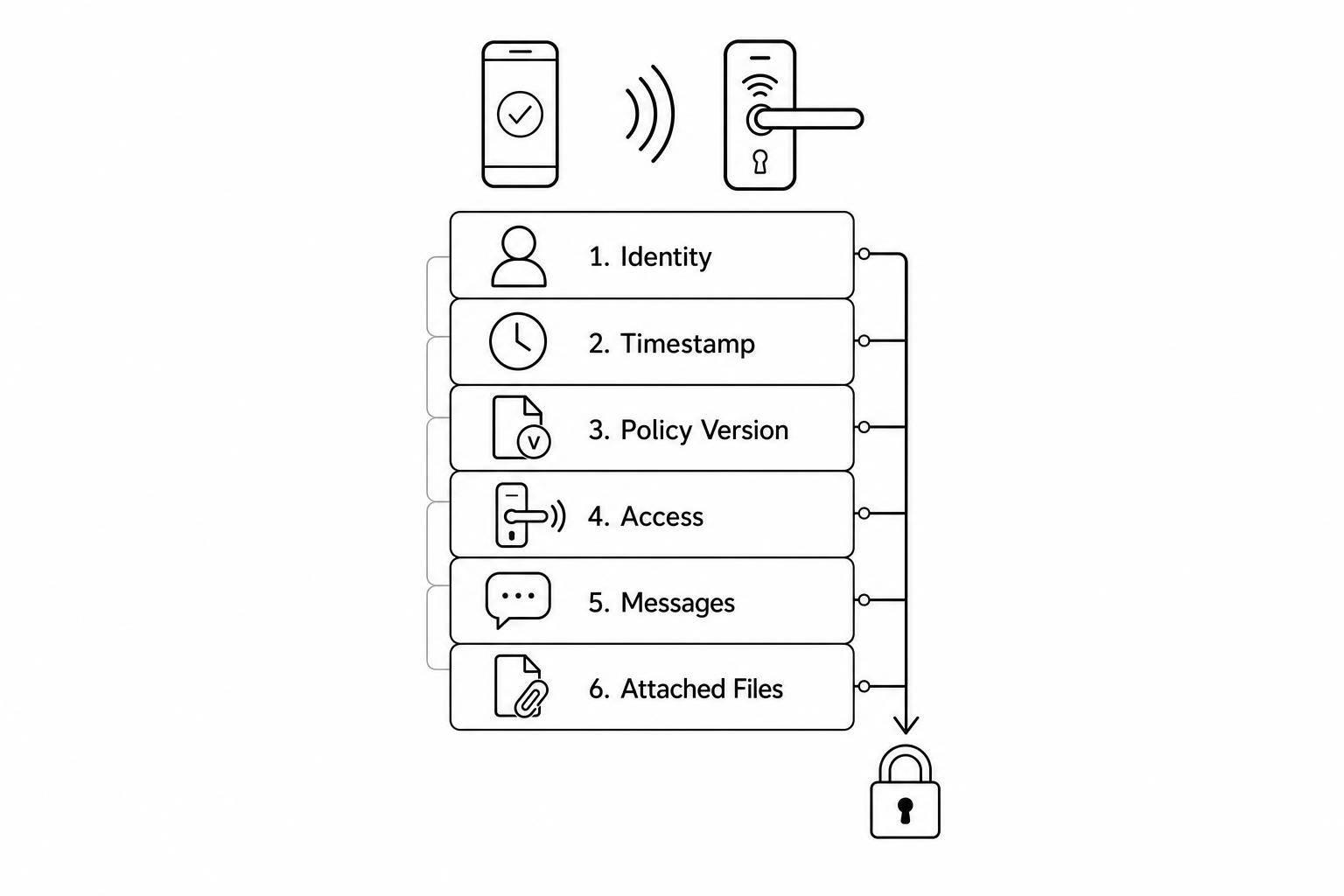
I’d boil this article down to one point: for online booking, smart-lock pickup, in-rental messaging, returns, extensions, and follow-up, I need an append-only event log tied to the same booking ID. That log should show identity, timestamp, location, action, actor type, policy version, and linked file evidence. Without that, a late-fee fight, damage claim, text-message complaint, or GPS tracking consent question can turn into a mess.
Here’s the short version:
- I need to log every moment when consent changes
- I should use clickwrap for rental terms and separate marketing opt-in
- I need event records for booking, ID check, access, messages, return, photos, extensions, and opt-outs
- I should store logs as append-only records, not edited histories
- I need linked stores for consent events, access events, admin changes, and file metadata
- Each record should include site/jurisdiction tags and the policy version
- Files should include a hash, upload time, uploader type, and retention deadline
- Retention should be split into hot, warm, and archive windows
- Staff actions should be logged by role, device, time, and changed values
A few facts stand out. The article notes that some U.S. states require consent before tracking devices are installed or activated. It also points to retention windows that can stretch from 30 days to 7+ years, depending on the record type. And for payment logs, it mentions a 1-year minimum, while some financial records may need 7 years.
| Area | What I need to prove |
|---|---|
| Booking | Terms accepted, fees shown, policy version, payment approval |
| ID check | What method ran, result, and time |
| Access | Lock code issued/open event, site, booking link, consent state |
| Messages | Template/version, trigger, delivery status, consent at send time |
| Return | Return time, location, checklist answers, uploaded photos |
| Extension | New end date, updated USD price, customer confirmation |
| Staff/admin | Who changed what, from which device, and old vs. new value |
Bottom line: I’m not trying to log everything. I’m trying to keep a clean, ordered record of the few events that decide whether a rental dispute is easy to answer or hard to untangle.
What is an audit trail and why it matters in eSignatures?
sbb-itb-eb44693
Where consent must be captured from booking to return
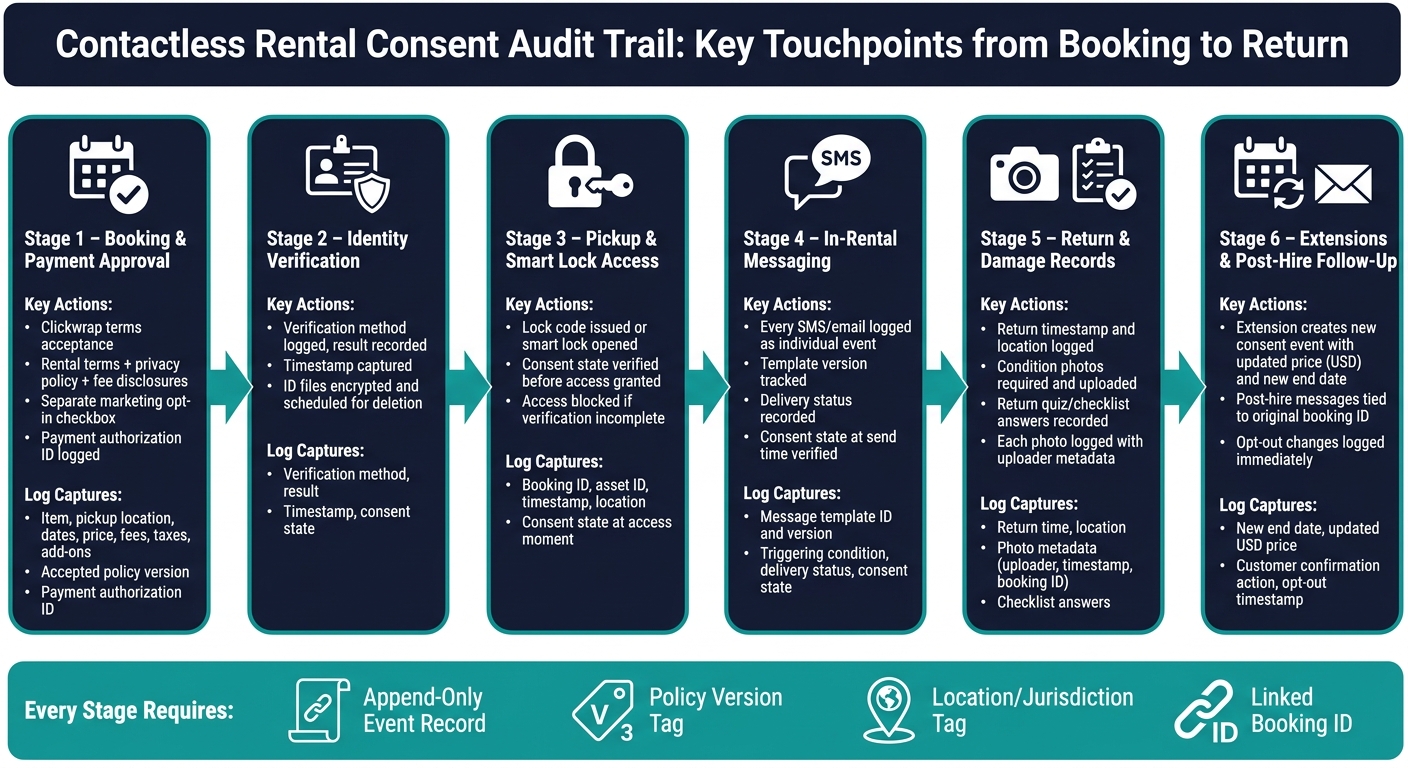
A contactless rental has more consent points than many operators think. And each one can turn into a dispute if the record is incomplete. So the job isn't to log _everything_. It's to log every moment when consent changes.
Booking, account creation, and payment approval
Booking is the main consent checkpoint. Before a customer confirms a reservation using a contactless rental process planner, they should clearly accept the rental terms, privacy policy, damage responsibility, cleaning fees, late-return fees, and any GPS or tracking disclosures. They should also separately approve charges, the deposit, and any stored payment credentials.
Use clickwrap. That means a required checkbox or an "I agree" button linked to terms the customer can actually see and open.
At this stage, log:
- the item
- pickup location
- dates
- price
- fees
- taxes
- add-ons
- accepted policy version
- payment authorization ID
Marketing opt-in should be a separate optional checkbox. Never bundle it with required terms. If you mix them together, you lose the clean, granular record you may need later.
Once the customer accepts those terms, that record should carry forward into identity checks and pickup access.
Identity verification, pickup access, and in-rental messaging
After booking is confirmed, the next consent layer starts with identity verification. The audit log should show what was collected, which verification method was used, the result, and the timestamp. Encrypt ID files and delete them on a set retention schedule. In the log itself, only the verification result should stay visible.
Access events come right after that. If a lock code is issued or a smart lock opens, that action needs its own log entry. Record the booking ID, asset identifier, timestamp, location, and the consent state in effect at that moment.
Access should happen only when the logged consent state allows it. If a customer's verification was not complete, the log should show that access was blocked and why. That kind of detail matters. If someone later asks, _Why was entry denied?_ you don't want to rely on memory or scattered system notes.
Every SMS or email sent during the rental should also be logged as its own event. Capture the message template ID and version, the triggering condition, delivery status, and whether the customer's consent state at send time covered that message type.
Return steps, damage records, and post-hire follow-up
At return, the audit trail should show the return timestamp and location, every photo uploaded through the end-of-rental flow, and each answer from any return quiz or checklist the customer completed. For each photo, include metadata that shows who submitted it and when.
Treat these records as direct evidence for fee and damage decisions. Condition photos at return should be required, and each file should be logged with the uploader, timestamp, and booking ID.
Extension requests need their own consent event too. If a customer extends a rental, the log should show the new end date, the updated price in USD, and the explicit confirmation action that tied the customer to the new terms.
Any post-hire messages, such as follow-up surveys, damage notices, or late-fee notices, should point back to the original booking ID and show which consent covered them. If a customer opts out of marketing emails in the middle of a rental, log that change right away and apply the new consent state to every message sent after that.
These events form the evidence layer the audit trail needs to keep by policy version, location, and actor.
Those event records must then be stored in a way that preserves order, policy version, and location.
How to structure an audit trail that holds up to review
Use append-only event records with clear before-and-after states
Once you capture events, store them in a way that keeps the full timeline intact. Never overwrite a record. Add a new event every time something changes.
Each event should include:
event_idactor_idactor_role(customer,admin, orsystem automation)action_typefrom a fixed set, such asconsent.accepted_termsorlock.openedprevious_valuenew_valueip_addressuser_agent
The change history is what makes the record defensible. Append-only records let you rebuild exactly what the customer saw and changed. If a customer updates a damage waiver selection, the log should show both the earlier choice and the later one - not just the current state. Without that, the timeline falls apart.
Separate consent logs, access logs, and file evidence
Keep consent, access, admin, and file records separate, but link them with shared IDs. Every store should point back to the same booking so the full sequence can be rebuilt in order.
A clean setup looks like this: a consent_events store for customer agreements, preference changes, and any later withdrawal or new consent; an access_events store for smart lock operations, PIN retrievals, GPS tracking activations, and portal logins; an admin_events store for configuration changes, pricing edits, policy text updates, and manual overrides; and a file_metadata store for every document, photo, or report attached to a booking. Every record should still include the same booking_id and customer_id, and, where it applies, location_id.
Each file needs a content hash, upload time, uploader type, retention class, and retention deadline.
These linked stores also need site and policy context if you want them to hold up in review.
Add location controls, policy versioning, and retention rules
Tag each event with the site’s jurisdiction and active policy so every location is reviewed under the right rules. Different sites may follow different rules, tax handling, opening hours, and grace periods. Without location tagging, you can’t show that the right rules were applied at the right site.
Track policy versions in a separate place. Keep a policies table where each row is a discrete version with an effective_from date, a hash of the exact text, and the locations it applies to. Log each policy update with the old version, new version, actor, and summary. When a customer gives consent, store the policy_version they agreed to so you can always pull up the exact wording they saw at that time.
Retention rules should be tiered by how often you need to access a record:
| Storage Tier | Typical Window | Best For |
|---|---|---|
| Hot | 0–30 days | Active bookings, recent disputes, live lock events |
| Warm | 30 days–12 months | Chargeback defense, investigations, trend review |
| Archive | 12 months–7+ years | Long-term compliance, tax records, rare forensic needs |
Regulatory minimums - such as 1 year for payment audit logs and 7 years for financial records - map directly to these tiers.
How operators use audit trails to solve real problems
Handling disputes, chargebacks, and consent challenges
When consent, access, and file records are stored as event-level logs, disputes get a lot easier to handle.
Take a disputed damage charge. Without a clear record, you're stuck in a back-and-forth. With an audit trail, that same dispute turns into a dated sequence of events. You can pull the booking acceptance, return photos, and fee-assessment log in seconds. That gives you a complete, defensible record - not an argument.
The same setup helps with claims like "I never opted in to texts." Your consent log should connect the opt-in event to each outbound message, plus any later unsubscribe.
The big win here is simple: structured records cut out manual digging. Operators using Lockii's Booking Audit Logs and Item Audit Logs can pull linked evidence tied to the same booking ID.
That same record structure can also surface internal misuse and automation mistakes.
Reviewing staff access and automation behavior across locations
Internal access matters just as much, especially for multi-location operations.
Audit logs should record every privileged action: who viewed a customer profile, when they viewed it, which device they used, whether a booking was edited by hand, and what changed. If a staff member adjusts a damage fee, updates a policy, or changes a consent setting, the log should show the old value and the new one - not just the current state.
It's also smart to flag patterns like bulk changes to consent settings across many customers in a short period. That won't always mean bad intent, but it does deserve a look. Automated alerts tied to those patterns help keep the workload under control.
Role-based visibility limits access while still keeping people accountable. Not every staff member needs to see every record. Limiting access by role cuts risk and reduces noise. Logs should also be filtered by assigned site and jurisdiction so each location is reviewed under the right rules.
| Role | Visible Logs | Permitted Actions |
|---|---|---|
| Owner/Admin | Full access: all logs, financial records, policy history | Edit policies, change role permissions, export data |
| Location Manager | Booking logs, customer profiles, staff activity at assigned sites | Edit bookings, review damage photos, manage local staff |
| Maintenance Staff | Item audit logs, maintenance history, return damage photos | Mark items as "In Maintenance", upload repair records |
| Customer Support | Communication logs, identity verification status, booking history | Resend access codes, process extensions, view booking history |
| System | Internal trigger-based event logging | Generate codes, send SMS/email, log GPS pings, flag exceptions |
That setup also makes location-by-location monitoring much easier for a centralized back office.
Applying this model in Lockii and key controls to put in place
How Lockii supports consent-aware contactless rental records
In day-to-day use, Lockii turns those consent controls into connected audit records across booking, access, and return.
Lockii logs each rental event as an append-only entry in Booking Audit Logs and Item Audit Logs. That covers the full rental flow, from booking acceptance and identity verification to lock access, SMS delivery, end-of-rental quizzes, and return photos.
When a customer accepts a booking, that acceptance is timestamped and tied to the policy version in effect at that moment. If the customer verifies their ID, Lockii logs the result alongside the consent language they saw. When they open a lock through the IglooHome integration, the access event is recorded with a timestamp and linked back to the original booking.
That link matters. If something goes wrong later, you don't want to piece the story together from scattered systems.
GPS tracking adds location context, which can help sort out damage disputes. At return, end-of-rental quizzes and photos are stored with the booking record. If a customer extends a rental through the self-service portal, that extension creates its own log entry, including updated charges and any revised terms they agreed to.
For operators with more than one location, site-level tagging is a must. Every log entry includes a site identifier and the jurisdiction-specific rules that apply. That means you can filter disputes, automation behavior, and staff actions by site instead of mixing everything together.
Put simply, one location's issue stays with that location's record. No manual rebuild. No guessing.
Conclusion: the non-negotiable elements of a usable consent audit trail
A usable consent audit trail needs a few core parts:
- Consent captured at each major touchpoint
- Append-only event history
- Linked files and policy versions
- Location tags on each entry
- Reviews on a set cadence
Without those controls, the record may exist, but it won't do much when you need to check what happened, when it happened, and what the customer agreed to at that point in time.