
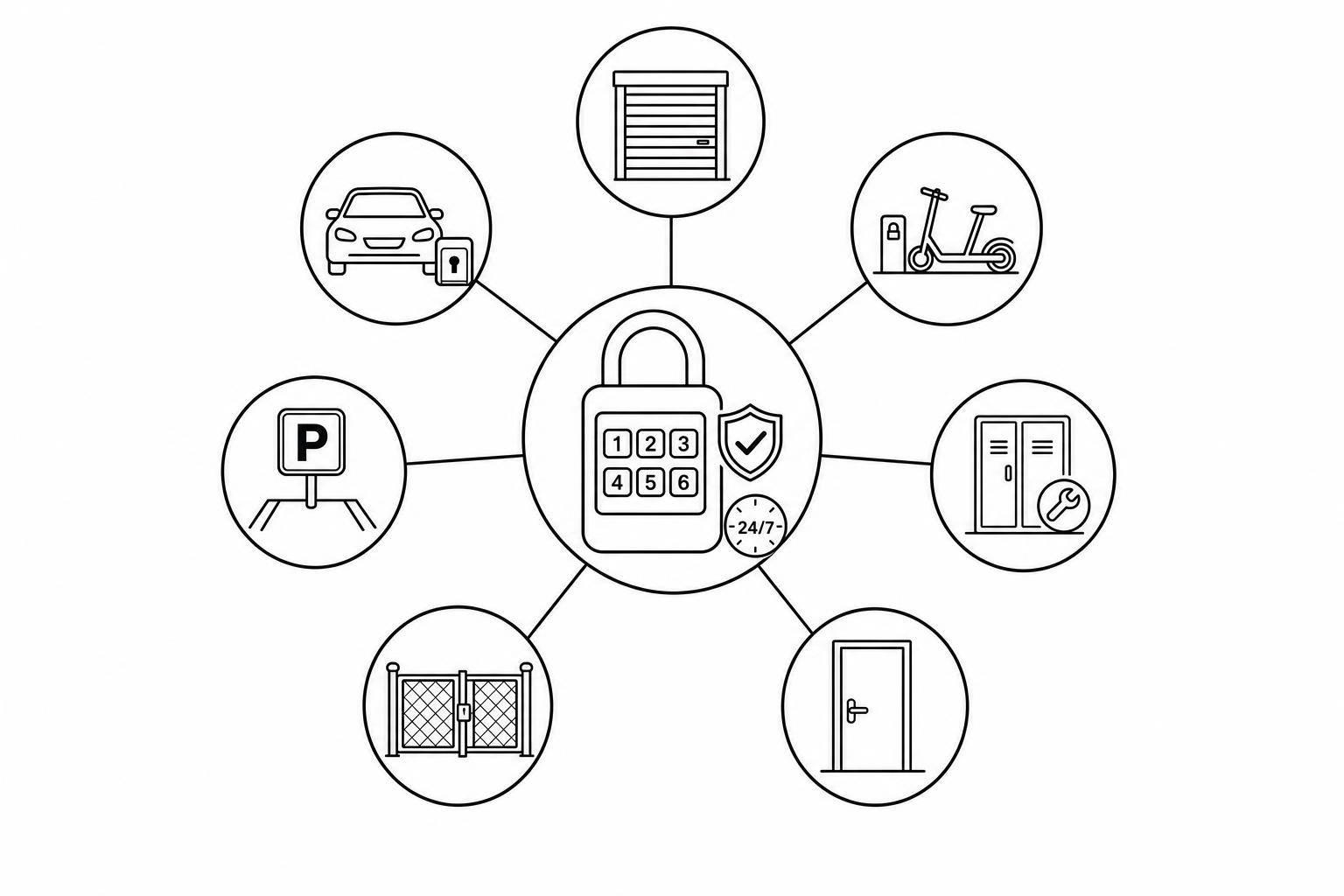
Unmanned Rental Sites: 7 Lock Platform Use Cases
August 15, 2026 · 18 min read
Unmanned Rental Sites: 7 Lock Platform Use Cases
If you want an automate rental business operations for an unmanned site, the lock setup has to do more than open a gate. It needs to link each booking to the right renter, send a timed code, shut that code off when the rental ends, and log every access event.
Here’s the short version: I’d use this model for fenced yards, shared depots, roadside trailer bays, hotel pickup points, marinas, event sites, and mixed-fleet hubs. The same pattern shows up in each one: online booking, ID checks, timed access, return records, and photo or GPS proof. That matters even more when 38% of booking requests happen outside business hours and many pickups happen before staff would normally be on-site.
What I’d look for right away:
- One booking = one renter = one timed code
- Codes that still work in low-signal areas
- Access logs tied to each reservation
- Return photos, checklists, and GPS records
- Clear pickup instructions by text and email
Quick Comparison
| Site type | Main access need | Main risk | Best fit for lock setup |
|---|---|---|---|
| Fenced yards | Gate + asset access | Missed tracking at entry and return | Timed codes for gate and unit |
| Shared depots | Door + locker/cage access | Wrong item or wrong storage area | Booking-linked locker access |
| Roadside trailer bays | Fast drive-up pickup | Early-morning or after-hours issues | Offline PIN-based locks |
| Hotel pickup points | Locker or key handoff | Guest confusion at pickup | Clear directions + locker-only codes |
| Marinas | Gate + dock + gear + vessel | Weak signal on docks | Multi-point access with offline support |
| Event sites | Short access windows at changing sites | Busy handoff periods | One-time codes with auto-expiry |
| Mixed-fleet hubs | Many assets in sequence | Messy handoffs across asset types | One reservation tied to many locks |
My takeaway: the site type changes, but the rule doesn’t: _the best unmanned self-service rentals keep access simple for renters and fully logged for operators._ The rest of the article breaks down where each use case fits and what the lock platform has to handle in each one.
How Lock Platforms Run Self-Service Rental Sites
A lock platform automates the rental handoff. That's the engine behind unmanned rental sites. It handles booking, verification, access, return, and logging so operators can run sites at scale without staff on site.
Online Booking and Payment Before Arrival
Customers reserve the item they need, pick a pickup time, and pay in full before they show up. That means less on-site payment handling, fewer no-shows, and a clear record of who is coming and when. The result is simple: customers can book, pay, and arrive ready for pickup at any hour.
"Admin time per booking dropped from 30 minutes to 30 seconds and our whole workflow is now automated." - Nathan Curtis, Founder, Hafen's SSG [1]
Identity Verification and Fraud Checks
When no one is on site, identity checks do a lot of the heavy lifting. Before access is released, customers submit a government ID. The platform then cross-references it through secure automated checks. The renter's name, phone number, and ID must match before access is sent.
If something doesn't line up, the system flags it for manual review. And because these checks can return a result in under 30 seconds [4], pickup stays fast without letting fraud slip through.
Time-Bound Access Codes Tied to the Right Asset
Once identity is confirmed, the platform creates a one-time PIN or digital key linked to a single reservation, a single site, and a single asset, whether that's a gate, locker, or rental unit. The code turns on at the start of the booking window and turns off on its own when the rental ends.
It can't be reused or shared. Customers get the code by SMS and email, along with clear pickup instructions like where to park, which gate to use, and who to contact if they need help.
"As a solo operator, Lockii lets my trailers rent out 24/7 without me being tied to my phone. Customers book, pay, and access the trailer completely on their own." - Andrew Bravo-Diaz, Founder, OTG Trailer Rentals [3]
Pickup, Return, and Audit Trail Records
Every access event is logged with a timestamp: when the gate opened, which unit was accessed, and when the return was completed. At drop-off, customers upload photos and fill out a condition checklist in the platform. GPS tracking helps confirm that the asset is back at the right location.
Put together, those records create a clear timeline for access, return, and condition. If there's a dispute over damage, timing, or a missed return, the operator and customer both have a record to point to.
Those same mechanics look a little different across fenced yards, depots, trailer bays, hotel pickup points, marinas, event sites, and mixed-fleet hubs.
1. Fenced Yards for Equipment and Trailer Rentals
Fenced yards are a strong match for unmanned rentals. The site already has physical security in place, so the main job is simple: control who enters and when they can enter.
That extra control point is the perimeter gate.
Multiple Access Points
Most yards don't have just one lock. There's usually a main gate, a pedestrian entrance, and separate locks for each asset. That means a single booking may need two codes: one for the gate and one for the trailer or equipment itself.
A lock platform can handle that flow on its own. It sends clear, step-by-step instructions telling the customer which gate to use, which bay to head to, and which code opens their assigned trailer. So instead of guessing or calling support, the customer gets the right code and directions automatically.
Offline Lock Reliability
Remote yards need locks that still work when the signal doesn't. That's a big deal because fenced yards are often in industrial zones or on the edge of town, where cell service can be spotty.
Platforms that work with hardware like IglooHome solve this by generating time-bound PIN codes that are checked on the lock itself. In plain English: the code can still work even if the site has weak service or no live internet connection at that moment.[1][2]
Booking-to-Lock Automation
Once a customer books and passes identity verification, the platform assigns separate access details for the gate and the asset automatically. No one has to dig through a booking, copy a code, and send it by hand.
That cuts admin work and helps each renter get the right access at the right time.
Security and Audit Controls
Security isn't just about getting someone in. It's also about knowing what happened after that. Booking-linked codes that expire help limit unauthorized access, while return photos, GPS, and audit logs create a clear chain of custody.
Lockii supports this with ID checks, automated messaging, GPS tracking, and audit logs.
Shared depots use the same automation, but the access issue moves from gates to lockers and bins.
2. Shared Depots and Tool Libraries
Shared depots and tool libraries add a second layer of control. It’s not just about getting into the site. It’s also about getting into the right room, cage, or locker.
The U.S. has more than 100 active tool libraries, and many run with thin staffing or volunteer-led teams.[6][7] That’s exactly where automation helps most, especially for unmanned setups.
Multiple Locks, One Booking
A depot may need separate access for the front door, storage room, and each cage or locker. So one booking can trigger more than one lock event.
Once the customer arrives on-site, the platform sends only the credential tied to the booked asset. They don’t get blanket access to the whole facility. They get access to the specific space they need, and nothing more.
Booking-to-Lock Automation
Once a booking is confirmed and identity is verified, the platform creates a unique, time-bound code linked to the exact locker or cage where the tool is stored.
The customer then receives the access code, address, and pickup steps by SMS and email. The code turns on at pickup time and expires at the end of the booking window.
If the customer needs the tool longer, they can extend the booking through the customer portal. That self-service action updates the lock window automatically, with no staff call needed. For lean teams, that cuts a lot of back-and-forth and keeps pickup self-service.
Security and Audit Controls
After pickup, the same system records what left the depot and what came back. That matters because access control alone isn’t enough. You also need a clean record of the handoff.
At return, customers complete a return checklist and upload photos of the tool’s condition. The platform logs entry, return photos, and condition checks to help prevent damage disputes.
For tools that require training, training-gated zones stay locked until the customer completes the required steps. That way, access is tied to both the booking and the user’s status.
3. Roadside Trailer Bays and Drive-Up Self-Hire Stations
Roadside trailer bays need fast, staff-free pickup and return, often before the workday even starts. In this setup, the bay does the job that a front desk usually handles. The renter arrives, unlocks the trailer, and heads out, even when no one is on-site.
That matters because demand doesn’t wait for office hours. 38% of rental booking requests happen outside business hours, and 18% of trailer bookings are for 5:00 a.m. to 8:00 a.m. pickup windows.[8]
Booking-to-Lock Automation
The process is pretty direct. The platform links each booking to a set bay and trailer, then sends a time-bound PIN that turns on at pickup and expires at return. Once a booking is verified, access is granted on its own. If the renter needs extra time, they can extend the booking through the customer portal, and the access window updates without staff help.[1][2]
Operators have used this setup to keep bays open longer while cutting labor needs.
Offline Lock Reliability
Fast pickup falls apart if the lock can’t work in low-signal spots. And roadside bays often deal with patchy cell service. So the lock needs to check codes locally, without depending on live internet.
IglooHome’s algoPIN tech does exactly that. It creates time-bound codes that the lock validates on its own.[9][12]
There’s also a cost angle here. Battery-powered smart padlocks and keyboxes run about $100 to $150 per unit and don’t need hardwiring.[11]
Security and Audit Controls
This model also needs a clean paper trail. Identity checks, GPS tracking, return photos, and condition checklists help document what happened if there’s damage or a late-return dispute.[1][5]
Lockii reports that about 96% of self-service trailer rentals finish without staff involvement when those controls are in place.[10]
The same access setup can also work through lockers or pickup points, not just open bays.
4. Hotel Pickup Points and Key Lockers
Hotels already have shared entry and pickup areas, so key lockers tend to fit right into the guest flow. You don't need a staffed counter or a separate storefront. That makes hotels a good match for reservation-based access, clear directions, and auto lock control.
Access Point Complexity
In a hotel setup, guests may need to find a locker in a lobby, parking garage, or side entrance with no staff nearby. So the platform needs to guide them well. That means sending SMS and email directions, photos, maps, and a _find-my-order_ page so they can get to the right pickup point without wandering around.
There’s another piece here: each asset should link to one locker slot only. That way, the code opens only that compartment. Once the guest reaches the locker, the platform should release only the code tied to that reservation.
Booking-to-Lock Automation
Hotel pickup usually works best when the booking, locker assignment, and access code all live under one reservation. After payment goes through, the system can send everything automatically. The result is simple: guests can pick up rentals 24/7, even when no staff member is on site. This is possible through automated rental software that handles the entire workflow from booking to access.
Offline Lock Reliability
Offline-ready locks matter in hotels because Wi-Fi in lobbies, garages, and side entrances can be spotty. IglooHome locks handle this by validating codes on the lock itself instead of needing a live connection.
If the network drops but the lock still opens as expected, the audit log becomes the main record of the handoff. In that setup, the lock doesn't need to "phone home" in the moment to do its job.
Security and Audit Controls
When no staff member is there to watch the handoff, the audit trail has to fill that role. Log each access event with its booking and lock ID. Expire the code on its own after use or after the access window ends.
It also helps to keep return photos and condition checklists. Those give you a clear before-and-after record if there's a dispute.
A tight process usually includes:
- logging every access event
- tying each event to the booking
- expiring the code automatically
- checking identity before any code is issued
That last step matters most. By the time someone reaches the locker, they should already have been checked against their driver's license and payment details.
5. Marina Access for Boat and Watersports Rentals
Marinas bring a different kind of access challenge. Instead of one gate and one lock, you’re dealing with access spread across the whole waterfront setup: docks, lockers, and the boat itself.
A single rental can involve several entry points at once:
- A parking gate
- A dock gate or pier gate
- A storage locker for life jackets or boards
- A key safe or onboard smart lock for the vessel
So a jet ski booking may need timed access to the gate, dock, locker, and vessel, all tied to the same reservation.
Access Point Complexity
Slips, dock gates, storage lockers, and onboard locks each need their own credential, but those credentials still have to match the same booking window. On top of that, renters need dock maps, slip numbers, and clear step-by-step directions before arrival. Otherwise, they’re stuck wandering the marina or calling for help.
That access setup also has to keep working when marina signal drops. A nice map doesn’t help much if the lock won’t open at the dock.
Offline Lock Reliability
Waterfront connectivity is often unreliable. Dead zones on docks and piers are common.
IglooHome locks handle this well because they validate time-based PINs on the device itself. That means the dock gate can still open even when the network is down. Once service comes back, access events sync afterward.
Booking-to-Lock Automation
When a marina booking comes in, access should be triggered for the right vessel and the right access zone without staff stepping in. That cuts back on mix-ups and saves time during busy handoffs.
Automated reminders sent before the return window closes can also help reduce overruns and keep turnover smooth for the next renter [1].
Once the renter leaves the dock, the job changes. At that point, it’s less about entry and more about showing the vessel’s condition before and after use.
Security and Audit Controls
Pre- and post-rental photos, digital condition checklists, and end-of-rental quizzes give operators a clean record for each vessel. That paper trail helps with damage disputes and insurance claims.
Lockii supports multi-point marina access from one dashboard.
6. Event Sites and Short-Term Rental Setups
Event rentals run on short, staff-free handoffs at temporary sites. Think festival yards, tournament depots, and wedding supply pickups. Access has to work during load-in, load-out, and overnight storage.
The self-service model still fits here. The difference is simple: the access window is tighter, and the site can change fast. That puts access control front and center.
Access Point Complexity
Event sites can shift by the day or even by the hour. Because of that, the platform needs to manage gates, containers, staging areas, and category-specific lockers without manual reprogramming.
At these temporary sites, one-time access assignments matter more than permanent permissions. Each crew should get access only for its booking window. If the layout changes daily, the lock system has to keep up without manual resets.
Offline Lock Reliability
Event sites often deal with weak signal and temporary power. That means locks need to validate codes locally.
When power drops or signal cuts out, local code validation keeps access moving. Offline-capable smart locks help avoid delays during load-in and load-out. Once offline access is in place, the next piece is linking that access to the booking itself.
Booking-to-Lock Automation
A booking should trigger a time-bound code for the right asset, turn on at pickup, and expire on its own at return.
If a renter extends the booking, the access window should update without staff involvement. That's what keeps temporary sites self-service, even without anyone onsite. After pickup, the audit log becomes the record of handoff.
Security and Audit Controls
Event sites need a timestamped access log for every rental. On busy event weekends, there's not much room for handoff disputes, so the record needs to be clear from the start.
Identity verification happens before any code is released. At the end of the rental, renters submit return photos and condition checklists. That creates a timestamped photo record for each item, which matters most when disputes show up after a busy rental period. Item and booking logs keep temporary-site rentals traceable from one dashboard.
7. Mixed-Fleet Hubs and Multi-Asset Access Control
Things get more involved when one site handles trailers, vehicles, tools, and lockers at the same time. A mixed-fleet hub has to manage different asset types, different locks, and access steps in the right order, all within a single reservation. And it has to do that with no staff on-site to walk the customer through pickup.
Access Point Complexity
One booking can involve several access points that must open in a set sequence: the main yard gate, a key locker, the vehicle or trailer, and an accessory cage. The platform needs to connect each booked asset to the right lock and release access in the proper order so pickup feels simple, not messy.
That sequencing across many assets is what sets a mixed-fleet hub apart from a site built for just one rental type.
Booking-to-Lock Automation
Once a booking is confirmed, the platform should send only the codes tied to the booked assets. Those codes should sit under one reservation and unlock in the order the customer needs them.
If the customer extends the rental online, each access window in that bundle should update on its own. In plain English: one reservation manages many assets, with no manual code assignment.
Offline Lock Reliability
Large sites that are spread out often deal with weak cellular service at different lock points. Because of that, offline-capable locks need to check codes locally at each gate, cage, and locker.
If that local validation fails, the whole handoff can fall apart fast.
Security and Audit Controls
When multiple asset types move through the same site, the audit trail needs to be detailed. Every lock event should be logged by code, lock ID, timestamp, and booking reference across each asset type and each location within that hub.
At return, customers upload photos and complete a condition checklist. GPS tracking then confirms that high-value assets are back in the assigned area. That kind of detail, across many assets and locations, makes dispute resolution much easier at a mixed-fleet hub.
That same setup shows up across other site types too, but mixed-fleet hubs need the tightest control.
What All Seven Use Cases Have in Common
These seven use cases run on the same basic setup: booking, identity, access, and audit records all need to work without on-site staff.
No matter the site type, three controls make or break an unmanned rental model.
Reliable Access in Remote and After-Hours Conditions
Access has to keep working when no one is around to help. That’s why locks should validate time-bound codes locally. If cellular service drops, renters can still pick up the asset without getting stuck at the gate.
Reservation-Linked Codes and Clear Pickup Instructions
Shared codes leave a security hole. A better setup is simple: one booking should create one time-bound code for one asset.
That code should come with one clear pickup message that covers:
- the address
- the access point
- any safety notes
The goal is pretty plain. Pickup should feel easy for renters and stay locked down for operators.
Identity Checks, Audit Logs, and Dispute Protection
Checking a government ID before sending any access code gives operators a clear record of who accessed the asset. That paper trail matters most when things go sideways, like disputes, chargebacks, or overdue returns.
Lockii brings ID checks, booking logs, GPS, hire-end photos, and support tools into one workflow.
The table below shows how these shared requirements shift by site type.
Comparison Table by Site Type
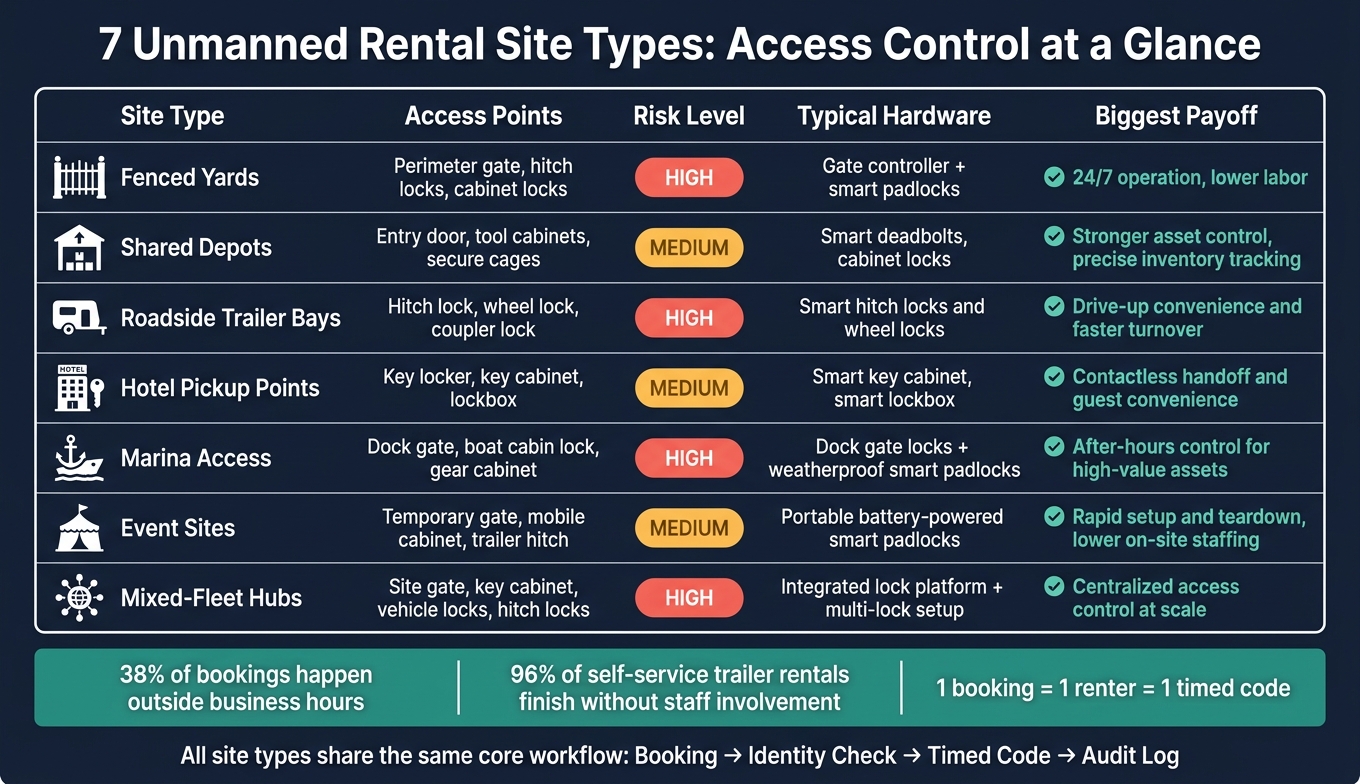
Not every rental site works the same way. Some have one main entry point. Others have gates, cabinets, vehicles, and trailers all in play at once.
That’s why the mix of access points, risk, and hardware can change a lot from one setup to another. The table below makes that easy to scan. For those looking to automate your equipment hires, understanding these hardware requirements is the first step.
| Site Type | Access Points | Risk | Typical Hardware | Biggest Payoff |
|---|---|---|---|---|
| 1. Fenced Yards | Perimeter gate, hitch locks, cabinet locks | High | Gate controller and smart padlocks | 24/7 operation, lower labor |
| 2. Shared Depots | Entry door, tool cabinets, secure cages | Medium | Smart deadbolts, cabinet locks | Stronger asset control, precise inventory tracking |
| 3. Roadside Trailer Bays | Hitch lock, wheel lock, coupler lock | High | Smart hitch locks and wheel locks | Drive-up convenience and faster turnover |
| 4. Hotel Pickup Points | Key locker, key cabinet, lockbox | Medium | Smart key cabinet, smart lockbox | Contactless handoff and guest convenience |
| 5. Marina Access | Dock gate, boat cabin lock, gear cabinet | High | Dock gate locks and weatherproof smart padlocks | After-hours control for high-value assets |
| 6. Event Sites | Temporary gate, mobile cabinet, trailer hitch | Medium | Portable battery-powered smart padlocks | Rapid setup and teardown, lower on-site staffing |
| 7. Mixed-Fleet Hubs | Site gate, key cabinet, vehicle locks, hitch locks | High | Integrated lock platform and multi-lock setup | Centralized access control at scale |
The pattern is pretty clear. More exposed sites need tighter access control. More complicated sites need more lock points. And sites that run remotely - or need after-hours pickup - usually get the biggest upside from 24/7 self-service.
Conclusion
A smart lock by itself won’t do the job. The difference between an unmanned rental site that runs smoothly and one that creates constant support work comes down to how well the lock fits into the full rental workflow. Use a rental business automation checklist to ensure no steps are missed.
Across all seven use cases, the pattern stays the same: one booking, one verified renter, one timed code, one audit trail. Look at your locations and assets through these seven site types - fenced yards, shared depots, roadside bays, hotel pickup points, marinas, event sites, and mixed-fleet hubs - to see what fits now and what could work as you expand.
For operators that want this workflow in one system, Lockii brings together booking, verification, messaging, and lock control for scaling with contactless rental models across many locations. Build the full workflow around the right site model, and it will scale.