
Electronic Trailer Lock For Rental Fleets
October 5, 2026 · 8 min read
Electronic Trailer Lock For Rental Fleets
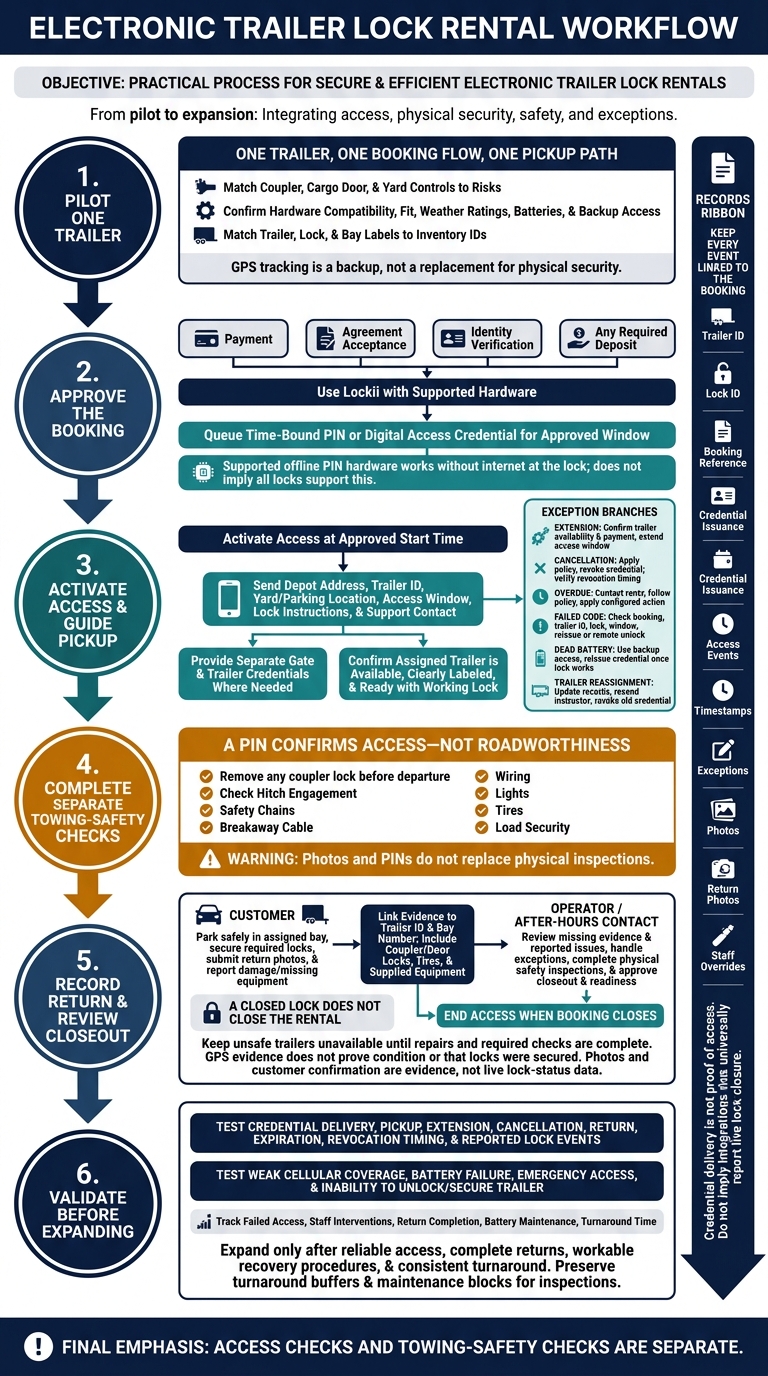
I’d start with one trailer: fit the lock, tie access to an approved booking, and test pickup and return before adding more. Electronic locks can support 24/7 self-service pickup, but a working code does not mean a trailer is safe to tow.
Here’s what I’d check:
- Hardware: Match coupler, cargo door, and yard locks to what you need to protect. Check fit, weather ratings, batteries, and backup access.
- Booking access: Use Lockii with supported hardware to issue timed access after payment, agreement acceptance, identity checks, and any required deposit.
- Pickup and changes: Send clear directions and lock instructions. Test failed codes, extensions, cancellations, and access expiration.
- Returns and records: Link photos, lock details, access events, and reported damage to the booking. Assign someone to handle after-hours problems.
My rule: <u>keep access checks separate from towing-safety checks</u>. _Photos and PINs do not replace physical inspections._ Track failed access, incomplete returns, and staff callouts before expanding your fleet.
Trailer Coupler, Door, and Yard Security
Choose Security Controls for Each Trailer Risk
Once access is tied to the booking, match each trailer risk to a physical control: a coupler lock, cargo door lock, or yard gate lock. Use layers rather than relying on one lock. For high-value trailers, add GPS tracking as a backup - not a replacement for physical security.
The table below shows what each control protects.
| Control | Asset protected and purpose | Access method | Installation needs | Limitations |
|---|---|---|---|---|
| Coupler lock | Trailer; deters hitching without permission | Physical key or PIN, depending on hardware | Must fit the coupler or lock mount | Depends on hardware support |
| Electronic door lock | Cargo area; restricts entry | Supported PIN or digital access | Compatible latch, hasp, and secure mounting | Protects only the entry point |
| Gate lock | Yard; controls depot entry | Supported PIN or digital access | Compatible gate hardware and reachable placement | Does not secure individual trailers |
| GPS tracker | Entire trailer; monitors location | Tracking dashboard | Suitable mounting, power, and connectivity | Does not physically prevent theft |
Electronic access requires compatible hardware and software. Lockii integrates with igloohome, and supported offline PIN hardware works without internet at the lock[1]. Confirm compatibility for every device before buying.
Check Lock Fit, Weather Ratings, and Power
Before installing a control, check that it fits the trailer and can withstand yard conditions. Measure coupler openings and latch clearance. Compare the manufacturer’s operating range with local conditions, then check the outdoor rating, tamper resistance, battery replacement process, and low-battery alerts.
Mount locks where renters can reach them, and label locks and bays with matching numbers. Test keypad or offline access at each yard. Keep a sealed backup access method and spare hardware on hand in case something fails.
Keep Lock Security Separate From Towing Safety
Lock access and towing safety are separate checks. Pickup instructions must explain which security devices to remove and where to store them. Remove any coupler lock before departure.
Customers must still check hitch engagement, safety chains, the breakaway cable, wiring, lights, tires, and load security. A PIN confirms access - not roadworthiness.
Booking-Controlled Access and Customer Pickup
Issue Access After Booking Approval
Once you’ve chosen the coupler or door lock, set the rental system to control when access starts and ends. Configure Lockii to require payment, agreement acceptance, identity verification, and any required deposit before issuing access. After booking confirmation, Lockii issues a time-bound PIN or digital unlock command for the trailer’s booking window.
| Booking event | Required action | Access handling |
|---|---|---|
| Approval | Approve the booking | Queue the credential for the booking window |
| Pickup | Reach the approved start time | Activate the PIN or digital key |
| Extension | Confirm availability and additional payment | Extend the access window |
| Cancellation | Apply the cancellation policy | Revoke the credential |
| Return | Complete the return and secure the trailer | End access when the booking closes |
| Overdue | Contact the renter and follow the overdue policy | Apply the configured overdue action |
Send Clear Self-Service Pickup Instructions
Use Lockii’s automated SMS and email messages to send the depot address, trailer ID, yard or parking location, access window, lock instructions, and support contact. Where needed, provide separate gate or yard codes and trailer lock credentials. Add links to a safety video, condition photos, and the customer portal.
Before the renter arrives, check that the assigned trailer is available, clearly labeled, and ready with a working lock. These checks and instructions give the renter what they need to pick up the trailer without staff involvement.
Resolve Access Problems and Booking Changes
Handle pickup problems and booking changes from the same booking record. If a renter arrives early, start an express pickup flow from the booking or order page.
If a code fails, check the booking, trailer ID, lock, and access window before reissuing access or using remote unlock, where supported. For a dead lock battery, use the backup access method, then reissue the credential once the lock works again. If you reassign the trailer, update the trailer and lock records, resend the instructions, and revoke the old credential.
Approve self-service extensions only when the trailer is available and the additional payment succeeds. Then check that the access window matches the new end time. Use the depot’s local time zone and U.S. date format in every change notice.
GPS Tracking & Locking Your Utility Trailer
Trailer Returns and Rental Software Records
After pickup, the return process must show where the trailer came back, how it was locked, and what condition it was in.
Document Return Location, Locking, and Condition
Use Lockii’s return quiz and photos to document the trailer in its assigned bay. Match the evidence to the trailer ID and bay number, and include photos of the coupler and door locks, tires, and any supplied equipment. Ask renters to report damage, missing items, or locks they couldn’t secure. GPS data can confirm a return to the correct yard or bay, but it cannot prove condition or that locks were secured. [3][6]
A closed lock does not close the rental. Review missing evidence and reported issues in damage tracking. Keep unsafe trailers unavailable until repairs and required checks are complete. When live lock status isn’t available, record customer confirmation and photos as evidence - not as live lock-status data. [6]
Define Pickup and Return Responsibilities
Once the return is recorded, make clear who handles exceptions. Assign an after-hours contact for unsecured locks, wrong-bay returns, and incomplete forms. That person should record the exception and follow the backup physical process to close the record. [2]
| Responsible party | Pickup and return duties |
|---|---|
| Customer | Submit return photos, park safely, secure required locks, and report damage or missing equipment. |
| Lockii workflow | Send return prompts, collect photos and quizzes, record available GPS evidence, and update booking records according to the configured workflow. |
| Lock integration | Record access events and lock actions; do not assume live closure status. |
| Fleet operator or after-hours contact | Review exceptions, arrange overrides, inspect the hitch, lights, brakes, and reported damage, and approve closeout and readiness. Keep unsafe units unavailable. |
Self-service pickups and returns still need clear responsibilities. Customer photos do not replace the operator’s trailer rental safety inspections or maintenance work.
Connect Lock Records to Bookings and Trailers
Link every return event to its booking so support, maintenance, and billing work from the same record.
Keep the trailer ID, lock ID, booking reference, credential issuance, access events, timestamps, exceptions, return photos, and staff overrides linked to the rental. Use booking and item audit logs to review the full rental history across locations. Credential delivery is not proof of access: check which events each integration supplies before using them in a dispute. Restrict access to credentials, and set retention rules for photos, location data, and audit records. [6]
Deployment Checklist and Next Steps
Test Each Step of the Rental
Once the workflow is set up, pilot one trailer before adding more: one trailer, one booking flow, one pickup path. Check the installed hardware against the selected trailer. Match lock and bay labels to inventory IDs in the Lockii dashboard. Then have a first-time renter test the pickup directions, including a bay map, a photo of the trailer, and lock instructions. [2]
With hardware and labels checked, test the full booking-to-access flow after hours, from approval to closeout. Cover credential delivery, pickup, extension, cancellation, return, and expiration. Check when credentials activate and whether booking changes correctly update when access starts, changes, and ends. Confirm revocation timing and which lock events the system actually reports. [2][4][5]
Test weak cellular coverage, battery failure, emergency access, and what happens when a renter cannot unlock or secure the trailer. Document the recovery steps each hardware setup supports and assign an after-hours contact.
Measure Results Before Adding More Trailers
After testing failures, track what breaks and what slows the process: failed access, staff interventions, return completion, battery maintenance, and turnaround time. Use these results to assess whether the workflow can handle more trailers and locations. Review failure causes before adding units. Once the pilot works reliably, standardize lock-to-trailer pairing, pickup instructions, and recovery procedures across locations. [2][6]
Expand only when the pilot shows reliable access, complete returns, workable recovery procedures, and consistent turnaround. Set turnaround buffers and maintenance blocks so faster bookings don’t cut into inspection time. [6]