

Google Ads Budget Guide for Rental Companies
October 5, 2026 · 11 min read
Google Ads Budget Guide for Rental Companies
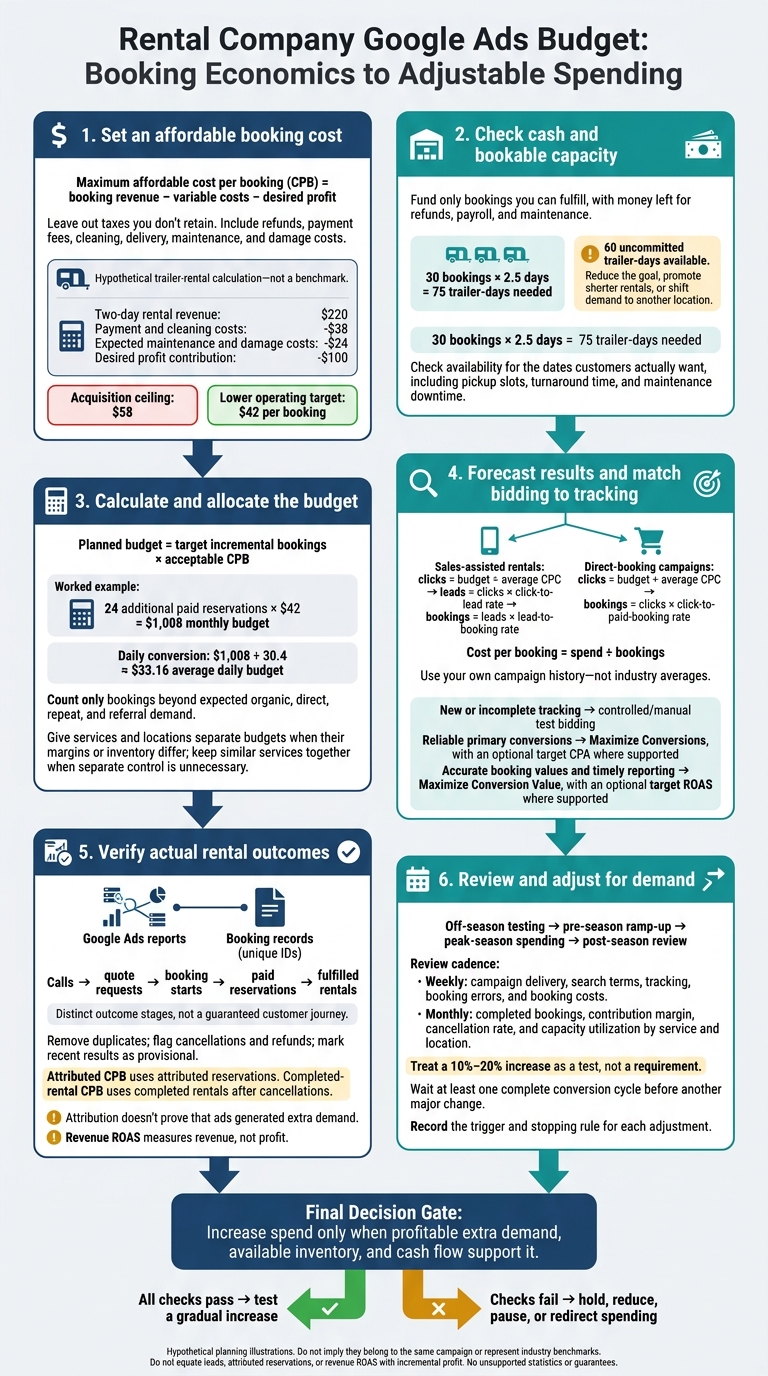
I start with what you can afford to pay for a booking - not a monthly ad spend target. Subtract variable rental costs and your desired profit from booking revenue to find your cost-per-booking ceiling. Then use a lower spending target: _24 extra bookings at $42 each_ means a $1,008 monthly budget, or about $33.16 per day.
Here’s how I turn that budget into a plan:
- Check cash and capacity. Fund only bookings you can fulfill, with money left for refunds, payroll, and maintenance.
- Split spend where needed. Give services and locations separate budgets when their margins or inventory differ.
- Forecast results and choose bidding. Estimate clicks, leads, and bookings using your own data, and match bidding to your tracking quality.
- Verify bookings. Compare ad reports with booking records, including cancellations, refunds, and completed rentals.
- Adjust for demand. Shift spending by season and available equipment inventory. Treat a 10%–20% increase as a test, then wait a full conversion cycle before another major change.
My rule: <u>more attributed bookings don’t automatically mean more profit</u>. I increase spending only when the numbers, available inventory, and cash flow support it.
7 Google Ads Budgeting and Forecasting Tips For Beginners - Spend Your Budget More Efficiently
Calculate and Allocate Monthly Ad Spend
Use your booking cost ceiling to set budgets for each service. Then check whether each campaign can grow without cutting into profit.
_All examples and planning figures in this section are hypothetical, not benchmarks or achieved results._
Set an Affordable Cost per Booking
Maximum affordable cost per booking (CPB) = booking revenue − variable costs − desired profit. Leave out taxes you don't retain. Include refunds, payment fees, cleaning, delivery, maintenance, and damage costs. Longer rentals bring in more revenue but slow inventory turnover. Make sure you can pay for ads before rental payments arrive.
Planned budget = target incremental bookings × acceptable CPB. Count only bookings beyond expected organic, direct, repeat, and referral demand.
Attributed CPB divides ad spend by attributed reservations. Completed-rental CPB uses completed rentals after cancellations. Attribution doesn't prove that ads generated extra demand. Use the same booking definition across campaigns.
Hypothetical trailer-rental calculation - not a benchmark: A two-day rental earns $220, with $38 in payment and cleaning costs and $24 in expected maintenance and damage costs. Keeping $100 in profit contribution leaves a $58 acquisition ceiling. A lower operating target provides a buffer. For July, a goal of 24 additional paid reservations at $42 each gives a $1,008 planned budget.
Compare Testing, Regular Spending, and Expansion Budgets
Use your CPB ceiling to set separate budgets for testing, regular spending, and expansion. Testing checks tracking, search terms, and booking operations. Regular spending needs dependable results. Expansion needs profitable extra demand and spare inventory - not just a low attributed CPB. Revenue ROAS measures revenue, not profit.
| Plan | Monthly budget | Average daily budget | Target bookings | Target CPB | Average booking value | Target revenue ROAS | Available capacity | | --- | --- | --- | --- | --- | --- | --- | --- | | Testing | $600 | $19.74 | 12 | $50 | $210 | 4.20x | 40 trailer-days | | Regular spending | $1,500 | $49.34 | 30 | $50 | $225 | 4.50x | 110 trailer-days |
Capacity check: At an expected average duration of 2.5 days, 30 bookings consume 75 trailer-days. With only 60 uncommitted trailer-days, reduce the goal, promote shorter rentals, or shift demand to another location. Monthly availability must also match the dates customers actually want.
Split Budgets by Rental Service and Location
Create separate campaigns when differences in margins, capacity, geography, booking value, or conversion rates call for separate control. Otherwise, keep similar services together.
| Budget approach | Best fit | Advantages | Risks or controls needed |
|---|---|---|---|
| Separate campaign budgets | Locations or services have different margins, capacity, or goals | Clear spending limits and reporting by location or service | May prevent spend from moving to stronger opportunities; requires monitoring |
| Shared budget across eligible campaigns | Campaigns have similar goals, conversion values, and interchangeable capacity | Spend can flow toward available demand and stronger opportunities | One campaign may absorb most spend; use location exclusions, capacity checks, and reporting |
| Combined campaign with service-specific ad groups | Similar pricing, geography, and conversion goals | Avoid unnecessary campaign fragmentation | Keep ads and landing pages relevant to each service |
Prioritize high-intent searches that still have profitable capacity. Check pickup slots, turnaround time, and maintenance downtime - not just trailer counts. Verify capacity with booking records and location-level availability. Keep Google Ads conversion values aligned with your booking definition.
July allocation | Campaign | Service area | Available capacity | Target bookings | Target CPB | Monthly budget | | --- | --- | --- | --- | --- | --- | | Enclosed trailer search | Phoenix north | 80 trailer-days | 16 | $48 | $768 | | Utility trailer search | Phoenix south | 120 trailer-days | 12 | $38 | $456 | | Equipment trailer search | Tucson | 70 trailer-days | 8 | $60 | $480 |
Next, use those budget rules to forecast bookings and track results against actual reservations.
Forecast Bookings and Track Ad Results
Estimate Clicks, Leads, and Bookings
Once you’ve set monthly budgets, estimate what that spend should produce. Forecast sales-assisted rentals and direct-booking campaigns separately, using your own campaign history - not industry averages.
For sales-assisted rentals, calculate clicks = budget ÷ average CPC; leads = clicks × click-to-lead rate; and bookings = leads × lead-to-booking rate. For direct-booking campaigns, calculate bookings = clicks × click-to-paid-booking rate.
For either campaign type, cost per lead = spend ÷ leads, and cost per booking = spend ÷ bookings.
Hypothetical monthly forecast versus actual results - not a guarantee. | Metric | Forecast | Actual | | --- | --- | --- | | Spend | $3,000 | $2,850 | | Clicks | 750 | 690 | | Leads | 60 | 52 | | Paid bookings | 15 | 11 | | Cost per lead | $50.00 | $54.81 | | Cost per booking | $200.00 | $259.09 |
Keep calls, quote requests, booking starts, paid reservations, and fulfilled rentals separate. A booking start shows intent; it isn’t a reservation.
For direct-booking campaigns, prioritize reliable paid-booking conversions. For sales-assisted rentals, use qualified leads until you can reliably pass confirmed booking outcomes back to the ad platform. Count only the primary conversion as the booking goal.
Use these forecasts to choose bidding that fits your tracking quality.
Choose Bidding to Match Your Tracking
Budgets set spend; bidding sets how aggressively campaigns compete. Choose your approach based on how well you can measure results, and check current Google Ads rules before switching.
| Approach | Tracking conditions | Goal | Main limit |
|---|---|---|---|
| Controlled/manual test bidding | New or incomplete conversion tracking | Establish CPC, search-term quality, and booking rates | Requires hands-on management; does not automatically favor bookings |
| Maximize Conversions, with an optional target CPA where supported | Reliable primary conversions and enough data to assess results | Increase qualified leads or paid bookings | Target CPA is an average goal, not a guaranteed booking price |
| Maximize Conversion Value, with an optional target ROAS where supported | Accurate booking values and timely conversion reporting | Prioritize higher-value reservations | Incorrect values or delayed outcomes can misdirect spending |
Wait about four weeks or three conversion cycles, whichever is longer, before judging target ROAS.[8] Check reporting lag before tightening targets, and change one major variable at a time.
Next, check that ad conversions match actual booking records.
Check Ad Conversions Against Booking Records
Build a dashboard showing spend, clicks, CTR, CPC, leads, paid bookings, fulfilled rentals, acquisition costs, revenue, and ROAS, split by service and location. This helps you see whether ad spend produces profitable rentals - not just leads.
Each week, reconcile results using booking IDs that identify each booking separately. Remove duplicates, flag cancellations and refunds, and keep platform data beside verified booking records.
Document conversion windows and whether each report uses click, booking, payment, or rental dates. Google notes that conversions may be reported up to 90 days after a click, depending on the selected window. Mark recent results as provisional.[6][7]
Lockii booking widgets, booking audit logs, and multi-location booking records can support this reconciliation once the tracking integration is tested and verified.
Use verified results to shift spend before peak and slow periods.
Adjust Budgets for Seasonal Demand and Capacity
Use verified booking results to direct spending toward months when you can fulfill the demand.
Build a Seasonal Budget Calendar
Plan separate periods for off-season testing, pre-season ramp-up, peak-season spending, and post-season review. Look at the previous two or three comparable periods to map search volume, reservation dates, lead time, cancellations, revenue per booking, maintenance, and available units. Include major local demand events and weather restrictions.
Start pre-season campaigns 60–90 days before winter demand or 90–120 days before summer demand when your booking history supports that timing.[11] Base budget shifts on bookable capacity. Google’s Performance Planner can model budget and conversion changes, with forecasts that account for seasonality and conversion delays.[9]
Illustrative seasonal budget calendar - not industry averages | Period | Expected demand | Available capacity | Average daily budget | Target booking cost | Adjustment trigger | | --- | --- | --- | --- | --- | --- | | January–February: off-season testing | Low to moderate | High | $40 | $35 | Increase only after tracking produces qualified bookings below target | | March–April: pre-season ramp | Rising | High, with maintenance planned | $75 | $40 | Raise budget 10%–20% weekly when impression share is lost to budget and profitable capacity remains; allow a complete conversion cycle between increases | | May–August: peak season | High | 80%–95% usable inventory | $150 | $50 | Shift spend to services and locations with open inventory and profitable bookings | | September–October: shoulder season | Moderate and event-dependent | Moderate to high | $90 | $40 | Reduce weak campaigns; retain budget for profitable local events and holidays | | November–December: post-season and holiday demand | Variable | Reduced or service-specific | $50 | $35 | Cut campaigns when weather, closures, or restricted pickup prevents fulfillment |
Replace these figures with each location’s historical demand, contribution margin, and booking capacity. Fund the campaigns that can handle demand profitably during each period. Use that fit to decide where spending should increase, hold, or pause.
Review Performance and Shift Spending
With the seasonal plan in place, check whether spending matches demand and capacity.
Weekly, review spend, clicks, search terms, booked conversions, cost per booking, delivery limited by budget, disapprovals, tracking status, and booking errors. Monthly, compare services and locations using completed bookings, contribution margin, lead-to-booking rate, cancellation rate, and capacity utilization.
For seasonal reviews, compare equivalent periods and account for changes in prices, inventory, weather, events, and tracking. Let the normal conversion cycle finish before judging recent changes. Use Google’s budget history and spend projections where available.[9][10]
| Symptom | Issue to investigate | Action before adding budget |
|---|---|---|
| High clicks, few bookings | Search-term mismatch, landing-page friction, pricing, availability, or booking errors | Add negative keywords, improve the booking path, and clarify pricing and availability. Hold off on budget increases until conversion quality improves. |
| Low impressions, profitable bookings | Lost impression share due to budget, search volume, targeting, ad rank, and campaign status | Increase spending gradually or move funds from weaker campaigns if capacity is available. |
| Rising booking costs | Higher CPCs, weaker conversion, competition, or fulfillment issues; check lead-to-booking rate, cancellations, service mix, and location profitability | Find the stage causing the increase. Reduce weak queries or locations before cutting the budget across the board. |
| Inventory shortages | Available units by date and location, maintenance status, pickup capacity, and reservation utilization | Pause or reduce affected campaigns. Redirect spending to locations or services with bookable inventory. |
| Weak lead-to-booking rate | Contact speed, qualification, quote accuracy, payment completion, and CRM-to-Google Ads matching | Improve follow-up and qualification. Don’t count raw leads as successful conversions. |
Treat a 10%–20% increase as a test, not a requirement. Wait at least one complete conversion cycle before another major change. Record each adjustment, what triggered it, and its stopping rule so you can measure the effect at the next review. Direct spending toward profitable bookings you can fulfill - not just those with the lowest booking cost.
Conclusion: Fund Profitable Bookings Within Capacity
Build your budget around profitable bookings, not platform spend. Set a cost-per-booking ceiling below your contribution margin. Then multiply that ceiling by the number of incremental bookings you can fulfill to set your monthly spending cap. Divide the cap by 30.4 to get your average daily budget.[12][4]
Split that budget by service and location. Increase seasonal spending only where available inventory and margins support it. Check spending against booking and payment records, accounting for cancellations, refunds, and fulfilled rentals. Clicks, leads, and attributed bookings do not prove profit or incremental demand.[5][13] Check whether returning customers or direct demand account for some of those results.
Increase spend only if you still have cash for refunds, payroll, maintenance, and other obligations. If you can’t pay for the spend, fulfill the rentals, and keep your target margin, cut the budget.