
How to Automate Feedback Requests for Rentals
March 21, 2026 · 11 min read
How to Automate Feedback Requests for Rentals
Automating feedback requests is a simple way to improve customer engagement and streamline your rental business. By setting up automated SMS and email systems, you can request feedback immediately after a rental ends, ensuring timely responses while reducing manual effort. Key benefits include:
- Higher Response Rates: Feedback requests sent within 1-6 hours of a rental return see better engagement, with SMS open rates at 95% and emails at 30-45%.
- Improved Insights: Consistent feedback helps identify operational issues, such as equipment maintenance needs or process inefficiencies.
- Time and Cost Savings: Automation eliminates the need for manual follow-ups, freeing up staff to focus on other tasks.
Using tools like Lockii, you can create personalized messaging templates and set triggers to send feedback requests at optimal times, such as immediately after a rental return or 24 hours later. Combining SMS for quick ratings and emails for detailed surveys ensures you gather both immediate and in-depth feedback. Monitoring your system’s performance and refining your approach ensures your feedback process remains effective and efficient.
Benefits of Automated Feedback Requests
Higher Response Rates
Automated systems ensure that every customer receives a feedback request right after their rental ends, creating a dependable and consistent process. Unlike manual methods, which can be hit-or-miss depending on how busy your staff is, automation guarantees no customer is overlooked.
Timing is key. Sending feedback requests while the rental experience is still fresh - typically within 1 to 6 hours after a customer returns a trailer or drops off equipment - can significantly boost response rates. For example, SMS messages have an impressive open rate of approximately 95%, with 90% of texts being read within 3 minutes of delivery [4]. Emails, while slightly less immediate, still achieve open rates between 30% and 45% [4].
The convenience of automation is also a game-changer. Customers receive a direct link via text or email, minimizing effort on their end and speeding up response times [4].
Better Customer Insights
In addition to improving response rates, automation helps uncover valuable insights about your operations. By consistently collecting feedback from every rental, you can identify patterns that manual methods might miss. This includes pinpointing maintenance issues with specific equipment, identifying challenges at particular locations, or spotting recurring damage trends.
With feedback tied to each rental, scattered opinions transform into actionable data. For businesses handling 20 or more rentals per week [4], this steady flow of feedback makes it easier to track trends - like which trailers need frequent repairs or whether certain processes are confusing customers.
This kind of systematic data collection gives you a clearer view of your operation’s strengths and areas for improvement, turning customer feedback into a powerful tool for growth.
Reduced Labor and Costs
There are many benefits of automated notifications for rentals, but automation doesn’t just gather data - it saves time and money. Manual feedback collection requires staff to handle outreach and follow-ups, which can drain resources. With automation, this entire process runs in the background after a one-time setup.
For businesses managing 20 or more rentals weekly [4], automated systems scale effortlessly without requiring additional staff. The same volume of feedback requests is sent out consistently, supporting growth without increasing labor costs. This allows your team to focus on more critical tasks, such as customer service, equipment maintenance, or expanding your business.
As the Plaudit Team explains:
The businesses collecting the most reviews aren't doing better work than their competitors. They're asking every customer, at the right moment, every time [4].
sbb-itb-eb44693
How to Set Up Automated Feedback Requests in Lockii
Finding Communication Automations
Setting up automated feedback requests in Lockii is straightforward, thanks to its centralized dashboard designed to manage your entire rental operation seamlessly [5]. To get started, head to the "Explore the Backend" section of your Lockii dashboard. This is where you'll find the tools to set up automated email and SMS schedules, ensuring your customers stay informed throughout the rental process.
Matt Cole, Founder of Empire Trailer Hire, shares his experience:
Since switching to Lockii, things have gotten so much easier. I was juggling three different systems before, and now it's all in one place. [5]
Lockii's centralized system simplifies integrating feedback requests into your automation workflow, making it a natural extension of your existing processes.
Once you're in the automation tools, the next step is creating personalized feedback templates.
Creating Feedback Templates
Lockii's communication automation section allows you to design SMS and email templates tailored for feedback requests. You can personalize these messages using dynamic macros like [customer_name], [rental_item], and [hire_end_date]. This way, your messages feel more personal and less like generic bulk communication [6].
For SMS templates, keep your message short and to the point. Here's an example: "Hi [customer_name], thanks for renting our [rental_item]! How was your experience? Reply with a rating from 1-5."
Emails, on the other hand, give you more space to include additional details. You can add a survey link or ask specific questions about the rental experience, such as equipment condition, pickup convenience, or overall satisfaction. With Lockii's system, you can send unlimited automated emails, giving you the flexibility to test different templates and find what works best.
Once your templates are ready, the final step is to configure triggers that send these messages at the right moments.
Configuring Feedback Triggers
After setting up your templates, it's time to schedule when they’ll be sent. Lockii's automated return system offers several trigger options, such as GPS return confirmation, return form submission with photos, or when the hire end date passes.
For example, you can link feedback requests to the "Confirm Return" trigger, which is ideal for capturing customer engagement during return submissions. Here’s how you can set it up:
- Send an SMS immediately after GPS return confirmation to ask for a quick star rating.
- Follow up with a detailed email survey shortly after the return form is submitted.
Here’s a breakdown of recommended triggers and timing:
| Trigger Event | Recommended Timing | Channel | Purpose |
|---|---|---|---|
| GPS Return Confirmation | Immediate | SMS | Quick star rating while the customer is still at the drop-off location |
| Return Form Submission | 1 hour after | Detailed feedback survey, including equipment condition | |
| Hire End Date | 24 hours after | Email/SMS | Formal review request for public platforms |
| No Response Received | 7 days after | Final reminder before the transaction window closes |
With 95% of bookings on Lockii running without any manual input [5], automating feedback requests allows your team to focus on more pressing tasks while still collecting valuable customer insights.
How Businesses Are Automating Customer Reviews with AI (Full Tutorial)
Writing Effective Feedback Templates
Once your automation triggers are in place, the next step is to create templates that turn customer interactions into actionable feedback. Well-crafted templates feel personal and make it easy for customers to respond, boosting your feedback collection.
SMS Feedback Templates
Keep your SMS messages concise - stick to 160 characters or less. Use macros like [customer_name] and [rental_item] to personalize the message, and always include a direct link to your feedback form.
Here’s a sample template: _"Hi [customer_name], thanks for renting our [rental_item]! How’d it go? Rate us 1-5: [link]"_
As the Plaudit Team emphasizes:
"The direct link is what separates an effective SMS review request from a vague follow-up. Customers don't need to find your business on Google... One tap gets them there." [4]
Timing is everything - send your SMS within 2–4 hours of confirming the rental return so the experience is still fresh in the customer’s mind. For example, Jeda Logistics, an Australian transport provider, saw impressive results by switching to a "feedback first" approach. Initially, they had just seven Google reviews. After asking for private ratings first and directing satisfied customers to Google, they collected 171 survey responses and added 19 Google reviews in three months. About 40% of survey respondents left public reviews. [7]
Don’t forget to include an opt-out option, like: _"Reply STOP to unsubscribe."_
Email Feedback Templates
Emails give you more room for detail but should still be short and to the point. Keep the body under 100 words and include a single call to action. Personalize the subject line with the customer’s name and make it direct, such as: _"How did we do, [customer_name]?"_
Here’s an example email:
Subject: Quick question, [customer_name]?
Body: Hi [customer_name],
Thanks for renting our [rental_item] from [location_name]. We’d love to hear about your experience.
Click here to share your thoughts: [Survey Link]
Your feedback helps us improve and helps others make informed decisions.
Thanks, [Your Business Name]
The best time to send emails is 24 hours after checkout, during peak open-rate windows: 2 PM–3 PM or 6 PM–7 PM on weekdays. [8] With Lockii’s unlimited automated emails, you can experiment with different templates and refine your strategy without worrying about limits.
SMS vs. Email for Feedback
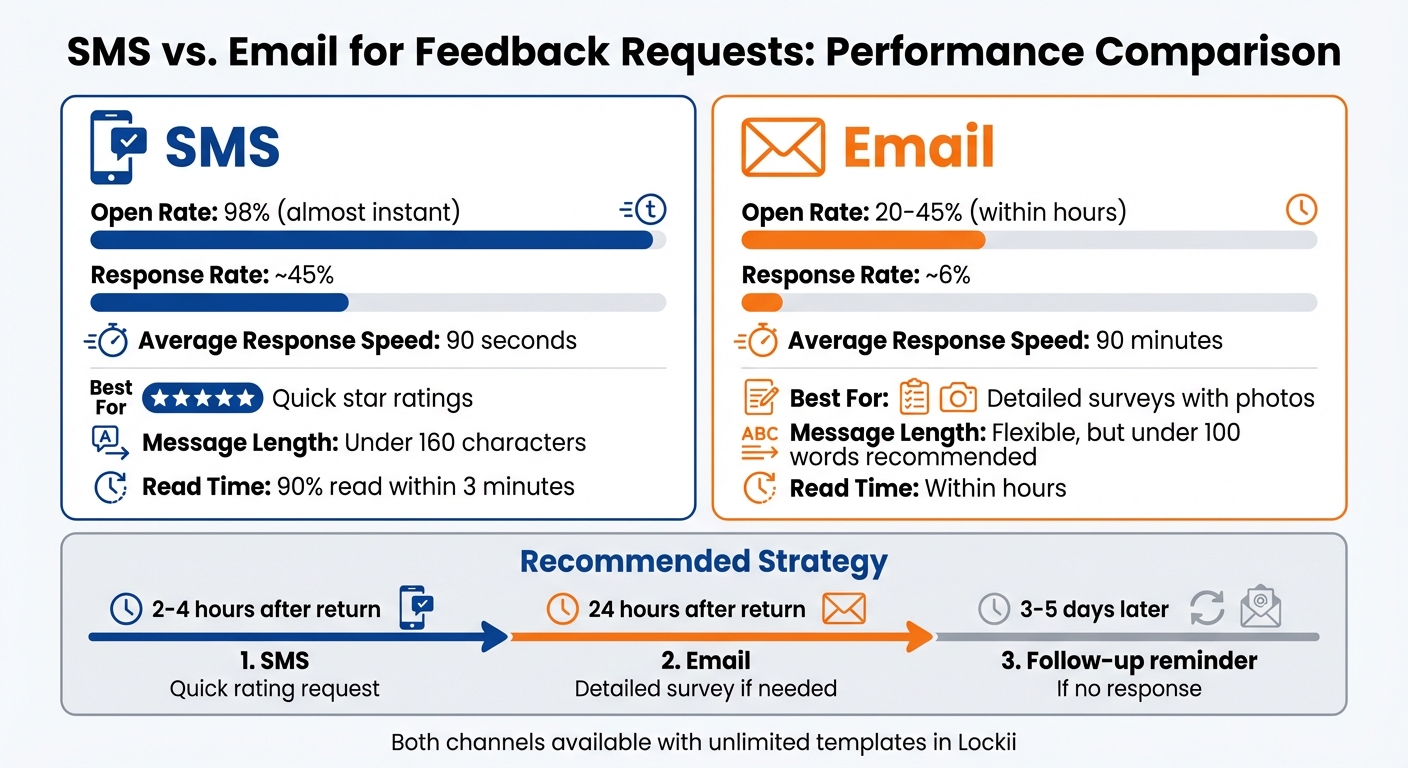
Both SMS and email have their advantages, and combining them can yield the best results:
| Aspect | SMS | |
|---|---|---|
| Open Rate | 98% (almost instant) [3] | 20–45% (within hours) [8] |
| Response Rate | ~45% [8] | ~6% [8] |
| Best For | Quick star ratings | Detailed surveys with photos |
| Message Length | Under 160 characters [4] | Flexible, but under 100 words [8] |
| Response Speed | 90 seconds average [8] | 90 minutes average [8] |
| Customization in Lockii | Unlimited templates | Unlimited with custom domains |
SMS shines when you need quick responses - 90% of texts are read within 3 minutes of being sent. [4] On the other hand, emails are better for gathering detailed feedback, including longer comments or photos.
For the best results, use both channels in a sequence. Start with an SMS 2–4 hours after the rental return for a quick rating. Follow up 24 hours later with an email survey if more detailed feedback is needed. Lockii’s automation tools and customizable templates make it easy to implement these strategies, ensuring every feedback request is timely and engaging.
Timing and Monitoring Feedback Requests
When to Send Feedback Requests
To get the best response rates, send your initial feedback requests within 24 hours of a customer's return. If you wait longer than 48 hours, the chances of a response drop significantly[1][4]. For SMS requests, send them immediately after checkout, and follow up with an email within 24 hours. If there’s no reply, schedule a single follow-up reminder 3–5 days later - this keeps things professional without overwhelming your customers.
Automated messaging tools can help streamline this process. Set them to send requests just before or after checkout, ensuring customers receive the message while their experience is still fresh[2]. Make sure your Lockii automation skips customers who’ve already provided feedback to avoid unnecessary reminders.
Once your requests are scheduled, use Lockii’s tracking tools to monitor their performance and make adjustments as needed.
Tracking Feedback in Lockii
With Lockii's Order Audit Log and Item Audit Log, you can track every feedback request and customer interaction tied to each rental. These logs give you a detailed view of when messages were sent, which templates were used, and whether customers engaged with them. This data helps ensure your automated triggers are working as intended and that every rental ends with a communication attempt.
The logs also let you spot trends, such as which templates are performing well or where engagement drops off. By regularly reviewing this information, you can fine-tune your follow-up strategy to make it more effective.
Improving Your Feedback Strategy
Use insights from the audit logs to tweak your feedback templates and timing within Lockii’s automated tools. For instance, if trailer rentals are generating fewer responses than tool hire or bike rentals, update your trailer feedback template to include specific questions about hitching ease or tire condition. This makes the request more relevant and engaging.
Also, pay attention to which communication channels work best. Quick, simple rentals might get better responses through SMS, while longer or more complex equipment hire could benefit from detailed email surveys. Test different send times and message formats to see what resonates most with your audience.
Keep in mind that 69% of customers are likely to leave a review if prompted[1]. By consistently monitoring and refining your strategy, you can boost both the quantity and quality of your feedback.
Conclusion
Automating feedback requests can transform how rental businesses engage with customers and manage daily operations. By setting up SMS and email triggers in Lockii, you can skip the hassle of manually chasing reviews while gathering timely insights - right after the rental experience. This not only saves time but also lays the groundwork for ongoing improvement, driven by real customer feedback.
This system doesn't just simplify review collection; it also cuts down on administrative tasks. With 95% of Lockii bookings requiring no human intervention[5], you can shift your focus to strategic decisions instead of routine paperwork.
Lockii offers more than just feedback automation. Its full suite of tools - including GPS tracking, hire-end photos, and AI support - helps rental businesses scale efficiently. On average, companies using Lockii operate across 10+ locations[5], demonstrating that automation enables growth without adding unnecessary overhead or extra staff.
Start using these templates and triggers, monitor your progress through audit logs, and fine-tune your approach based on customer feedback. Lockii's automated system is the key to running a more efficient, data-driven rental business.