
How to automate hire emails and sms
December 25, 2025 · 15 min read
How to automate hire emails and sms
Automating hire emails and SMS simplifies rental processes by sending pre-set messages triggered by specific events, like bookings or returns. This eliminates manual errors and ensures timely communication. Here's what you need to know:
- Key Messages to Automate: Booking confirmations, payment reminders, pre-pickup instructions, digital lock codes, mid-rental check-ins, return instructions, and post-rental follow-ups.
- When to Use Email vs SMS: SMS is ideal for urgent updates (e.g., lock codes) with a 98% open rate, while email works better for detailed information like agreements or manuals.
- Cost and Efficiency: Automated messages cost less than $0.01 each, save hours of manual work, and reduce errors like typos.
- Conditional Triggers: Automate access codes only after verifying ID, signatures, and payments to avoid issues.
- Tools like Lockii: Streamline communication by setting up templates, triggers, and integrations with platforms like Stripe or Zapier.
Automation ensures smooth, 24/7 operations for contactless rentals, boosting efficiency and customer satisfaction.
What Emails and SMS Should Be Sent During a Booking
The Main Communication Points in a Rental
Each stage of the rental process calls for specific and timely communication. Start with booking confirmations sent immediately after a reservation is made. These set the tone for the relationship and provide essential details. Next, send payment reminders to ensure deposits and final balances are handled smoothly. Before the rental begins, share securing contactless rentals with identity checks and digital signatures to meet legal requirements and avoid last-minute hassles.
A few days before the rental starts (typically 1–3 days), send pre-pickup instructions that include location information, directions, and any special requirements. When it’s time for pickup, digital lock codes or self-check-in links should arrive via SMS, giving renters immediate access. During the rental period, mid-hire check-ins can be used to address any concerns and even suggest optional upgrades, like additional equipment. As the rental wraps up, send return instructions - these should include cleaning guidelines and drop-off procedures, ideally sent the day before or the morning of the return date. Finally, follow up 1–2 days after the rental ends with post-rental messages. These can request reviews or offer discount codes to encourage future bookings.
Using the right communication channel at each step is key to ensuring a smooth and positive experience.
When to Use Email vs SMS
Choosing between email and SMS depends on the type of message and how quickly it needs to be seen. SMS is best for urgent updates like digital lock codes, last-minute changes, or time-sensitive reminders. Since most people check their phones an average of 63 times a day[3], SMS is a reliable way to grab attention quickly.
On the other hand, email is better suited for detailed information that renters may need to reference multiple times. This includes rental agreements, itemized invoices, house manuals, or pre-arrival instructions with maps and photos. If legal documents require digital signatures, they should always go through email to ensure a clear and documented record.
As Lauren Keen Aumond, a host from Tarpon Springs, explains: "I always let guests know a message is automated, in case we've had a conversation outside of the platform... so that the message doesn't seem out of left field."[5]
To stay compliant with regulations like CASL and TCPA[3], always include an opt-in checkbox for SMS notifications on booking forms. This ensures you respect privacy laws while keeping communication effective.
How To Automate Your Service-Based Business (Send Emails & SMS Reminders On Auto-Pilot)
Cost-Benefit Breakdown of Automating Emails and SMS
Labor Costs and Error Reduction
Handling tasks like copying lock codes or typing out instructions manually can eat up valuable time and lead to frequent mistakes. By automating these repetitive processes, you can cut down on 90% of routine messaging tasks [8]. This not only saves time but also allows your team to focus on more valuable activities, such as following up on leads or expanding your business.
The financial advantages are clear. Automation enables you to run a leaner operation with fewer support staff. Property Manager Michael Clark shared his experience, saying: _"I've now automated guest communications and 100% trust and depend on the calendar/bookings management, which saves me a significant amount of time and eliminates human error."_ [8]
Manual errors can be costly. A simple typo in a lock code or address can frustrate customers, result in refunds, or even cost you future business. Automated systems solve this by pulling data directly from booking records using variables, ensuring that details like guest names, arrival dates, and payment amounts are always accurate [5]. This level of precision not only protects your revenue but also helps maintain a professional reputation.
And it doesn’t stop there - automation doesn’t just save money; it also opens doors to new revenue streams.
Revenue Increases from Automation
Automation doesn’t just reduce costs; it actively drives revenue growth. For example, automated reminders for booking extensions and add-ons provide instant upsell opportunities without requiring any manual follow-up [1]. Similarly, post-stay messages sent a couple of days after checkout encourage guests to leave reviews, which can boost your rankings and attract more customers [3][6]. Another powerful feature is targeting abandoned bookings - automated reminders can nudge potential customers to complete their reservations [10][11].
The impact can be transformative. Take FLOHOM, a Maryland-based company managing five luxury houseboats. In October 2022, they implemented automated guest workflows and a direct booking engine. Under the leadership of Co-Founder and CEO Brian Meyer, their three-person team saw direct bookings jump to over 70% within a year, generating $135,000 in annual revenue - all while maintaining consistent 5-star reviews and without adding extra staff [7].
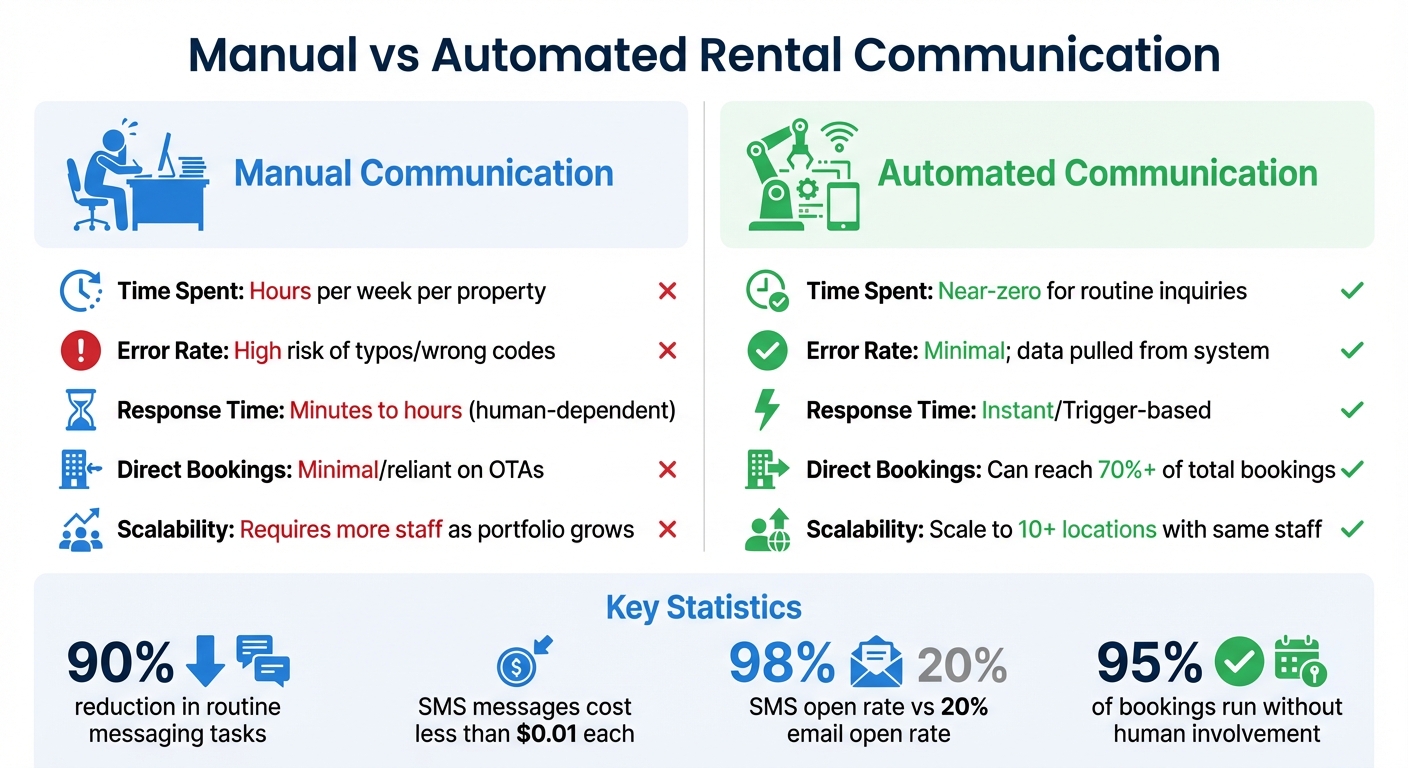
Here’s a comparison of manual versus automated communication to highlight the difference:
| Process | Manual Communication | Automated Communication |
|---|---|---|
| Time Spent | Hours per week per property [7] | Near-zero for routine inquiries [1] |
| Error Rate | High risk of typos/wrong codes [5] | Minimal; data pulled from system [5] |
| Response Time | Minutes to hours (human-dependent) | Instant/Trigger-based [5] |
| Direct Bookings | Often minimal/reliant on OTAs [7] | Can reach 70%+ of total bookings [7] |
| Scalability | Requires more staff as portfolio grows [9] | Scale to 10+ locations with the same staff [1] |
Differences Between Standard and Self-Hire Businesses
When you remove staff from the equation, the way you interact with customers changes dramatically. In a traditional rental setup, employees handle everything - checking in customers, verifying IDs, explaining safety procedures, and handing over keys face-to-face. In contrast, self-hire businesses rely entirely on automation to replace these in-person interactions.
And the stakes? They’re much higher. Picture this: a customer arrives at an unstaffed location at 10 PM, ready to pick up a trailer or bike. There’s no one to knock on a door or call for help if their access code is missing. In this scenario, your automated communication becomes the entire customer experience. That’s why having a strong, reliable automation strategy is critical to ensure immediate and secure communication by using a contactless rental process planner.
Why SMS Matters More for Contactless Rentals
Sure, email works fine for confirmations or receipts, but it falls short when customers need real-time access to their rentals. With unattended pickups, time is everything. That’s where SMS comes in - it’s the only channel that guarantees your customer sees important information instantly.
Think of SMS as your digital handshake for contactless rentals. It’s how you deliver lock codes, GPS coordinates to the exact pickup spot, and any last-minute instructions. This is especially crucial for businesses with multiple locations, where customers might arrive at an unfamiliar, unstaffed yard or parking lot. A missed email in this situation could lead to frustration, a lost rental, or a support call - defeating the whole purpose of automation.
And here’s the kicker: automated SMS messages cost less than $0.01 each [3]. That makes it one of the best investments you can make to enhance the customer experience.
Sending Safety and Liability Information
Without staff to walk customers through safety protocols or operational details, automated messages step in to fill the gap. These messages can deliver safety videos, instruction PDFs, and liability waivers directly to customers at just the right time. Plus, they create a traceable record that these materials were sent and acknowledged.
For example, Lockii automates the liability process by triggering return forms that capture photo evidence and GPS data [1]. This replaces the manual inspections typically done by staff and provides timestamped proof of the equipment’s condition upon return. So, if a customer damages something and disputes the charge, you have solid evidence - photos and GPS data - to back you up.
You can even use automated quizzes to ensure customers follow proper procedures. For instance, a short checklist can confirm they’ve removed personal items, locked the equipment, or returned keys to the lockbox. These automated steps not only protect your business but also keep the rental process fully self-service.
Setting Up Conditional Triggers
Conditional triggers take automation to the next level by ensuring that only verified customers receive access codes. One of the biggest risks in contactless rentals is sending access codes too early - or to the wrong person. Conditional triggers solve this by setting up a sequence of requirements that must be met before sensitive information is shared.
For example, you can configure your system to release a lock code only after the customer has completed identity verification, signed the rental agreement, and paid their invoice in full [1][4]. This is especially important for high-value rentals like vehicles or expensive equipment. If a customer books but doesn’t verify their ID, the system won’t release the access code - eliminating unauthorized pickups without any manual intervention. The same applies to security deposits: no deposit on file, no lock code.
For last-minute or same-day bookings, you can simplify communication by consolidating multiple updates - confirmation, payment receipt, and check-in instructions - into a single SMS [4]. This keeps things streamlined while still maintaining all the necessary security checkpoints. The goal is to anticipate every possible issue and create automated rules to handle them, ensuring your system operates as seamlessly as a well-trained employee would.
sbb-itb-eb44693
How to Automate Emails and SMS Using Lockii
Lockii streamlines communication with a straightforward three-step process. It fits seamlessly into a five-step rental workflow - covering everything from booking and stock assignment to automated messaging, GPS/photo returns, and identity verification [1]. Once set up, 95% of customer bookings run without human involvement by scaling with contactless models [1], freeing you to focus on growing your business. Here’s how to set it up.
Step 1: Configure Your Items and Locations
Start by organizing your inventory and locations, which form the backbone of your automated communication system. Input all your rental items and their respective locations. Lockii supports unlimited locations and ensures smooth stock assignment. Don’t forget to set the correct timezone in your Store Settings to ensure notifications go out at the right time [1][2].
This step is especially important for businesses with locations in different states. For instance, if you operate in both New York and California, Lockii automatically adjusts pickup instructions and notification times based on each location’s timezone. This ensures customers receive reminders that match their local time.
Step 2: Create Email and SMS Templates
Once your inventory and locations are ready, it’s time to craft the messages your customers will receive. Lockii allows you to create unlimited email and SMS templates in the Notification Settings [2]. Each template needs a name (for internal use), a category (like "Return Reminder" or "After-Rental Message"), and a delivery method - email, SMS, or both.
To personalize these messages, use Template Tokens such as {{customerFirstName}} and {{lockCode}}. These placeholders automatically fill in customer-specific details. For example, instead of a generic message like "Your rental is ready", a customer will see: "Hi Sarah, your trailer pickup is confirmed for 12/26/2025 at 2:00 PM. Your lock code is 4829."
Keep SMS templates concise - under 200 characters - since they’re designed for quick, time-sensitive updates like access codes or GPS directions. Longer information, such as safety guidelines or rental terms, is better suited for email. It’s worth noting that SMS messages have a 98% open rate, compared to just 20% for emails [3].
Step 3: Set Up Triggers and Test Your Automation
With your templates in place, the next step is deciding when to send them. Lockii uses a "Days offset" system to schedule messages based on the rental start or end date [2]. For example:
- A -1 offset sends the message one day before the rental begins.
- A 0 offset schedules it for the day of pickup or return.
- A +7 offset sends a follow-up a week after the rental ends.
For same-day bookings - like a trailer reserved just hours before pickup - use the "Between booking and check-in" setting with a 0 offset [4]. This combines confirmation and pickup instructions into a single message, preventing customers from being bombarded with multiple notifications.
Before going live, test your triggers with a sample booking. Use the "Mail & Action" tab to review the message logs and ensure everything is scheduled correctly [2].
Lockii also integrates with tools like Stripe and Zapier to expand your automation capabilities [1]. For example, you can use Zapier to connect Stripe’s "New Payment" event to an SMS notification, instantly informing customers when their payment is processed [13][14]. You can even set up a Zap to notify your team on Slack if a payment fails, allowing for quick follow-up [13]. With access to over 8,000 apps via Zapier [12], you can create advanced workflows - like updating your CRM, logging details in Google Sheets, or alerting your team when high-value rentals are booked.
Tracking and Improving Your Automated Communication
Once your automated emails and SMS are live, it’s crucial to monitor their performance to ensure everything runs smoothly. Lockii’s "Mail & Action" tab provides a detailed log of every message sent. This includes timestamps, delivery confirmations, and any errors that occur[4]. These logs are invaluable for catching issues early - like a customer not receiving their lock code or an email bouncing due to an invalid address. This real-time tracking complements your automation setup by making error detection and performance adjustments faster and easier.
Measuring Performance
Keep an eye on metrics like open rates (e.g., SMS at 98% vs. email at 20%), click-through rates (SMS at 19% vs. email at 4%), delivery rates, and time-to-first-response. These numbers can quickly highlight technical issues that might lead to customer drop-offs or an uptick in support calls[3][16][17][18]. If delivery rates drop, check your system logs for error messages that could point to the problem. Accurate performance data not only helps troubleshoot technical issues but also supports compliance efforts and improves customer satisfaction.
Staying Compliant and Keeping Customers Happy
In the U.S., automated messages require explicit consent[3][15]. Always include a clear opt-out option, like “Reply STOP to unsubscribe,” to meet compliance standards and maintain trust with your customers[15][17]. Lockii helps you stay on track by keeping detailed communication logs that can verify both consent and delivery[1][4]. To avoid complaints, don’t send SMS messages before 7:30 AM in your customer’s local time zone[19]. Keep in mind that 90% of people prefer texting over phone calls or emails when interactions are handled respectfully[18].
Regular Reviews and Updates
Use your performance metrics and compliance data to regularly update your templates and automation triggers. Set a quarterly reminder to review your email and SMS templates, ensuring they align with current customer behavior and seasonal trends[17]. Look at your logs to pinpoint drop-off points where engagement decreases, and tweak your timing or content to address these gaps. Testing different send times can also improve open rates - mid-morning messages often perform better than those sent later in the day[15]. Keep templates fresh by updating links, verifying personalization tokens, and ensuring contact information is accurate[5]. These small adjustments can make a big difference in maintaining a seamless communication flow.
Conclusion
Automating your hire emails and SMS isn't just about saving time - it’s about creating an automated rental business that can grow without limits. When 95% of customer bookings happen without any human involvement, you’re free to focus on scaling your operations and reaching new heights[1]. For contactless self-hire businesses, automation handles everything: verifying identities, delivering digital lock codes, and even managing return forms with photos and GPS tracking alerts[1].
The stats are hard to ignore: SMS messages boast a whopping 98% open rate, compared to just 20% for emails, ensuring customers never miss crucial pickup instructions or access codes[3]. Plus, at less than $0.01 per message, automated SMS is an incredibly cost-efficient way to cut down on no-shows, late returns, and support tickets[3]. Businesses using Lockii are managing an average of 10+ locations, all thanks to automation that eliminates the need for large storefronts or on-site staff at every location[1]. These numbers reflect a system that’s not only cost-effective but also fine-tuned for operational efficiency.
Lockii takes care of stock assignment, generates unique lock codes, and sends timely messages for booking confirmations, safety reminders, and return forms. Customers enjoy instant, 24/7 access to their rentals, while you gain detailed transaction logs for every step of the process[1]. This streamlined approach doesn’t just enhance the customer experience - it enables rapid growth without the burden of increasing labor costs.