
How Automated Notifications Reduce No-Shows
April 16, 2026 · 11 min read
How Automated Notifications Reduce No-Shows
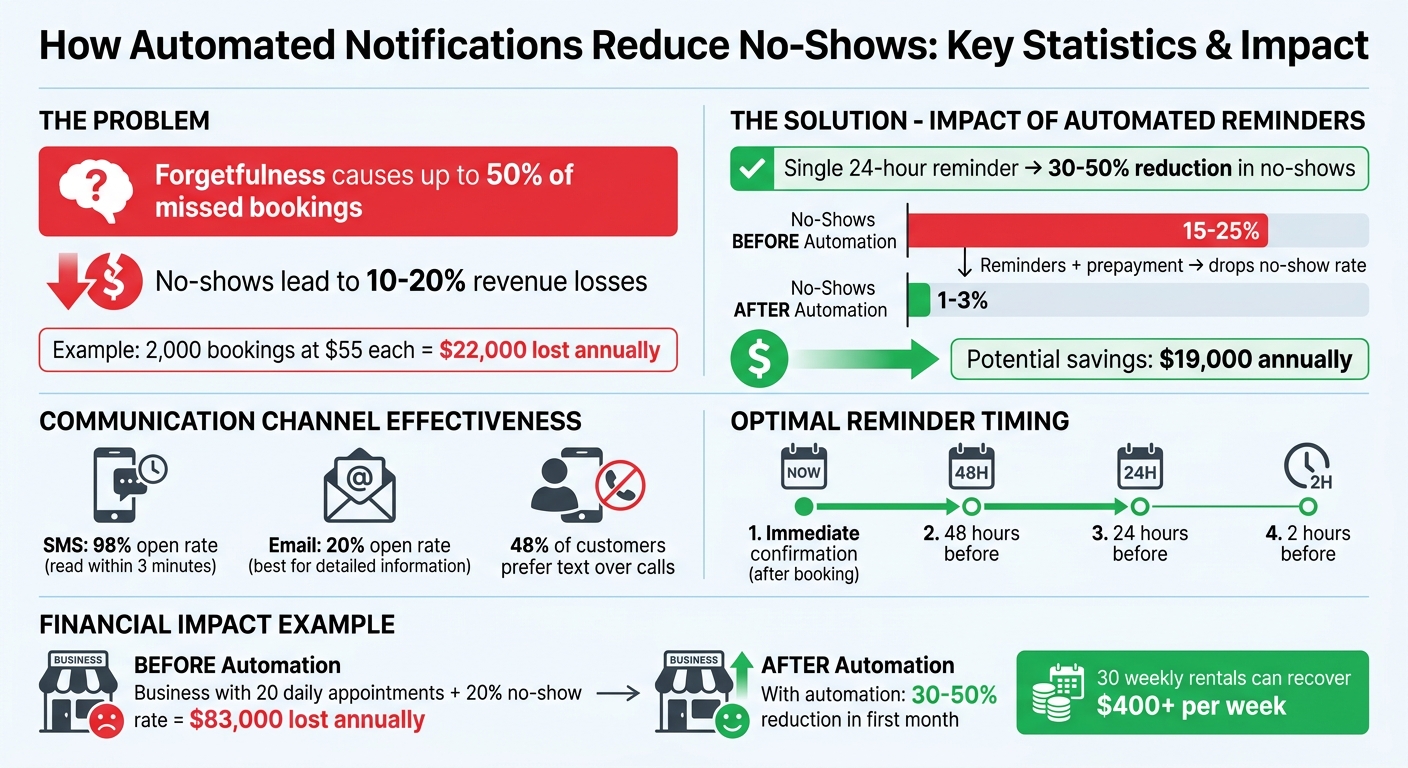
No-shows cost rental businesses thousands annually. Forgetfulness is the main culprit, causing up to 50% of missed bookings. Automated notifications - like SMS and email reminders - solve this by keeping customers informed and engaged.
Key takeaways:
- No-shows can lead to 10-20% revenue losses. For a business with 2,000 bookings at $55 each, this could mean losing $22,000 annually.
- A single reminder, sent 24 hours before a booking, can cut no-shows by 30-50%.
- Combining reminders with prepayment can drop no-show rates from 15-25% to just 1-3%, potentially saving $19,000 annually.
- SMS is highly effective, with a 98% open rate, while email works well for detailed information.
Best practices:
- Send reminders at multiple intervals: immediately after booking, 48 hours, 24 hours, and 2 hours before the appointment.
- Use SMS for urgent updates and email for detailed instructions.
- Personalize messages with booking details, action links, and a tone that suits your brand.
Platforms like Lockii streamline this process with features like automated reminders, access codes, and self-service extensions, helping businesses reduce no-shows, save time, and recover lost revenue.
How to Reduce No-Shows with WooCommerce Booking Reminder Emails
sbb-itb-eb44693
How Automated Notifications Work
Automated notifications are triggered by specific events to send messages seamlessly. These triggers fall into three main categories:
- Time-based triggers: Scheduled for a particular time, like 24 hours before a pickup.
- Event-based triggers: Activated by actions, such as a customer completing a booking.
- State-based triggers: Linked to changes in status, like an overdue payment[6].
Once a trigger is activated, the system automatically sends out notifications through various channels - SMS, email, push notifications, or integrations like Slack[5]. This system forms the backbone of the reminder strategy previously mentioned. For a step-by-step guide on implementation, refer to our rental business automation checklist.
Types of Automated Notifications
After a trigger is set off, notifications are sent using different communication methods, each suited to specific purposes.
- SMS: Perfect for urgent reminders. With a 98% open rate compared to email's 20%[2], texts are usually read within three minutes[3]. This makes them ideal for last-minute or same-day reminders that require immediate attention.
- Email: Best for detailed information, such as booking confirmations that include attachments or links[8][4]. Emails also provide a reliable record for customers.
- Voice calls: Though less common, they work well for high-value bookings or for customers who prefer phone communication. Notably, about 48% of customers still prefer text messages over calls[3].
When to Send Notifications
Timing plays a crucial role in reducing no-shows. A well-planned sequence ensures bookings stay on the customer’s radar. Consider this approach:
- Send a confirmation immediately after the booking is made.
- Follow up with reminders at 48 hours and 24 hours before the scheduled time.
- Add a final notice about 2 hours before the event.
The 48-hour reminder is especially helpful for rescheduling, allowing time to fill any cancellations[2]. For bookings made well in advance, a 7-day reminder can serve as a gentle nudge[2].
Customizing Your Messages
Personalized messages create a stronger connection with customers and help reduce no-shows. Include key details like the item booked, the time, and the location (with a map link). Add any specific instructions, such as “Please bring your driver’s license”[8][1].
Keep your brand’s tone consistent. For example, a surf rental shop might use casual, fun language: _"Hey Sarah, your board is waxed and ready!"_ Meanwhile, a formal tone might suit an equipment rental company better.
Don’t forget to include action links like “Confirm,” “Reschedule,” or “Cancel.” Offering multi-language support can also make your messages more inclusive and effective for a broader audience.
Benefits of Automated Notifications for Rental Businesses
Automated notifications go beyond just functionality - they offer clearer communication, reduce manual tasks, and help boost revenue.
Better Customer Communication
Automated notifications show customers they matter. Instead of relying on memory, renters get timely updates that keep their bookings front and center. These messages include all the important details and simple instructions, making the process smoother.
"Proactive communication fosters trust and satisfaction, as clients feel valued and well-cared for." - Cal.com [8]
Modern systems also allow two-way interaction, so customers can confirm, reschedule, or cancel by replying "YES" or clicking a link. This removes unnecessary hassle, making it easier to manage bookings. Plus, automation can go beyond reminders - sending thank-you messages or holiday greetings adds a personal touch that builds long-term loyalty.
While improving the customer experience, automation also takes a big load off your team.
Less Manual Work
Automation frees up hours of staff time spent on follow-up calls and texts. For example, in December 2024, one rental business switched to automated SMS reminders sent 48 and 24 hours before appointments, complete with direct rescheduling links. The result? A 50% drop in no-shows and staff who could focus on customer service instead of constant phone calls [10].
"Staff no longer follow up manually or worry about missed appointments disrupting schedules. Automated reminders save time and resources, allowing team members to concentrate on essential tasks." - an industry expert [9]
With less manual work, your team can focus on what really matters - while automation delivers measurable financial benefits.
Higher Revenue from Fewer No-Shows
The financial impact of reducing no-shows is massive. A business with 20 daily appointments and a 20% no-show rate could lose over $83,000 annually [2]. Automated reminders can cut no-shows by 30% to 50% in the first month alone [7][2], recovering revenue that might otherwise be lost.
When customers get a 48-hour reminder, they have time to reschedule if something comes up. A rescheduled booking still brings in revenue, while a no-show brings in nothing. With SMS reminders boasting a 98% open rate [2], customers are almost guaranteed to see these alerts. And with one-tap reschedule links, adjusting plans becomes easier than simply skipping the appointment altogether.
Setting Up Automated Notifications with Lockii
Lockii's Notification Features
Lockii's automated notification system ensures customers stay informed throughout the entire rental process, making bookings more reliable and hassle-free. With a centralized platform, it handles emails, SMS, and push notifications seamlessly - whether it's sending booking confirmations, providing pickup codes, or issuing return reminders.
One standout feature is Express Checkout, which enables customers to book, verify their identity, and begin their rental with minimal delay. The automated identity verification process reduces the chances of no-shows and keeps things moving smoothly.
Lockii also integrates with digital locks and GPS tracking to enhance the experience. Customers receive access codes precisely when they need them, while operators are instantly alerted to issues like late returns. The Automatic Extensions feature is another highlight, letting customers extend bookings and pay online without needing direct assistance. This gives renters the flexibility to adjust their plans on their own.
Ready to dive in? Let’s explore how to set up these features in Lockii.
How to Set Up Notifications in Lockii
Getting started with Lockii’s notification system is straightforward. The platform offers customizable templates, allowing you to tailor messages to fit your brand’s tone and style. Through the backend interface, you can configure when notifications are triggered, such as at the time of booking or as a rental period nears its end.
To maximize communication, combine SMS for time-sensitive updates with email for detailed information. Lockii also allows you to link GPS trackers to receive automated alerts for returns or location-related issues. Don’t forget to enable the self-service extension feature, which empowers customers to independently manage schedule changes.
Lockii caters to businesses of all sizes, from those managing six units to operations with 600 trailers across 200 locations. Best of all, its pricing is simple: $12 per month per locked item includes unlimited automated emails, lock codes, and GPS tracking.
Results from Using Lockii
Businesses using Lockii report smoother operations and lower labor costs. The platform boasts a 5.0-star rating, reflecting positive feedback from both operators and customers. This efficiency helps reduce no-shows and ensures booking reliability.
Lockii has been a game-changer for our business. It's allowed us to operate fully automated, 24/7 trailer rentals and scale that side of our operation with confidence.
Lockii has made our business efficient in managing our bookings; saving us a lot of time to focus on the growth of the business.
Hayden Given, owner of 208 Trailer Rental, shared how Lockii improved customer conversions:
We've even had customers switch over from competitors specifically because their system was too complicated. This CRM has made a noticeable difference in both customer experience and conversions.
Best Practices for Automated Notifications
Using Multiple Reminders
Layered reminders are key to keeping bookings top of mind. Studies show that automated reminder systems can cut no-show rates by 30% to 50% when used strategically. A solid sequence includes: an immediate confirmation, a primary reminder 24–48 hours before pickup, and a final nudge 1–2 hours before the rental begins [11].
The 24–48 hour reminder is pivotal - it gives customers the opportunity to reschedule if necessary. For rentals booked well in advance, consider adding a mid-point reminder (about 3–7 days before pickup) to ensure the date doesn’t slip their minds. Since forgetfulness accounts for nearly half of all no-shows, this multi-touch approach helps keep your rental top of mind [2].
You can also customize the reminder frequency based on customer behavior. For example, first-time renters or those with a history of no-shows might benefit from a three-step sequence (48 hours, 24 hours, and 2 hours before pickup). On the other hand, loyal customers may only need a single reminder on the day of their rental.
Once your reminder strategy is in place, the next step is to ensure your messages reach customers through the right channels.
Using Multiple Communication Channels
SMS notifications outperform email in terms of open rates, but both have their strengths. The trick is using them together effectively. Email is ideal for detailed information like rental agreements, pickup instructions, and parking details. SMS, however, is better suited for quick, time-sensitive updates.
Give customers the option to choose their preferred contact method when they book. For example, if someone doesn’t respond to an email confirmation, follow up with an SMS to capture their attention. This cross-channel approach ensures your messages aren’t buried in crowded inboxes.
To make things even easier for your customers, include a link to the pickup location in your final SMS reminder. For emails, consider attaching calendar files so customers can add the rental period to their digital calendars with a single click.
By combining channels thoughtfully, you increase the likelihood that your reminders will be seen and acted upon.
Tracking and Improving Notification Performance
Regularly tracking your notification performance is essential to fine-tuning your strategy. Start with the no-show rate as your primary metric, but also monitor the confirmation rate, which measures how many customers actively confirm their rentals. If less than 50% of customers are confirming, it might mean your call-to-action isn’t clear enough or your messages aren’t getting through.
Another useful metric is the reschedule rate. A higher reschedule rate is actually a good sign - it shows customers are engaging with your notifications and adjusting their plans rather than skipping their bookings altogether. Keep an eye on unsubscribe or complaint rates too, aiming to keep them below 2% [11].
To understand the financial impact, calculate lost revenue by multiplying your no-show rate by your average rental value. For instance, if your business handles 30 rentals a week and has a 20–30% no-show rate, you could be losing $25,000 to $37,000 annually [7]. Use this data to identify patterns, like specific rental types or times with higher no-show rates, and adjust your reminder strategies accordingly.
Conclusion
Automated notifications are a powerful tool to protect your rental revenue by significantly reducing no-shows. With 40–50% of no-shows happening simply because customers forget [2], timely reminders can turn missed opportunities into confirmed bookings. Pairing these reminders with prepayment requirements can drop no-show rates to as little as 1–3% [1].
By automating reminders, you eliminate the need for manual calls, freeing up your team to focus on more important tasks. The system takes care of confirmations, rescheduling, and waitlist notifications. For example, with 30 weekly rentals, this could recover over $400 in revenue that might otherwise be lost [7].
Taking this a step further, a multi-touch strategy - combining SMS and email reminders with features like one-tap rescheduling or cancellation - keeps bookings front and center, reducing the chances of no-shows. By monitoring metrics like confirmation, reschedule, and no-show rates, you can fine-tune your strategy for even better outcomes.
For rental businesses that rely on contactless pickup or operate across multiple locations, Lockii’s automated notification system offers seamless integration with its digital lock access, booking management, and customer portal features. This means your reminders can include everything from pickup codes to location details and preparation instructions, all sent automatically. This level of detail ensures customers are well-prepared and helps keep no-show rates to a minimum.