
Trailer Return Photos Cut Damage Disputes
July 1, 2026 · 8 min read
Trailer Return Photos Cut Damage Disputes
If you want fewer damage arguments, take return photos every time. In my view, the fix is simple: use the same photo list at pickup and return, tie each image to the booking, and keep the record long enough to answer chargebacks.
Here’s the short version:
- Photos at return help show what changed
- One or two random shots are not enough
- After-hours returns need photo proof even more , especially when comparing staffed vs contactless trailer rental models.
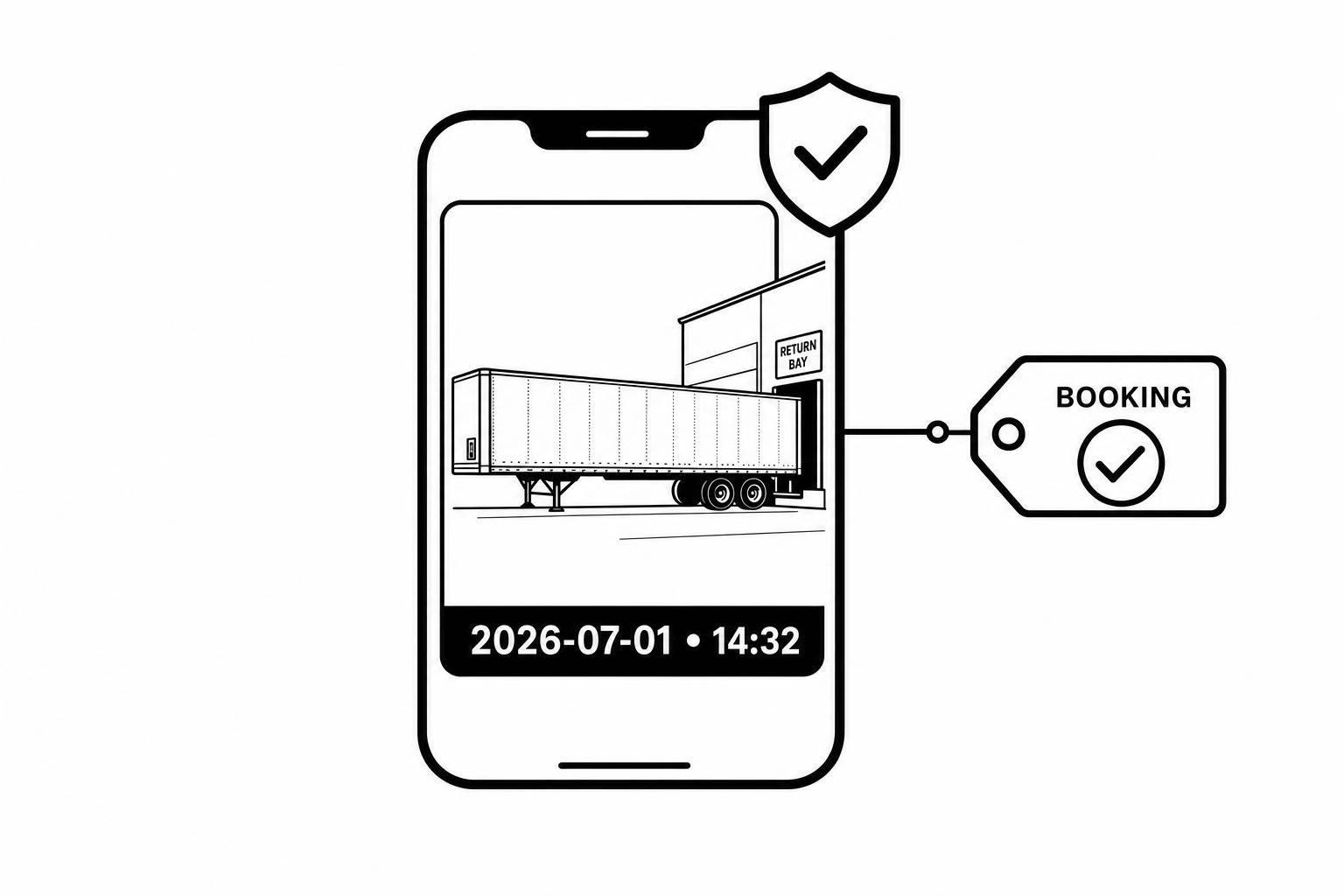
- Booking-linked timestamps help with disputes
- A standard [12-point photo routine](https://www.lockii.app/post/trailer-rental-safety-checklist-generator) keeps things clear
- Chargeback response windows can be as short as 7 to 30 days
- Keeping records for at least 60 days gives you more room to respond
If I were running a trailer rental yard, I’d focus on three things first:
- Require return photos before unhitching
- Match return photos to pickup photos
- Store everything under the booking ID with date and time
The biggest problem in damage claims is usually not the scratch or dent itself. It’s the lack of proof. A signed agreement may support a charge, but it does not show the trailer’s condition at drop-off. That’s where photos help most.
A few damage points come up again and again:
- Dents and scrapes
- Coupler and jack damage
- Cracked or broken lights
- Ramp or gate damage
- Floor or deck wear
- Interior mess or damage on enclosed trailers
Here’s a quick view of what matters most:
| Return issue | What helps settle it | | --- | --- | | Exterior damage | Wide shots from all sides | | Hitch area damage | Coupler and jack close-ups | | Light damage | Close-up photos, with lights on | | Ramp or gate issues | Rear and hinge photos | | Deck wear | Clear floor shots | | After-hours disputes | Timestamped images tied to the booking |
_I’d sum it up like this:_ better return photos mean fewer arguments, faster claim review, and less guesswork. The rest of the article explains how to make that process simple and repeatable.
Where Trailer Damage Disputes Usually Start
Most trailer damage disputes come back to the same trouble spots. These are the return points your photos need to show every single time.
| Common dispute trigger | Why it's hard to resolve without photos | | --- | --- | | Dents and scrapes | Easy to claim as pre-existing | | Coupler or jack damage | Safety-critical and often missed at pickup | | Broken or cracked lights | Cracked tail lights are a common disagreement point | | Ramp damage | Bent gates or broken hinges affect use and liability | | Floor/deck wear | Soft spots, holes, or exposed fasteners can be pinned on prior use | | Interior cleanliness | Hidden from exterior view on enclosed trailers |
Why Missing Proof Leaves Claims Unresolved
The pattern is usually simple. The renter says the damage was already there. The operator believes it happened during the rental. And neither side has hard visual proof. At that point, the claim becomes a credibility fight.
A signed contract may allow a damage charge, but it does not prove the trailer's condition at return [5]. That gap matters. Without timestamped photos, the same-condition requirement is still up for debate. If an operator can't show a clear before-and-after visual record, card networks and insurers may side with the customer when the evidence is thin [2][3].
"Damage that doesn't appear in the pickup photos wasn't pre-existing - the photos are the record, not the conversation at return." - Pablo Fernandez, Big Rentals [3]
That’s why one quick snapshot isn’t enough. You need a full return photo set.
Why Contactless and After-Hours Returns Raise the Risk
Unmanned return yards remove the main safeguard staffed operations depend on: a person present at handoff. Once that witness is gone, a gap opens between drop-off and the operator’s next inspection. That’s where disputes tend to start.
A renter can say the damage happened after they left. Without a timestamped photo tied to the return event, the operator has little to push back with. GPS logs can help show when a trailer reached a location, but they don’t show its condition at that exact moment. For contactless and after-hours returns, photos and GPS/audit trails matter even more because they help show who returned the trailer, when it was dropped off, and what condition it was in at that time [1].
That’s why return photos need a standard, repeatable capture process.
sbb-itb-eb44693
How Return Photos Cut Down on Disputes
Once staff step away after handoff, the return process needs to build proof on its own. That means matching return photos to the pickup photo set and attaching both to the booking record. When you have a full return set, operators can compare condition side by side, spot new damage, and deal with claims fast. Without matched before-and-after photos, even a valid damage claim can be tough to prove.
What a Complete Trailer Photo Set Should Cover
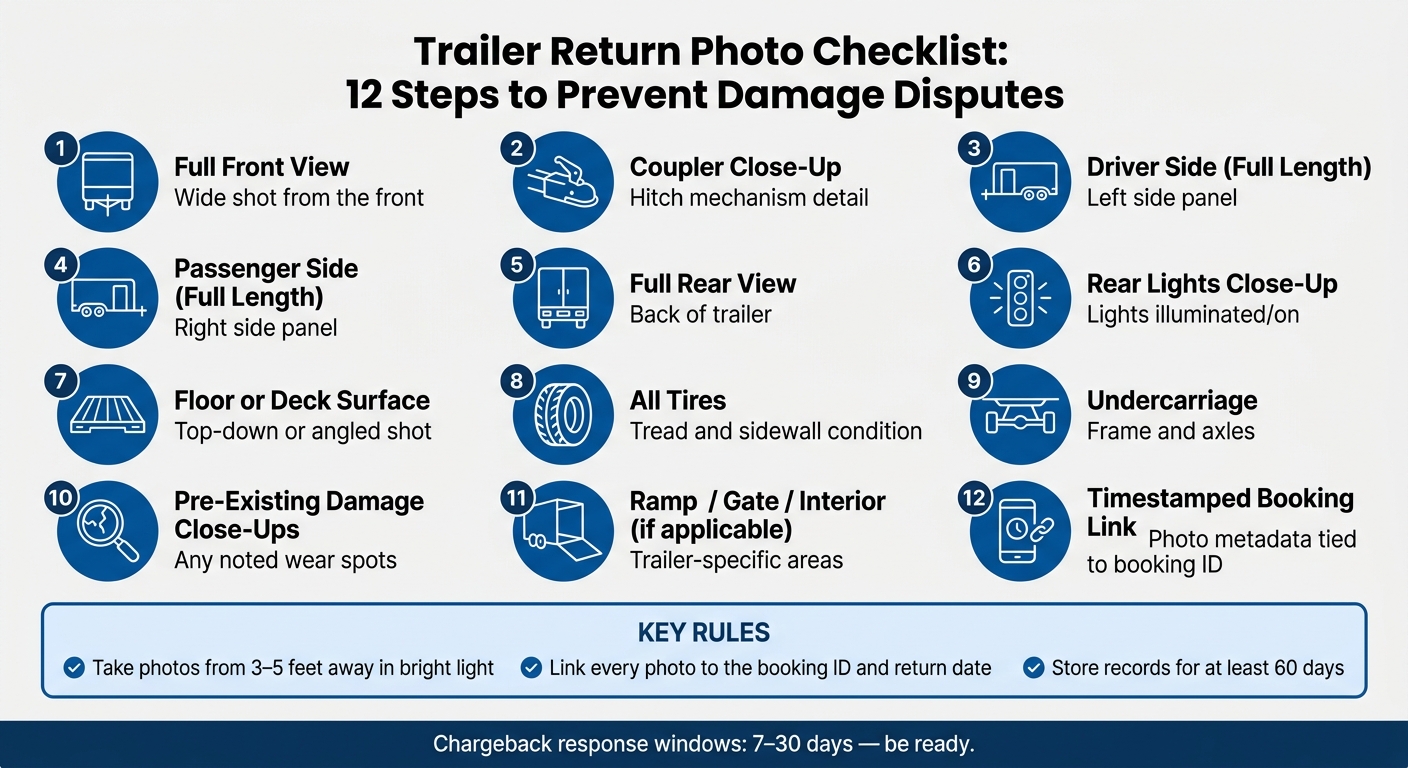
Use the same 12-area checklist every single time. Consistency matters here. A complete set should include:
- Full front view
- Coupler close-up
- Full-length driver side
- Full-length passenger side
- Full rear view
- Rear lights close-up, illuminated
- Floor or deck surface
- All tires, including tread and sidewall
- Undercarriage, including frame and axles
- Close-ups of any pre-existing damage
Add trailer-specific shots when needed, especially for ramps, gates, interior surfaces, roofs, and hydraulic parts if those parts tend to wear down or fail.
In the captions, use feet and inches, and call out wear points like stake pockets and E-track anchors. Take photos from 3 to 5 feet away in bright light so scratches, cracks, and wear show up clearly [3][2].
Why Timestamps, Booking Links, and Audit Trails Strengthen Your Records
Photos help most when they're easy to tie to one exact return. A photo sitting in someone's phone gallery isn't strong proof. Photo metadata records the exact date and time, which helps clear up doubt about when the inspection took place [3][2].
Linking each image to a booking ID and renter record creates an audit trail that insurers can review and that can support chargeback disputes. Card networks often give operators just 7 to 30 days to answer a chargeback with evidence, so tidy records make a big difference [4].
Store every return photo with the booking ID and return date, keep the file inside your automated rental software, and hold the record for at least 60 days [3].
Build a Self-Service Return Workflow Around Photos
Once you know _what_ to photograph, the next step is simple: make sure every renter takes those photos the same way.
A self-service return workflow lets the process run without staff on site. Send return instructions by SMS or email, guide the renter to the drop-off spot, and require guided photo capture before unhitching. Use GPS to confirm the trailer reached the correct location. [1][3] That step-by-step flow matters most when no one is there to catch missed shots.
Use Guided Photo Capture to Standardize Every Return
Guided prompts walk every renter through the same required photo angles, including the coupler and undercarriage. [3] In practice, that means the same 12-area checklist mentioned earlier gets baked right into the return flow.
"A checklist without photos is a verbal agreement... The checklist states what the operator observed. The photos prove it." - Ryan Keen, HQRent [2]
When each return follows the same photo sequence, pickup and return images are much easier to compare.
Use Timestamped Photos to Handle Damage Faster
If a trailer comes back late, staff can review pickup and return photos side by side, check whether damage is new, and move the issue along faster without an on-site inspection. Sending that photo evidence straight to the renter can also settle the dispute faster. Keep all damage notes inside platform messaging so the full record stays in one place.
"The listers who win damage disputes aren't the ones with the best memory of what the trailer looked like - they're the ones with timestamped photos and a platform message thread that shows exactly what it looked like before and after." - Pablo Fernandez, Big Rentals [3]
How Lockii Supports Photo-Based Trailer Returns
A platform can automate the whole flow, from return instructions to record storage. Lockii supports contactless trailer returns with guided return photos, SMS and email instructions, GPS tracking, and audit logs. Renters finish the return on their phones, while operators keep a timestamped record for later review.
For operators running more than one site, Lockii's IglooHome integration supports digital lock access across locations, which helps make 24/7 returns possible without staff on site. [1]
Conclusion: Better Return Records Mean Fewer Damage Disputes
Most trailer damage disputes don’t start with bad intent. They start with missing proof.
When there’s no clear record of a trailer’s condition at return, even a simple claim can turn into a _he said, she said_ mess - especially for rentals with no staff required at drop-off.
Return photos fix that. They show the trailer’s condition at the exact handoff. And when you have timestamped pickup and return photos, banks and insurers get a clear before-and-after record. [2]
That paper trail doesn’t just help settle arguments. It also helps move things along. For U.S. operators, that means fewer disputes, faster claims, and quicker repairs - especially for after-hours and self-service returns. [1][3] Guided self-service workflows make it much easier to do this at scale.
The bottom line: better return records protect revenue and make customer conversations easier. When renters can see the return photos, disputes often end before they turn into a bigger problem.