
IoT Asset Tracking for Rental Businesses
June 28, 2026 · 10 min read
IoT Asset Tracking for Rental Businesses
If you run a rental fleet, IoT tracking can help you cut loss, find idle units, and tighten billing. In plain terms, it shows where each asset is, when it left and returned, how much it was used, and when service is due.
Here’s the short version:
- Theft recovery can move from 7%–21% to 85%–97% with GPS-based tracking.
- Usage-based service can cut unplanned downtime by up to 50%.
- Fleet use is often lower than teams think, sometimes 40%–50% instead of 65%.
- GPS, RFID, QR codes, and barcodes each fit a different asset type.
- The best rollout usually starts with 10–20 high-risk assets, not the whole fleet.
- Good setup means tying tracking to pickup, return, damage logs, geofences, and service rules.
- The numbers to watch are utilization, shrinkage, audit time, late returns, downtime, and invoice disputes.
I’d sum it up like this: IoT tracking is not just about dots on a map. It helps you build a clean, time-stamped record for each rental, cut yard-check time, and make better calls on service, billing, and fleet mix.
A simple way to think about the tools:
| Tool | Best for | Main job | | --- | --- | --- | | GPS | Trailers, vehicles, generators, excavators | Off-site location and movement | | RFID | Tools, attachments, yard stock | Fast yard counts | | QR codes | Mid- to low-cost rental items | Phone-based check-in/check-out | | Barcodes | Small parts, indoor items | Low-cost scan tracking |
If I were setting this up, I’d start with high-value mobile assets, build asset records around rental events, turn on geofence and return alerts early, and track results week by week.
How to Optimize Your Rental Equipment Management with Asset Tracking?
sbb-itb-eb44693
What IoT Asset Tracking Does in a Rental Workflow
IoT tracking shows where an asset is, what it’s doing, and what happens next. In a rental business, that means pickups, returns, and maintenance can turn into automated events instead of manual check-ins.
Rather than asking staff to log each step by hand, sensors and tags collect data in real time and send it to one dashboard. That matters most when the tracking setup matches the rental lifecycle: booking, pickup, use, return, and service.
When a customer drives off with a trailer, the system logs the departure time, changes the asset status to "on rent," and starts tracking usage on its own [1][5]. When that trailer comes back and crosses the yard geofence, the status switches to ready for the next rental or flags the unit for inspection after a damage alert [1][5]. The result is a live chain of custody with no staff intervention.
Beyond Location: Tracking Usage and Condition Too
Location is only the first layer. The bigger day-to-day gain comes from tracking status - whether an asset is earning money, sitting idle in the yard, or in maintenance.
A healthy rental fleet usually aims for about 72% of assets rented, 20% ready for the next rental, and 8% in maintenance or transit [5]. IoT helps close that gap by sorting assets automatically based on movement and usage data.
Condition monitoring adds one more layer. Impact and tilt sensors can log damage events the moment they happen, complete with a timestamp [1]. That gives operators proof when a customer says equipment wasn’t returned damaged [1].
Usage data, such as engine hours and ignition cycles, also helps teams handle maintenance with better timing. Instead of servicing equipment on a fixed 90-day schedule, you service it at actual usage thresholds, like every 250 engine hours [1][5]. That switch can cut unplanned downtime by up to 50% [5].
How Tracking Supports Contactless and Self-Service Rentals
A 24/7 rental operation without staff on-site only works if you can see what’s happening from a distance. That’s where IoT tracking comes in.
When a customer picks up equipment at an unstaffed location, the system logs the departure time, sends automated messages, and starts monitoring the asset’s position without anyone standing there. Geofences around the yard send instant alerts if something moves outside approved hours or leaves set boundaries [1][5].
If a customer wants to extend the rental, they can do it through a self-service portal, and the system updates the expected return window automatically. Lockii supports this setup with GPS tracking, digital locks, automated SMS and email workflows, and customer self-service tools for multi-location operations.
Removing manual handoffs doesn’t just save staff hours. It also creates a cleaner audit trail: timestamped pickup and return logs, plus usage logs, that help protect the business when disputes come up and make each customer handoff smoother.
Once the workflow is automated, the next step is choosing which assets to track first and which tags fit each one.
Which Assets to Track First and Which Technology Fits Each One
Not every asset needs a GPS tracker on day one. A better place to start is with the assets that create the most financial risk, then move down the list.
Start With the Assets That Create the Biggest Risk or Delay
Prioritize assets based on replacement cost, downtime risk, theft exposure, and how often they’re rented out. Focus first on assets that move through pickup, handoff, and return again and again.
Losses tend to hit hardest with high-value mobile assets. In most fleets, that means trailers, vehicles, generators, excavators, aerial work platforms, and other powered equipment. These items leave the branch, move across jobs, and face the highest chance of theft or simple misplacement.
Assets that move often between branches or job sites should also go into the first wave, even when the price tag is only moderate. Why? Because these are often the assets that disappear _inside your own operation_ - left unused at one location while another branch is waiting for the same piece of equipment [1][4].
Start with the 10 to 20 assets that carry the most risk. Then expand into lower-cost, higher-volume inventory. That first group gives you the starting point for your tracking rules and asset records.
GPS vs. RFID vs. QR Codes vs. Barcodes
The right tag depends on what the asset needs to do in the field. Some items need staff to scan them at pickup. Others need off-site movement tracking. Others just need a clean yard audit.
So the choice comes down to three things:
- Where the asset goes
- How often it moves
- What kind of tracking you need
| Technology | Best Use Case | How It Works | Range | Typical Cost | Best Fit | | --- | --- | --- | --- | --- | --- | | GPS | High-value mobile assets | Satellite/Cellular | Works anywhere with cellular coverage | High ($50–$200 hardware + $15–$50/mo) | Trailers, vehicles, generators, excavators [8][3] | | RFID | Yard inventory and stored assets | Radio waves (no line-of-sight needed) | Up to 300 ft | Mid ($1–$5/tag) | Small tools, attachments, scaffolding [1][9] | | QR Codes | General inventory tracking | Optical (any smartphone) | Line-of-sight | Low (under $0.50/label) | Bikes, kayaks, power tools [9] | | Barcodes | High-volume indoor check-in/out | Optical (handheld scanner) | Line-of-sight | Lowest (under $0.10/label) | Hand tools, indoor equipment, small parts [1][9] |
QR codes make sense for lower-cost items that need fast smartphone scanning. Durable laminated labels can store more data than barcodes, and they’re easier to scan from more angles with a phone [9].
For most rental fleets, a hybrid setup makes the most sense: GPS for high-value mobile assets, RFID for yard inventory, and QR codes or barcodes for lower-cost items. Use your tiered asset list to shape the first rollout, then build the tracking workflow around that. Once the tag type is set, the next move is building the asset record and alert logic around it.
How to Set Up an IoT Tracking System Without Disrupting Operations
After you pick your first assets and tag types, don’t flip the switch on everything at once. Roll it out in phases: audit the fleet, clean up the records, give each asset its own ID, install the trackers, and test the full workflow before you go live [3]. Once those IDs are in place, link each one to the device ID in your management platform [2].
Installation will look a little different depending on the asset. A trailer, a skid steer, and a temperature-sensitive item won’t all be tagged the same way. After tagging, set aside a full test day. Track every rental, return, and transfer so you can spot process gaps before they turn into day-to-day headaches [9]. During rollout, add "GPS Tracked" decals too. That alone can help discourage theft [1].
Once the hardware is installed, the asset record becomes the control center for each rental.
Build the Asset Record Around Rental Operations, Not Just Inventory
Your asset record should support the way rentals move in the field, not just show what’s sitting on a shelf. That means building it around booking status, return condition, and maintenance readiness.
Include core fields like:
- Asset type
- Serial number or VIN
- Base location
- Booking status
- Maintenance schedule
- Condition photos
- Damage and issue logs
- Movement history [1][3]
For powered equipment, add engine hours, ignition cycles, and fuel use. For sensitive assets, track temperature, humidity, impact, and tilt data [1][6].
With that record in place, alerts can turn raw tracking data into something your team can act on.
Set Up Alerts, Return Triggers, and Maintenance Reminders Early
Alerts are where the system starts paying off. Set them up _before_ launch, not after the first missing asset or damaged return.
Start with the alerts that matter most: geofence exits around equipment yards and customer jobsites, after-hours movement, low battery notices, and temperature or impact threshold alerts [1][3][2]. Then add return triggers like yard-entry detection, return-condition check prompts, and overdue notices sent to both staff and customers [1][5].
When an asset comes back into the yard geofence, prompt the team to take photos and flag damage before the next booking begins [1][5]. That small step can save a lot of back-and-forth later.
For maintenance, move away from calendar-based schedules. Engine-hour triggers are a better fit because they track actual wear, not idle time in the yard [3][5].
Where Lockii Fits Into the Implementation Stack
GPS hardware and tags handle the physical side of tracking. But rentals need more than location data. You also need a system for bookings, customer communication, access control, and condition records.
Lockii ties GPS tracking to digital locks, identity verification, maintenance tracking, damage and issue logs, item and booking audit logs, customer self-service, and multi-location support.
How to Measure Results and Improve the System Over Time
The Metrics That Show Whether Tracking Is Working
Use the same asset IDs, geofences, and maintenance rules from rollout as your reporting baseline. That gives you a clean apples-to-apples view once the system is live.
From there, keep your focus on a small set of metrics. The goal is simple: check whether the system is cutting exceptions and reducing labor shortages. Review results in three layers:
- Daily alerts
- Weekly utilization
- Monthly fleet health
Track audit time, late-return recovery rate, utilization, on-time maintenance completion, unplanned downtime, and shrinkage.
Shrinkage reports help show whether losses are dropping, recoveries are happening faster, and replacement costs are coming down.
Utilization tells you where assets are pulling their weight and where they aren't. Compare it with your target mix, then move or sell underused assets.
Admin time is easy to miss because it gets spread across lots of small tasks. But those minutes stack up fast. Automated alerts and tracking can cut admin labor by an estimated 40% , especially when using automated access solutions to remove the need for on-site staff [10], and rental companies using GPS report a 21% reduction in disputed invoices [10].
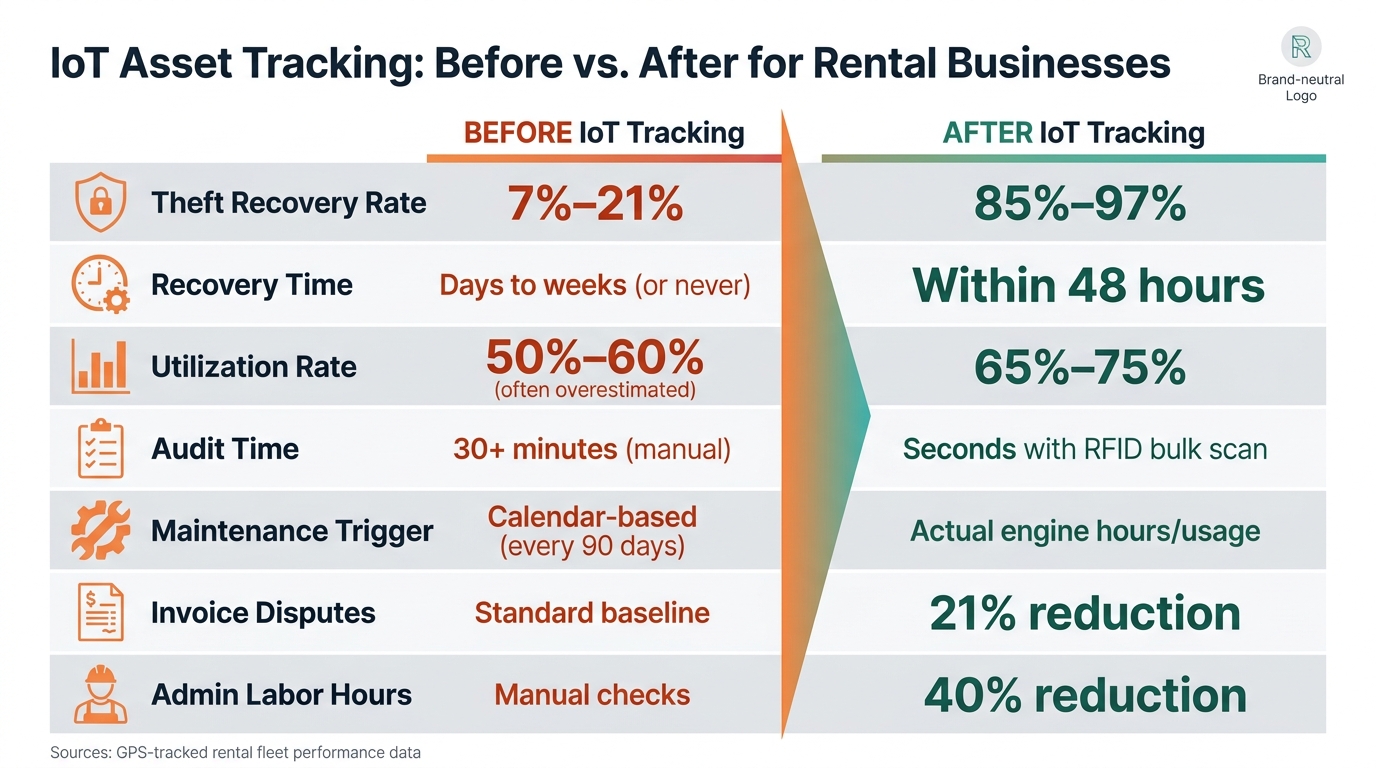
Before-and-After Performance Benchmarks
Typical before-and-after results:
| Metric | Before | After | | --- | --- | --- | | Theft Recovery Rate | 7%–21% [5] | 85%–97% [3][5] | | Recovery time | Days to weeks (or never) [5] | Within 48 hours [3] | | Utilization Rate | 50%–60% (often overestimated) [5] | 65%–75% [10] | | Audit time | 30+ minutes (manual) [7] | Seconds with RFID bulk scan [7] | | Maintenance trigger | Calendar-based (every 90 days) [5] | Actual engine hours/usage [3][5] | | Invoice Disputes | Standard baseline | 21% reduction [10] | | Admin Labor Hours | Manual checks | 40% reduction [10] |
Check alerts every day, utilization every week, and fleet performance every month. If assets stay below 40% utilization for three straight months, they may be better sold or moved to a higher-demand area [3][5].