
Google Ads Retargeting for Local Rental Shoppers
July 2, 2026 · 8 min read
Google Ads Retargeting for Local Rental Shoppers
Most rental shoppers leave without booking, so the best move is to bring back the people who already showed intent. I’d set up Google Ads retargeting around tracked bookings, tight audience lists, local radius targeting, and location-level budget decisions.
Here’s the short version:
- Track bookings first so Google Ads knows who booked and who dropped off.
- Segment visitors by intent, like checkout abandoners, item-page viewers, and pricing-page visitors.
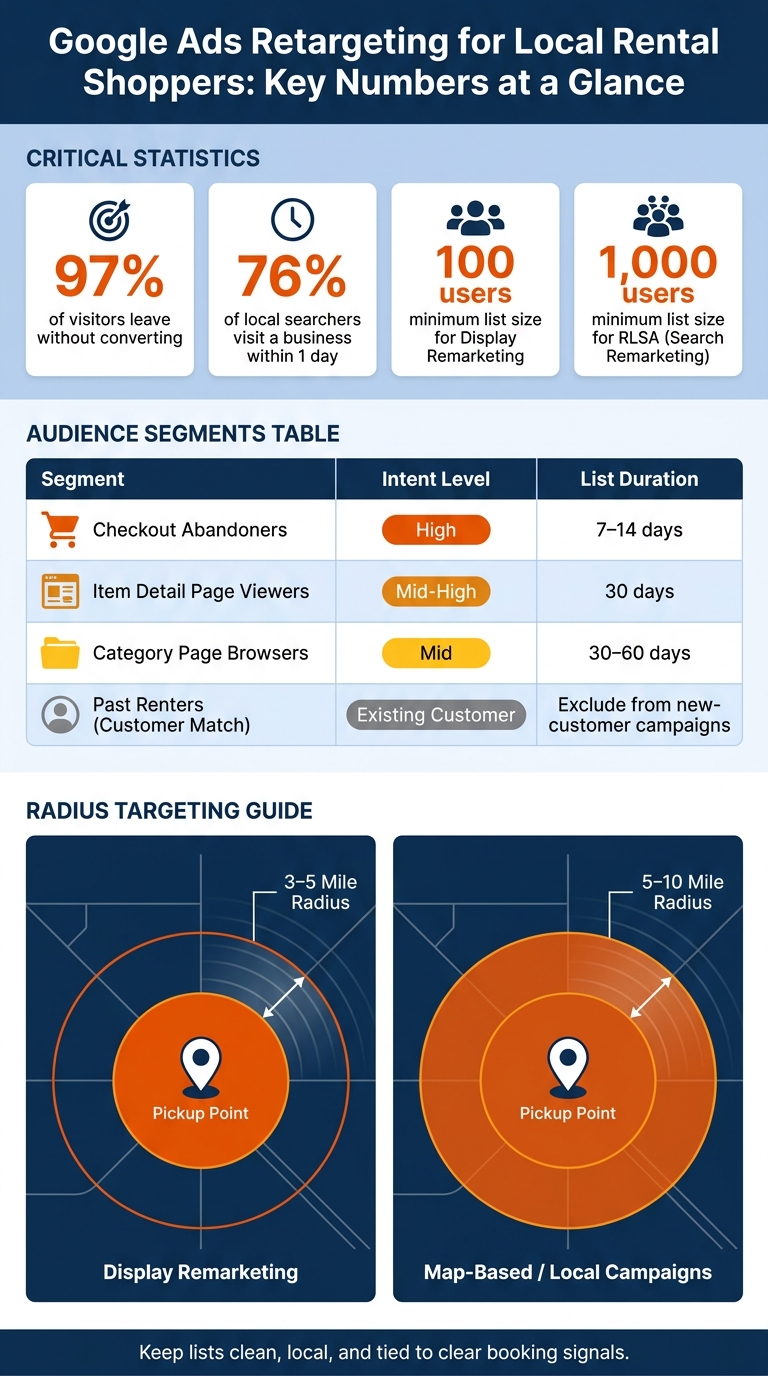
- Keep retargeting local with small radiuses around each yard or pickup point, such as 3–5 miles for display and 5–10 miles for map-focused campaigns.
- Use both display and search retargeting: display brings people back, while RLSA helps you bid more when past visitors search again.
- Exclude booked customers from new-booking campaigns and review CPA, ROAS, conversion rate, calls, and directions clicks by location.
A few numbers stand out: about 97% of visitors leave without converting, 76% of local searchers visit a business within a day, display remarketing needs 100 active users, and RLSA needs 1,000 active users. That tells me this setup works best when I keep lists clean, local, and tied to clear booking signals.
If I were running local rental ads, I’d focus less on raw traffic and more on _who visited, how close they are, what they viewed,_ and which yards turn clicks into bookings.
The RIGHT Way to Set Up Google Ads Display Remarketing Campaigns | Step-by-Step Tutorial
sbb-itb-eb44693
Set Up Tracking and Audience Lists Before You Launch
Before you launch anything, set up remarketing tags and conversion tracking for completed bookings. Google Ads needs both. Without them, it can’t tell who booked, who dropped off, or where to put your budget.
"When there's no conversion tracking set up for a campaign, it will be flying blind. In that case, your Google Ads remarketing campaign will end up having no idea what to optimize itself for." - Chris Down, Downey Marketing [5]
Install remarketing tags on key rental pages
Use [Google Tag Manager](https://marketingplatform.google.com/about/tag-manager/) to add your Google Ads tag to the pages that matter most:
- category pages
- item pages
- booking steps
- the confirmation page
The confirmation page is the key one for tracking completed bookings.
You should also set the view-through conversion window to 1 day. That gives you a cleaner picture of how much display ads are helping, without stretching credit too far. [7]
Build audience segments that match rental behavior
Start with intent. Someone who abandoned checkout is much closer to booking than someone who glanced at the homepage and left.
For short booking cycles, like bikes or cars, keep audience durations between 7 and 30 days. For heavier equipment or long-term trailer hire, use 30 to 90 days. [7]
The most useful audience groups for local rental operators are below:
| Segment | Intent Level | Recommended List Duration | | --- | --- | --- | | Checkout abandoners | High | 7–14 days | | Item detail page viewers | Mid-High | 30 days | | Category page browsers | Mid | 30–60 days | | Past renters (Customer Match) | Existing customer | Exclude from new-customer campaigns |
It also helps to build a separate high-intent audience for pricing-page visitors. These people are already comparing options, so you can bid more aggressively.
Use Lockii pages and booking flows as audience sources
If you use Lockii, pull in audiences from booking widgets, find-my-order pages, and customer-portal activity. Those visits usually mean more than a casual browse.
For operators with more than one location, keep audience lists tied to each yard or pickup point. That way, your retargeting stays local and lines up with how people actually book.
Use these lists for both display and search retargeting, grouped by location and rental type.
Build Display and Search Retargeting Campaigns for Local Bookings
Use display remarketing to bring past visitors back with visual ads. Then use RLSA to bid more when those same people search again. The idea is simple: display puts your inventory back in front of them, while search retargeting reaches them when they return with stronger intent.
Launch display remarketing by rental category and location
Display remarketing shows image ads to past visitors across the Google Display Network. If someone looked at your trailer inventory, they should see a trailer ad, not a generic brand banner. That kind of match matters.
Pair those ads with radius targeting. Start with a 3–5 mile radius around each pickup point so you’re not paying to reach people who probably can’t book from that location. Set frequency caps at 3–5 impressions per user per day to cut down on ad fatigue. And exclude anyone who already finished a booking. This is especially important when managing self-service rentals where the customer journey is fully automated. The minimum list size for display remarketing is 100 active users. [8][9]
Display works best for recall; search works best for conversion.
Use search remarketing to raise bids for returning shoppers
RLSA works a bit differently. It lets you bid more when past visitors search again. If someone viewed your equipment page and later searches "mini excavator rental," that person is warmer than a first-time searcher. Paying more for that click often makes sense.
Start with Observation mode. That keeps your ads showing to new users while you gather data on how returning shoppers perform. After that, look at which audiences convert best and bid more for your highest-intent lists, such as:
- Contact page visitors
- Service page visitors
- Category page visitors
You can also use RLSA to go after broader terms like "trailer rental" that may be too expensive for cold traffic on its own, because returning shoppers tend to convert at a higher rate. RLSA needs a minimum of 1,000 active users on a list before that list can serve. [9]
Capture Map-Based Demand Near Rental Yards and Pickup Points
After you re-engage past visitors with display and search, move the campaign closer to the actual pickup point as you scale to new locations. Map-based ads put you in front of nearby shoppers when they’re close to making a booking.
Connect location assets and target nearby demand
Start by linking your Google Business Profile (GBP) to your Google Ads account. Once that’s in place, your ads can show your address, a map icon, and a clickable phone number. Your rental yard can also appear as a prominent Maps listing for nearby users [1][4].
Then use radius targeting to put your budget around people who are physically near your location. For most rental yards, a 5- to 10-mile radius is a solid starting point [1][4]. That keeps your audience local before you retarget based on browsing behavior.
Retarget shoppers who interacted with local listings
You can also combine website visitor lists with geographic signals to re-engage nearby rental shoppers who viewed your GBP or clicked for directions [4]. This helps you stay in front of people who already showed local intent.
Add call extensions so renters who need equipment fast can call right away. This is a key step in your rental business automation checklist to ensure no lead is missed. Then track those clicks by yard, so you can compare booking cost by location in the next section.
Support bookings from nearby shoppers with Lockii multi-location workflows
Lockii can send shoppers to the nearest location automatically, which helps keep local campaigns matched to the right pickup point. Treat those clicks as location-level signals, not as a separate campaign silo.
Optimize by Location, Inventory Type, and Cost Per Booking
Track the metrics that show booking efficiency
Once retargeting is live, move budget based on what actually books. That means looking at CPA, ROAS, and conversion rate by location and inventory type, not just at the account level.
Then go a step deeper and split those numbers by rental category and device. A trailer business and a bike rental operation can end up with very different CPAs. If you roll them into one average, you can miss what’s pulling its weight and what’s wasting spend.
| Metric | What to Monitor | What to Do With It | | --- | --- | --- | | Booking Efficiency | CPA, ROAS, Conversion Rate | Adjust bids for high-performing inventory types [2][11] | | Local Intent & Device | Store visits, directions clicks, calls, device type | Increase radius bids near your rental yard; lower mobile bids when mobile clicks do not convert [4][10] | | Ad Health | Frequency, CTR, View-Through Conversions | Refresh creative when frequency is high but CTR drops [11] |
Review results by city and ZIP code to spot demand and waste fast [2][4].
Scale campaigns across multiple rental locations
Use those performance splits to shift spend toward your strongest yards and categories. If one location or equipment type is outpacing the rest, move budget out of weaker segments and into the parts that are booking well instead of adding more total spend [3][6].
If you're using Lockii across multiple pickup points, treat each location's booking flow as its own audience source. This ensures real-time booking improves the accuracy of your retargeting data. That keeps your retargeting lined up with the right availability and the right pickup point.
Conclusion: Keep retargeting local, segmented, and focused on bookings
Retargeting works best when tracking, audiences, and budgets stay tied to each location. Keep segments tight and spend where bookings are profitable.