
How to make your own automated car rental service
April 22, 2026 · 16 min read
How to make your own automated car rental service
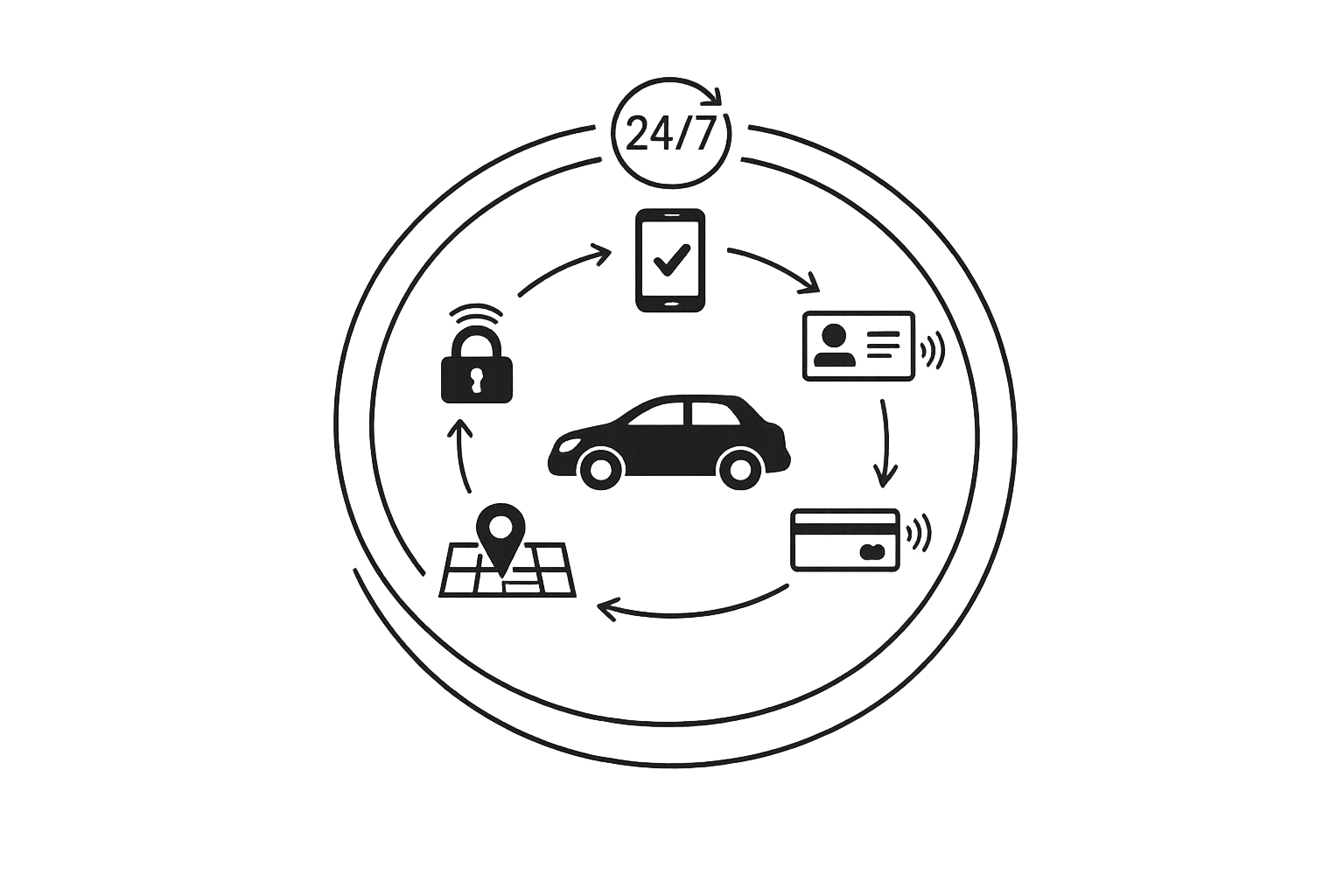
Want to run a 24/7 car rental service without staff? Automation makes it possible. Here's how you can create a fully automated car rental system that handles bookings, identity verification, payments, vehicle tracking, and returns - all without manual involvement.
Key Steps to Build Your Automated System:
- Choose the Right Software: Use platforms like Lockii to manage bookings, digital locks, GPS tracking, and customer communication in one place.
- Automate Identity Verification & Payments: Securely verify licenses and process payments online to prevent fraud.
- Install GPS Trackers & Digital Locks: Equip vehicles with GPS for real-time tracking and digital locks for contactless access.
- Enable 24/7 Self-Service: Let customers book, pick up, and return vehicles anytime with automated messages and self-service tools.
- Expand to Multiple Locations: Use centralized dashboards to manage fleets across various sites efficiently.
- Test & Launch: Conduct thorough testing, then start small with a soft launch to refine operations.
Why Lockii?
Lockii simplifies the process with features like Express Checkout, automated identity checks, and real-time GPS integration. It supports fleets of up to 600 vehicles across 200+ locations, creating a scalable system for contactless rentals.
By following these steps, you can transform your car rental business into a fully automated, customer-friendly operation.
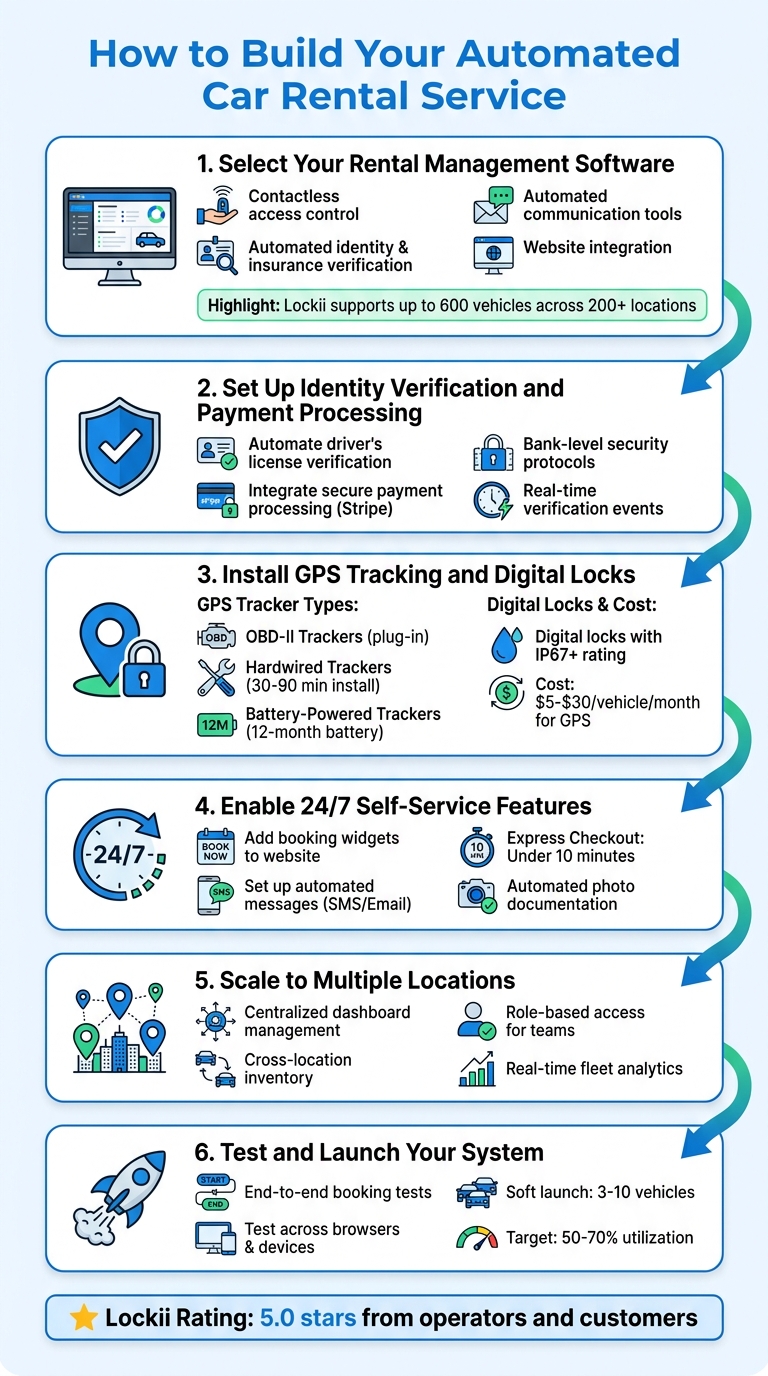
Step 1: Select Your Rental Management Software
Your rental management software acts as the cornerstone of your automation efforts. The right system streamlines booking, identity verification, fleet tracking, and customer communication, all in one place - eliminating the hassle of using multiple tools. Matt Cole, Founder of Empire Trailer Hire, shared his experience:
"I was managing three separate systems before, and now it's all in one place. It's saved me substantial time and reduced stress." [2]
To achieve this level of efficiency, you need software designed specifically for rental automation. It should cover every step of the customer journey, from booking a vehicle online to unlocking it and driving away - seamlessly.
Essential Features for Automation
There are a few must-have features to look for in your rental management software:
- Contactless access control: This is a game-changer. The software should integrate with digital locks and GPS trackers, allowing customers to pick up and return vehicles 24/7 without staff involvement. Look for systems that send unique lock codes directly to customers’ smartphones.
- Automated identity and insurance verification: Protect your business from fraud by choosing software that securely verifies driver’s licenses and insurance policies during the booking process. Bank-level security protocols are a must.
- Real-time GPS tracking: Geofencing capabilities can confirm vehicle returns automatically and send alerts if issues arise, ensuring smooth operations.
- Automated communication tools: Keep your customers informed with automated SMS, email, and push notifications. From booking confirmations to pickup instructions and return reminders, these tools enhance the customer experience. Bonus points for self-service options that let customers extend bookings and pay any additional fees online.
- Website integration: A seamless booking experience on your website is critical. Embeddable widgets ensure that the reservation process stays smooth and aligned with your brand.
Once you’ve identified these features, see how a platform like Lockii brings them all together.
How Lockii Supports Automated Rentals
Lockii offers a complete solution for rental automation, integrating all the essential features into one user-friendly platform. Designed specifically for rental businesses, it supports unlimited orders, lock codes, and automated communications, making it possible to manage fleets of up to 600 vehicles across more than 200 locations [2].
With Lockii’s Express Checkout, customers can book a vehicle, verify their identity, and start their rental in under 10 minutes [2]. The platform handles driver’s license and insurance verification automatically, saving time and reducing errors.
For businesses with multiple locations, Lockii simplifies operations with tools for coordinating maintenance, tracking vehicle health, and managing cross-location rentals - all from a single dashboard. It even captures pickup and return photos to document vehicle condition, complementing GPS alerts and maintenance tracking.
Charlie Haddad, Operator at Trailer 4 Hire, highlighted the impact of Lockii:
"Lockii has made our business efficient in managing our bookings; saving us a lot of time to focus on the growth of the business." [2]
With a 5.0-star rating from both operators and customers, Lockii has proven itself as a reliable platform for fully automated and scalable rental operations.
sbb-itb-eb44693
Step 2: Set Up Identity Verification and Payment Processing
Once you've picked your rental software, it's time to safeguard your operations with automated identity verification and secure payment systems. These tools not only help prevent fraud but also ensure a smooth experience for legitimate customers. Let's dive into setting up these essential features.
Configure Identity Verification
Identity verification acts as your primary shield against fraudulent activity. By automating the process of verifying driver's licenses and government-issued IDs, you can ensure that only eligible renters gain access to your vehicles. Lockii, for example, uses Stripe Identity to handle this seamlessly. It collects and verifies documents such as driver's licenses, passports, and national IDs - eliminating the need for manual reviews [3][4].
Here’s how to set it up:
- Create a secure server-side
VerificationSession. - Embed a modal or redirect customers to upload their identification documents.
- Use webhooks to receive real-time updates on verification events. For example:
- Listen for the
identity.verification_session.verifiedevent to trigger actions like sending digital lock codes or booking confirmations. - Monitor
identity.verification_session.requires_inputevents to alert customers if they need to re-submit documents.
Important: Never store or log sensitive details like the client_secret or session URL. These are single-use and expire within 24 to 48 hours [3][4].
Automate Payment Collection
After setting up identity verification, the next step is ensuring secure and efficient payment processing. Lockii integrates with Stripe to enable instant payment collection during bookings, with funds deposited directly into your business bank account.
To get started:
- Register for a Stripe account and complete the business verification process.
- Install Stripe libraries on your server and initialize Stripe.js using your API key for secure transactions [4].
This approach allows you to process payments without directly handling sensitive card data, keeping everything secure and compliant.
For U.S.-based rental businesses, you’ll also need to meet these compliance requirements:
- Obtain an EIN (Employer Identification Number) from the IRS for tax purposes.
- Formally register your business as an entity (like an LLC) to protect personal assets.
- Register for state sales tax collection if applicable.
- Open a business bank account to separate personal and business finances.
- Plan for commercial auto insurance, which typically costs $1,500 to $3,000 per vehicle annually [5].
Step 3: Install GPS Tracking and Digital Locks
With identity verification and payments now automated, the next step is equipping your fleet with the right hardware to enable contactless rental models. GPS tracking allows you to monitor vehicles in real-time, while digital locks eliminate the hassle of physical key exchanges. Together, these tools create a seamless self-service rental experience.
Choose Compatible GPS Trackers
Selecting the right GPS tracker depends on your specific needs. Here are the main types to consider:
- OBD-II Trackers: These plug directly into your vehicle's diagnostic port, making installation a breeze - just plug it in. They also provide useful data like fuel levels, engine diagnostics, and battery health, which can streamline maintenance scheduling. However, they can be vulnerable to theft since they’re easily accessible [6].
- Hardwired Trackers: For better security, these trackers are installed behind the vehicle's trim and powered by the car battery. While installation takes 30–90 minutes, their hidden placement makes them harder to tamper with. If theft recovery is important for your business, this is a solid choice [6].
- Battery-Powered Trackers: These attach to vehicles using magnetic mounts, making them portable and easy to install. The downside is the need for regular recharging. High-end models can last up to 12 months on a single charge when used in low-power mode [7].
When choosing a GPS tracker, make sure it supports LTE or LTE-M networks, as older 2G and 3G networks are mostly obsolete. Real-time tracking typically refreshes every 15 to 60 seconds, though premium options offer even faster updates (5 to 10 seconds) [6]. Look for features like geofencing alerts, which notify you when a vehicle enters or leaves a designated area, as well as ignition notifications, speed logs, and tamper alerts [6] [7].
GPS accuracy is generally within 8 to 15 feet in open areas. For better performance in urban environments, opt for multi-GNSS receivers that combine GPS with GLONASS or Galileo systems [6].
Cost Considerations: Subscription fees for GPS trackers vary, typically ranging from $5 to $30 per vehicle per month. For example, Bouncie hardware costs $90, with monthly subscriptions starting at $8.00 to $9.65. Tracki offers hardware for $15, but its monthly service costs $19.95 [6]. Some systems, like Lockii, integrate with GPS trackers to provide real-time location data and automated alerts through your dashboard.
Once your GPS tracking is set up, the next step is integrating digital lock systems for a complete contactless solution.
Set Up Digital Lock Systems
Digital locks are essential for enabling 24/7 self-service rentals. Instead of coordinating physical key handovers, you can send customers time-limited access codes automatically after their identity and payment are verified. Lockii, for instance, works with IglooHome digital locks to generate unique codes for each rental, which expire as soon as the booking ends.
Installation Options: The type of digital lock you need depends on your vehicle or equipment:
- For cars with traditional doors, smart padlocks can be installed on lockboxes that hold the physical keys.
- For trailers or equipment, digital locks can be mounted directly onto doors or access panels. Choose locks with an IP67 rating or higher to ensure durability in various weather conditions [6] [7].
Once installed, connect your digital locks to Lockii’s platform. The system will automatically generate and send access codes via SMS or email, based on your rental schedule. Customers simply enter the code to unlock the vehicle or equipment, grab the keys (if applicable), and start their rental. This setup eliminates the need for in-person interactions, making the rental process faster and more convenient.
Step 4: Enable 24/7 Self-Service Features
Once you've set up a secure hardware system with GPS tracking and digital locks, it's time to focus on creating a contactless rental process that runs smoothly without staff involvement. By offering self-service options, customers can book, pick up, and return vehicles anytime, making your business available around the clock.
Add Booking Widgets to Your Website
With Lockii's embeddable widgets, customers can handle the entire rental process directly on your website. From browsing and booking to payment, everything is automated. The system takes care of gathering payment details, verifying licenses and insurance, and sending out confirmations - completely eliminating the need for manual input. Hayden Given, the owner of 208 Trailer Rental, shared his experience:
"The platform and booking process are incredibly smooth and easy to use. We've even had customers switch over from competitors specifically because their system was too complicated."
Set Up Automated Customer Messages
Once online bookings are in place, automated messaging ensures customers stay informed every step of the way. Emails and SMS notifications can handle everything from booking confirmations to pickup instructions and return reminders. The system even sends digital lock access codes shortly before the rental begins, along with the exact location of the vehicle and any necessary instructions.
Lockii supports various communication channels, including email, SMS, and push notifications, so customers receive updates in their preferred format. Additionally, self-service tools allow renters to extend bookings and pay additional charges online, removing the need for direct assistance.
To protect your business, you can also automate photo requests at pickup and return to document the vehicle's condition. This creates a clear record of its state, reducing the risk of disputes over damage claims. GPS-triggered return confirmations further streamline the process, ensuring a fully documented and hassle-free rental cycle.
Step 5: Scale to Multiple Locations
Once you've nailed down smooth operations at a single site, expanding to multiple locations becomes much simpler with Lockii's centralized dashboard.
Simplify Multi-Location Management
Lockii is built to handle the complexities of managing multiple sites. In fact, some operators are already managing fleets across over 200 locations at once [2], all from a single dashboard. This means you can seamlessly oversee bookings, vehicle availability, and customer interactions across your entire network - no need for juggling separate systems or endless spreadsheets.
The platform provides full visibility across all your locations, using role-based access to streamline operations. Depot managers can focus on their local fleets, while central management keeps an eye on fleet-wide analytics. This setup eliminates data silos, ensuring your team stays on the same page.
Cross-location inventory management is just as easy. For instance, if a customer’s preferred location doesn’t have the vehicle they want, the system can suggest alternatives from nearby sites. Plus, you can use real-time GPS data and booking trends to shift resources from low-demand areas to those with higher demand. As Yvann Karamoko from The Trailer Co puts it:
"Lockii has been a game-changer for our business. It's allowed us to operate fully automated, 24/7 trailer rentals and scale that side of our operation with confidence."
>
- Yvann Karamoko, The Trailer Co
Stay on Top of Maintenance and Damage
Keeping vehicles in top shape across multiple locations requires consistent oversight, and Lockii makes this process straightforward. Its pickup and return photo feature creates a visual record for each rental, helping you quickly identify when and where any damage occurred - especially useful for remote or multi-site fleets.
Lockii also includes tools for tracking maintenance across your network. Automated alerts and reminders help you coordinate repairs and ensure vehicles are serviced on time, no matter where they’re located.
Integrated GPS trackers add another layer of control by automatically confirming vehicle returns at any location and sending alerts if something’s amiss. This constant flow of information keeps you informed and ensures your fleet stays in excellent condition, even as your operations grow. With everything operating in sync, scaling becomes less about managing chaos and more about refining your system for the future.
Step 6: Test and Launch Your System
When your fully automated system is ready, the next step is to ensure everything works seamlessly before going live. Testing is not just a formality - it’s essential to catch and fix any issues that could disrupt the customer experience. Start by conducting end-to-end booking tests that simulate the entire process, from searching for a vehicle to making a payment and receiving a confirmation [9][11].
Test All System Components
Every part of your system needs to be thoroughly tested. For instance:
- Identity verification: Check that it correctly scans licenses and populates profiles [10].
- Payment processing: Ensure it handles transactions and security deposits without any glitches.
- GPS trackers: Verify they provide accurate, real-time updates on vehicle location, mileage, fuel levels, and speed.
- Digital locks: Confirm they grant access to vehicles and properly log each use [10][11].
Don’t stop there - test your platform across different browsers like Chrome, Firefox, Safari, and Edge, as well as on various devices, including smartphones, tablets, and desktops. This guarantees a consistent user experience no matter how customers access your system [12].
Heather Brooks from testRigor emphasizes the importance of this step:
"Automating testing for Rent a Car is essential for ensuring the quality and stability of software systems" [9].
Also, check that automated notifications - like reminders for upcoming pick-ups, due dates, or overdue returns - are triggered at the right times [11]. Once all these components are verified, you’re ready to move on to a controlled soft launch.
Run a Soft Launch
After successful testing, a soft launch helps you identify any remaining issues in a real-world setting. Start small, using a fleet of 3 to 10 vehicles. This keeps costs manageable while allowing you to focus on fine-tuning the system [14]. Set clear goals for this phase, such as achieving 50% to 70% vehicle utilization or completing 20 rentals without system failures. These benchmarks make it easier to measure progress [14].
During the soft launch, monitor how the system performs under real-world conditions, such as unexpected spikes in demand. Gather customer feedback using automated evaluation forms [10]. Pay particular attention to problem areas like identity verification or payment processing, as these are common points where users abandon the process.
Finally, test your backup procedures. Even if your platform guarantees 99.95% uptime [13], you need to ensure customers can still access vehicles or receive support if something goes wrong. By addressing these details during the soft launch, you’ll be better prepared to scale up confidently.
Feature Comparison: Lockii vs. Generic Solutions
Once your system is tested and launched, it's worth examining how Lockii's automation tools stack up against traditional rental management methods. While many platforms function primarily as CRM tools requiring staff involvement, Lockii is designed for full automation. It integrates booking, identity verification, and vehicle access into a single, streamlined process. This approach enables a 24/7 self-service rental experience that eliminates the need for constant human supervision.
Feature Comparison Table
Here's a breakdown of how Lockii's automated features compare to traditional rental systems:
| Feature | Lockii Automated Platform | Traditional Rental Systems |
|---|---|---|
| 24/7 Contactless Hiring | Fully automated with digital locks and GPS [2] | Often requires staff-led mobile app check-ins [1] [15] |
| Booking Extensions | Automatically processed online; no support needed [2] | Typically requires manual intervention by staff |
| Identity Verification | Automated with bank-level license and insurance checks [2] | May involve manual reviews or third-party tools [13] |
| Checkout Speed | Express checkout in under 10 minutes [2] | Often slower due to manual approvals and multi-step processes |
| Multi-Location Support | Scalable for over 200 locations [2] | Generally restricted to branch-based management |
| Customer Interaction | Operates without human involvement [2] | Centered around staff-to-customer interaction [8] |
| GPS Tracking | Built-in for returns and alerts [2] | Frequently requires third-party add-ons or separate systems [8] [13] |
Lockii consistently earns a 5.0-star rating in company and customer reviews [2], with users applauding its ability to consolidate multiple systems into a single, efficient platform.
Mario Clewlow, the owner of Hitch Haul, shares his experience:
"Lockii has been a game changer for our trailer rental business. We now offer fully automated, contactless rentals. It's streamlined and secure - exactly the automation we needed." [2]
The standout factor? Lockii is purpose-built for unmanned operations. From booking to return, every step of the rental process runs independently of human involvement [2]. In contrast, generic solutions often require manual steps like key handovers, document verifications, or staff approvals for rental extensions.
This comparison underscores Lockii's focus on simplifying and automating every aspect of rental management, making it a powerful choice for businesses looking to embrace efficiency and self-service.
Conclusion
Creating an automated car rental service is more achievable than ever with the right tools. By following the six steps outlined in this guide, you can turn a traditional rental business into a 24/7 self-service operation that requires minimal hands-on management. The cornerstone of success lies in selecting software that seamlessly combines booking, identity verification, GPS tracking, and digital lock systems into one streamlined solution.
Lockii is designed specifically to meet these needs. It handles everything from secure driver's license verification to contactless vehicle pickups and returns through digital locks. Whether managing a fleet of 6 or 600+ vehicles across over 200 locations, Lockii simplifies operations. Its Express Checkout feature even gets customers on the road in under 10 minutes [2].
This streamlined approach not only makes operations easier but also enhances customer satisfaction. Ben Keep, owner of Hatoza Hire, shares his experience:
"Lockii has significantly reduced complexity, allowing me to focus more on running my business. The platform offers an intuitive interface, and the onboarding and ongoing support has been exceptional."
As discussed earlier, today's technology empowers rental services to meet customer expectations for instant reservations, electronic agreements, and real-time updates. People want to book, verify their identity, and access vehicles directly from their smartphones - without waiting for staff assistance. Lockii delivers all of this while maintaining a 5.0-star rating from both businesses and customers [2]. It’s proof that automation can elevate both efficiency and customer experience.