
How to setup GPS alerts for trailer hire
December 31, 2025 · 12 min read
How to setup GPS alerts for trailer hire
Running a trailer rental business can be challenging when it comes to tracking assets across multiple locations. GPS alerts simplify this by providing real-time updates on trailer locations, movements, and potential issues like tampering or late returns. Here’s how to set up and utilize GPS alerts effectively:
- Choose the Right GPS Tracker: Options include battery-powered, solar-powered, or hardwired trackers. Consider factors like durability (IP67/IP68 ratings), battery life (up to 7+ years for solar-powered), and connectivity (4G LTE with global roaming). Costs range from $13.88 to $460 for hardware, with monthly subscriptions between $6.99 and $35.
- Install Properly: Attach trackers securely under the trailer chassis or in protected areas. Ensure proper signal strength by avoiding metal enclosures. Fully charge and activate the device before installation.
- Set Up Alerts: Configure geofences, movement notifications, tamper alerts, and late return reminders. Customize notification methods (SMS, email, push) and recipients to ensure timely responses.
- Test and Troubleshoot: Verify alerts by moving trailers and crossing geofences. Address issues like weak signals, spam-filtered emails, or low battery levels.
Integrating GPS tracking with systems like Lockii automates notifications, links tracking data to bookings, and simplifies fleet management. This approach reduces manual effort, enhances efficiency, and improves trailer security.
How to Hardwire a GPS Tracking Device to a Dump Trailer
Choosing and Installing GPS Trackers for Trailers
How to Select a GPS Tracker
When it comes to trailer rentals, picking the right GPS tracker is crucial for keeping tabs on valuable assets. Start by choosing a tracker built to handle tough conditions. Look for models with IP67 or IP68 ratings - these ensure the device is dustproof and waterproof, capable of withstanding rain, mud, and road debris [8][9].
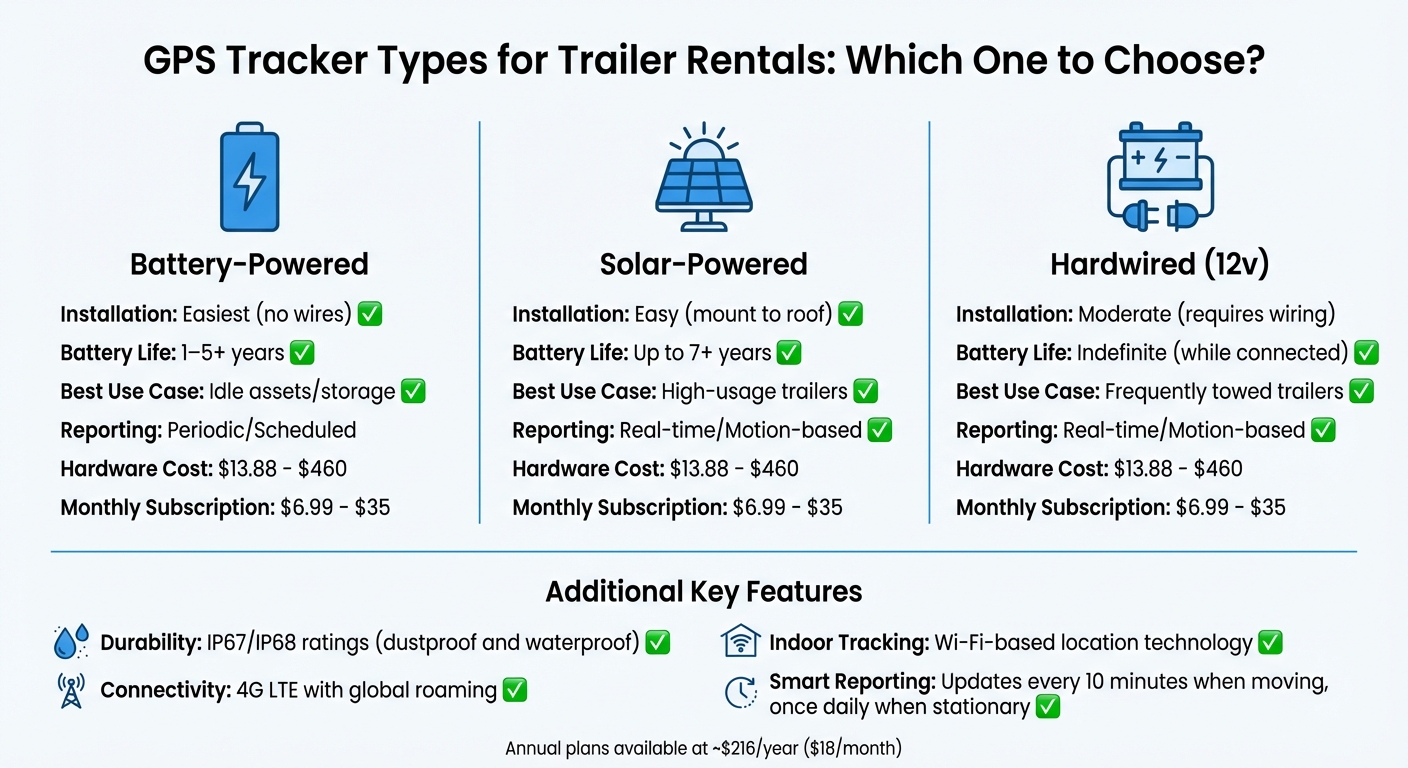
Battery life is another key factor. Basic trackers can last about 12 months, but premium options can run for several years. For non-powered trailers, you’ll want a tracker that doesn’t need frequent recharging. Solar-powered devices are an excellent choice, offering up to 7 years of battery life with backup power [9]. If your trailers are frequently towed, consider hardwired trackers. These connect to the towing vehicle's 12v system, eliminating the need for battery replacements [9][11].
To conserve battery life while maintaining visibility, set trackers to report less frequently when idle but more often when moving. For instance, the best trackers send updates every 10 minutes during motion and only once daily when stationary [8]. As for connectivity, opt for 4G LTE devices with global roaming capabilities. If your trailers are often stored in warehouses or shipping containers, look for trackers with Wi-Fi-based location technology to ensure accurate tracking indoors [7][11].
| Feature | Battery-Powered | Solar-Powered | Hardwired (12v) |
|---|---|---|---|
| Installation | Easiest (no wires) | Easy (mount to roof) | Moderate (requires wiring) |
| Battery Life | 1–5+ years | Up to 7+ years | Indefinite (while connected) |
| Best Use Case | Idle assets/storage | High-usage trailers | Frequently towed trailers |
| Reporting | Periodic/Scheduled | Real-time/Motion-based | Real-time/Motion-based |
Expect hardware costs to range from $13.88 to $460, with monthly subscriptions between $6.99 and $35. Some providers also offer annual plans for about $216 per year, which breaks down to roughly $18 per month [10][11][8].
How to Install GPS Trackers on Trailers
The installation method depends on the type of tracker you choose. For battery-powered units, you can attach them using magnets, cable ties, or mounting cases [3][2]. Hardwired trackers, on the other hand, require connection to the trailer's 12v electrical system. While this takes more effort, it eliminates the hassle of battery maintenance [9][11].
Placement is key for optimal performance and security. Install trackers under the chassis or inside electrical boxes to ensure a strong signal and reduce tampering risks [3][12]. Keep in mind, GPS and cellular signals can pass through materials like plastic, fiberglass, and wood but are blocked by metal enclosures such as toolboxes [12].
"Simply place a Blipbr in or on your trailer, hide it underneath and attach it with cable-ties and you can keep track of your trailer's location." - Blipbr [3]
Before mounting, fully charge the tracker - this usually takes overnight - and confirm it’s activated [12]. If the tracker isn’t waterproof, consider using an IP67-rated waterproof pouch for protection against the elements [12].
Once installed, it’s time to test the system.
Testing Your GPS Tracker After Installation
After installation, it’s essential to verify that the tracker is functioning as expected. Log into the web interface or mobile app and use features like "Live View" or "Locate" to confirm the device is transmitting accurate location data [3][2]. If the signal is weak or inaccurate, the mounting position might need adjustment.
To test movement alerts, move the trailer slightly and check if notifications are received. For wired units, perform a power cycle to confirm "Power Lost" alerts. Additionally, review the location history to ensure accuracy [3][2][6][4]. If you’re using geofences or speed alerts, create a test boundary and drive across it to make sure these features are working as intended [6][4].
Accurate testing ensures your trackers provide reliable updates, helping you manage trailer rentals and recover assets efficiently.
Setting Up GPS Alerts and Notification Rules
Types of GPS Alerts for Trailer Rentals
When it comes to trailer rentals, certain GPS alerts are absolutely essential. Geofence violations notify you whenever a trailer enters or exits a specific area, helping you keep track of its location. Similarly, movement or motion alerts send instant notifications via SMS or email if a trailer is moved or disturbed without permission - an invaluable tool for theft prevention.
Other key alerts include tamper and power alerts, which warn you if someone attempts to disable the tracker by removing it or cutting its power supply. Overspeed alerts can help you monitor how the trailer is being used, reducing wear and tear on tires and brakes while also minimizing liability. Late return alerts serve as reminders for both customers and staff when a rental period has been exceeded. Lastly, battery and diagnostic alerts ensure the tracker is operational and ready for the next rental.
| Alert Type | Trigger Condition | Operational Benefit |
|---|---|---|
| Geofence In/Out | Crossing a virtual boundary | Prevents unauthorized use and confirms job site arrivals. |
| Movement/Motion | Vibration or GPS movement | Detects theft immediately and monitors unauthorized use. |
| Tamper/Power | Device removal or power cut | Alerts staff to tampering attempts. |
| Overspeed | Exceeding a set MPH limit | Minimizes liability and reduces wear on brakes/tires. |
| Late Return | Asset not returned on time | Automates reminders or late fee processing. |
| Battery/Diagnostic | Low voltage or engine codes | Ensures trackers are always ready for use. |
After identifying the necessary alert types, the next step is to automate trailer hire by setting up geofences and movement triggers to make these notifications actionable.
Creating Geofences and Movement Triggers
Using your GPS system's geofencing tool, you can create virtual boundaries around your property or job sites. Alerts can be configured to trigger when a trailer enters, leaves, or crosses these boundaries. For theft prevention, you can also set up "Is Moving" triggers that activate during unauthorized movements, especially after hours.
To avoid being overwhelmed with notifications, configure a repeat delay of 5–20 minutes. This ensures you won't receive constant alerts if a trailer repeatedly crosses a geofence. Additionally, you can schedule alerts to be active only on specific days or during certain hours. For instance, you might monitor movement exclusively outside of business hours. If a trailer is stolen, activate Recovery Mode for real-time, high-frequency location updates - though keep in mind this may drain the battery faster [3].
For larger fleets, idle limit alerts can notify you if a trailer remains stationary for too long, helping you identify underused assets. Advanced systems even allow for nested geofencing, enabling you to create smaller zones within larger areas, such as isolating a specific rental bay within your yard [14].
These configurations work hand-in-hand with automation tools like Lockii, ensuring seamless integration with your booking system.
Configuring Who Gets Notified and How
Once your alert triggers are set, it's time to decide who gets notified and how. Operational alerts - like speeding, geofence breaches, or tampering - should be sent to staff, while rental reminders and late return warnings can go directly to customers. In theft situations, real-time GPS data and route history can be shared with law enforcement to aid recovery efforts.
Your GPS system likely supports a variety of notification methods, including SMS, email, push notifications, or webhooks. When setting up alerts, you can add multiple email addresses or phone numbers (separated by commas) to ensure the right people are informed. Use clear and concise titles for alerts so they’re easy to identify at a glance.
To avoid notification fatigue, set a Per Vehicle Delay of at least 20 minutes for trailers that frequently cross geofences. You can also schedule alerts to activate only during specific times, like after business hours. Finally, whitelist your GPS provider’s email address (e.g., alerts@[provider].com) to ensure notifications don’t end up in spam folders.
sbb-itb-eb44693
Automating GPS Alerts with Lockii
Connecting GPS Trackers to Lockii's Booking System
Lockii takes GPS tracking to the next level by linking tracking data directly to individual bookings. This creates a detailed audit log for every trailer and order, ensuring that each movement is tied to a specific reservation. When a customer rents a trailer, the GPS tracker is automatically linked to that booking. Once the trailer returns to your designated location, the system confirms its arrival and updates its availability for the next customer. This eliminates the need for manual checks and streamlines the entire process [1].
Automated Notifications for Customers and Staff
By integrating GPS tracking into your booking system, Lockii enables automated notifications that go beyond what traditional systems can offer. Staff members receive real-time alerts for critical updates, such as late returns or unauthorized trailer movements outside business hours. On the customer side, Lockii sends email and SMS reminders throughout the rental period. These include return reminders three hours before the booking ends and confirmation messages once the trailer is back at your yard. If a customer is running late, they can use Lockii’s self-service extension to update the booking, adjust GPS tracking, and handle any additional charges.
"No more cross-referencing, be instantly notified of important changes, and return issues." – Lockii
Thanks to this automation, 95% of customer bookings are completed without any need for human intervention. This allows your team to concentrate on growing the business instead of managing GPS dashboards [1].
How GPS Alerts Work with Other Lockii Features
Lockii’s automation doesn’t stop at notifications - it simplifies the entire rental process from start to finish. The system follows a five-step workflow: receiving the booking, assigning inventory and generating digital lock codes, sending automated updates, confirming returns through GPS and photos, and handling optional tasks like identity verification [1]. For instance, Lockii ensures that lock codes are only released after prevent fraud with identity checks are complete. Upon return, the system uses GPS data and photos to confirm the trailer’s arrival and update the rental record. This seamless process allows trailers to be rented 24/7 across multiple locations with minimal staff involvement, making it possible for businesses using Lockii to manage an average of 10+ locations efficiently [1].
Testing and Troubleshooting GPS Alerts
How to Test Your GPS Alerts
To test GPS alerts, move a trailer across geofence boundaries to confirm that "Geofence In/Out" triggers are functioning as expected. For movement-based alerts, enable real-time motion notifications and physically move the trailer to ensure the motion sensor detects activity and sends the appropriate alerts [6][2].
Check that notifications are being delivered to the designated recipients through push notifications, SMS, email, or webhooks [13][4]. During testing, activate "Recovery" or "Aggressive" mode to increase the frequency of updates, making it easier to detect boundary crossings clearly [2][3].
If alerts fail during repeated tests, review the "Repeat Delay" settings. These settings are designed to prevent excessive notifications but can sometimes interfere with testing [6]. Also, make sure the alert status is active and aligned with the trailer's local time zone [13][6]. Finally, double-check the delivery methods and scheduling configurations in your testing setup.
Fixing Common GPS Alert Problems
Once you've tested the alert triggers, it's time to address any issues that might affect their reliability. A common problem is signal interference or poor power supply. If alerts aren't coming through, check the cellular and GPS signal strength in the area where the trailer is parked [2][3]. For non-powered trailers, battery depletion can be an issue, especially when real-time tracking modes are active, as they consume more battery power [2].
Email alerts may get blocked by spam filters, so be sure to add your GPS provider's alert email (e.g., "alerts@\provider].com") to your safe senders list [[6]. If SMS notifications are not working, confirm that your SMS gateway is active and that you have enough credits available [6][13]. If the tracker stops reporting entirely, investigate whether external power has been disconnected or if the backup battery has failed [6][4].
To reduce false alerts, consider increasing the size of geofence boundaries or adjusting the sensitivity settings [6]. Before deploying your GPS system, double-check that the data source, notification methods, and contact details are set up correctly [6][13].
Conclusion
Setting up GPS alerts for your automated trailer rental business involves more than just choosing the right hardware. It’s about ensuring proper installation, fine-tuning notification settings, and, most importantly, eliminating the need for manual checks between GPS data and bookings.
This is where Lockii steps in to simplify the process. When a trailer returns to its geofenced area, Lockii automatically prompts customers to upload photos and complete return forms. Once everything is confirmed, the system instantly updates the trailer’s status, making it available for the next rental. Thanks to this integration, 95% of customer bookings on the Lockii platform require no human intervention [1]. Businesses using this system also report managing 10+ locations with ease, thanks to its scalability [1].
In addition to automated notifications, Lockii provides complete tracking control. Its GPS integration connects real-time tracking data with centralized audit logs, making fleet management much more efficient [1]. Staff members receive instant SMS alerts for geofence breaches or unauthorized movements, while routine notifications - like lock codes or care instructions - are sent automatically based on each booking’s schedule [5].
For trailer rental businesses looking to operate 24/7 without on-site staff, automated GPS alerts aren’t just helpful - they’re the backbone of a scalable, self-service model. By integrating your tracking system with your booking platform, you can shift your focus from constant monitoring to growing your business.