
How to setup GPS alerts for rentals
December 30, 2025 · 11 min read
How to setup GPS alerts for rentals
GPS alerts can transform how rental businesses manage their equipment. They provide real-time updates on location, improve theft prevention, and automate late return reminders. However, standalone GPS systems often fall short, requiring manual checks and offering limited functionality. Integrating GPS tracking with a booking system like Lockii solves these challenges by syncing live rental data with tracking tools.
Key Takeaways:
- Why GPS Alerts Matter: Reduce theft risk, lower insurance premiums by 10–25%, and cut maintenance costs by 15–30%.
- Standalone GPS Limitations: Manual checks and fixed schedules lead to inefficiencies.
- Lockii Integration Benefits: Automates alerts, confirms returns, and syncs with bookings for smarter management.
- Setup Essentials: Choose suitable GPS trackers, test functionality, and configure geofences and alert triggers in Lockii.
By linking GPS trackers to Lockii, you can streamline operations, improve efficiency, and ensure better asset security with minimal manual intervention.
What You Need Before Setting Up GPS Alerts
Setting Up Your Lockii Account
To get started, head over to the Lockii homepage and create an account using the "Get Started" or "Book A Meeting" options [1]. Once logged in, make sure all of your rental items are listed in the system and that bookings are enabled. Lockii automatically assigns stock and generates lock codes as orders come in, so double-check that everything is set up correctly before adding GPS tracking [1].
If you're renting out high-value equipment like trailers or vehicles, it's a good idea to enable identity verification during the booking process [1]. This extra step works hand in hand with GPS alerts to safeguard your assets. Additionally, configure automated SMS and email notifications so that lock codes and booking confirmations are sent out without any manual effort [1].
Once your account is fully configured, you're ready to choose and install GPS trackers.
Selecting and Installing GPS Trackers
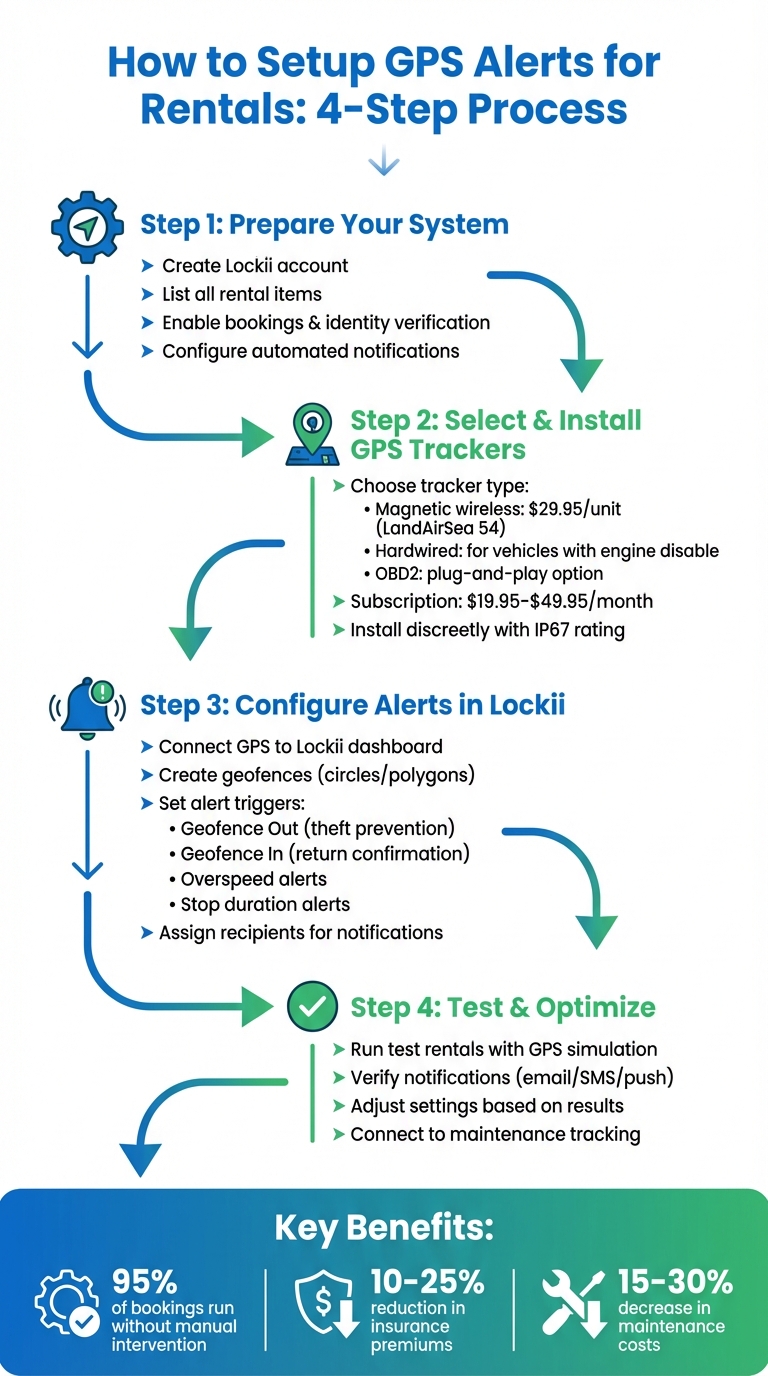
Pick a GPS tracker that matches the type of asset you're renting out. For trailers or non-powered equipment, magnetic wireless trackers like the LandAirSea 54 (2.275 inches, priced around $29.95 per unit) are a solid choice [5]. If you're dealing with vehicles, hardwired trackers that connect to the 9-90V system are ideal, especially if they offer features like remote engine disable [2]. For fleets with quick turnover, OBD2 plug-and-play devices are a convenient option - they connect directly to the diagnostic port without requiring any wiring [2].
Look for trackers with an IP67 rating for durability, and opt for devices that use 4G LTE or satellite networks. Battery life can range from one to three weeks, or even up to six months in low-power mode [5]. Subscription plans for these devices typically start at $19.95 per month for updates every three minutes, with premium plans offering real-time tracking at three-second intervals for around $49.95 per month [5].
When installing your trackers, place them discreetly and enable "Dark Mode" to reduce the risk of tampering [5]. For hardwired trackers with advanced features like killswitch technology, professional installation is strongly recommended.
"I highly recommend you have someone to install it with experience. We owe a luxury car rental business... Now we will have a peace of mind knowing that we have a killswitch that can prevent the thief from stealing our cars." – Lisa Peterson, Owner, Luxury Car Rental Business [2]
Testing Your GPS Trackers
Before linking your trackers to Lockii, confirm that they’re working correctly. Open the GPS provider’s app and check the signal strength [5]. Many devices allow you to scan a QR code on the back to instantly link them to your account [5]. Take a test trip and ensure updates appear in the History/Playback section [6].
Make sure the tracker shows up as "Active" in your management software, and keep an eye on the data panel for signal strength [6]. If your device includes motion-activated sensors, test that the tracker activates upon movement. Set up a basic geofence - often called an "InstaFence" - around your property and check if alerts are triggered when the boundary is crossed [5][2].
Once you've confirmed that the trackers are transmitting properly and alerts are working as expected, you can integrate them with Lockii’s booking system. With everything tested and active, your GPS trackers are ready to work seamlessly within Lockii’s platform.
How to Configure GPS Alerts in Lockii
Connecting GPS Trackers to Lockii
Once your GPS trackers are tested and ready, log into your Lockii dashboard and head to the integrations section. Lockii works seamlessly with many GPS providers, and if you're using third-party hardware, you can integrate it through Zapier. After connecting your GPS account, assign each tracker to a specific rental item in your inventory. This setup directly links location data to your bookings, saving you the hassle of manually cross-referencing between tracking software and your rental calendar.
From there, Lockii takes over. Each time you assign a tracker, the system automatically confirms returns and logs movements, instantly updating availability. This streamlined process ensures your GPS data is fully integrated into your booking workflow. To take it a step further, you can set up geofences and define alert triggers, adding another layer of automation to your rental operations.
Creating Geofences and Alert Triggers
In your GPS settings, open the tools menu to access geofencing options. You can draw geofences as circles or polygons. Polygons are ideal for precise boundaries, like property lines, and help reduce false alerts. Next, tailor your alert triggers to fit your rental needs. For example, a "Geofence Out" alert notifies you when an item leaves its designated area, which is crucial for theft prevention. A "Geofence In" alert, on the other hand, confirms when a customer returns an item to your lot.
You can also combine alerts for more specific scenarios. For instance, set an overspeed trigger within your rental yard (like a 10 mph limit) to monitor safe handling during pickups and drop-offs. Assign these rules to individual GPS trackers or rental items, and use the schedule calendar to determine whether alerts should run around the clock or only during specific hours. For high-value equipment, you might want to set up "Stop Duration" alerts to flag items left stationary for too long, signaling potential abandonment. Once your boundaries and triggers are in place, configure benefits of automated notifications to keep all relevant parties informed.
Setting Up Automated Notifications
Decide who receives each alert by assigning email addresses or phone numbers in the Alerts Center. For instance, theft or boundary violation alerts might go to the owner or security team, while return-related issues could be directed to your operations staff.
For customer-facing notifications, use Lockii's automation section to create templates. You can set up return reminders to go out 0 to 3 days before the rental end date and configure late notifications to trigger a day after a missed return. Personalize these messages with template tokens like {{customerFirstName}}, which pull real-time booking data. To avoid extra SMS charges, you can enable push notifications via the mobile app for instant updates.
| Notification Type | Trigger Event | Typical Timing | Recipient |
|---|---|---|---|
| Return Reminder | Rental End Date | 1–3 days before | Customer |
| Late Notification | Rental End Date | 1 day after | Customer & Business |
| Geofence Out | Boundary Crossing | Instant | Business Owner |
| Geofence In | Return to Lot | Instant | Operations Staff |
With GPS alerts set up, Lockii takes care of the heavy lifting. It tracks departures, destinations, and returns automatically, requiring minimal human oversight. In fact, 95% of customer bookings on Lockii run smoothly without manual intervention [1], thanks to its integration of GPS alerts with automated notifications and booking management.
sbb-itb-eb44693
Testing and Adjusting Your GPS Alerts
Running Test Rentals
To ensure your GPS alerts are working as expected, use a GPS simulation app like Lockito to mimic rental scenarios. This allows you to test events such as geofence exits, entries, overspeed, and stops without the need for actual vehicle movement, saving both time and resources. For example, you can create a route that triggers a "Geofence Out" alert as the vehicle leaves a boundary and a "Geofence In" alert upon its return. Keep an eye on notifications - whether they arrive via email, SMS, or push - to confirm they’re reaching the right recipients.
You can also simulate overspeed and stationary events to verify those alerts. Make sure to run these tests during the same hours your alerts are scheduled to be active. Afterward, review the notification logs in your Lockii dashboard to confirm that every trigger is properly recorded. Once you've validated the test notifications, you can move on to refining your settings.
Adjusting Alert Settings
After running simulations, tweak your alert settings based on the results. Start by reviewing the notification logs. If alerts are firing too often, you can narrow the conditions - for example, by limiting them to specific rental statuses or time windows - or increase the check interval. By default, Lockii automations check for triggers every 15 minutes, but you can adjust this to a once-per-day frequency if needed. To avoid duplicate notifications, set actions to "Once Per Customer."
If alerts aren’t triggering, double-check that all automation toggles are enabled. Ensure the logic behind the triggers aligns with the correct rental dates and "Days Offset" settings. If geofence alerts are inconsistent, try increasing the distance thresholds to account for GPS drift near your property’s boundaries. Additionally, check your approval queues - automations involving more than 50 records may require manual approval before they activate [3].
Connecting GPS Alerts to Other Lockii Features
Once your GPS alerts are fine-tuned, take advantage of Lockii’s broader automation capabilities. For instance, you can link GPS alerts to maintenance tracking, ensuring that items are flagged for service based on actual mileage or usage patterns instead of calendar schedules [2]. When a geofence "In" event is detected, the system can automatically update the booking status to "Completed" or "Returned", which keeps your inventory records accurate and up-to-date [4]. This integration also feeds directly into your item audit log, creating a seamless record of every rental and movement [1].
Additionally, you can set up webhooks to send GPS data to other platforms or trigger internal actions. For example, if a late return alert is triggered, the system can automatically charge the card on file [3]. You can also configure SMS and email notifications to inform customers immediately when a geofence "Out" event occurs, keeping everyone in the loop about their rental status. By connecting GPS alerts to Lockii’s full automation suite, you streamline operations so effectively that 95% of customer bookings can be handled without human intervention [1].
Conclusion
Summary of GPS Alert Setup
Using GPS alerts in Lockii transforms the way you handle rentals by seamlessly connecting tracking tools to your booking system. The process starts with linking your GPS trackers to your Lockii account, setting up geofences around your rental locations, and configuring automatic notifications for key events like late returns, unauthorized movements, or successful drop-offs. After testing and refining the setup in practical scenarios, you can further enhance operations by integrating GPS alerts with Lockii’s other features, such as maintenance tracking and status updates. This integration not only saves valuable time - eliminating the need for manual checks - but also works hand-in-hand with Lockii's automation suite, simplifying your rental management even further.
Growing Your Rental Business with Lockii
Lockii isn’t just about efficiency - it’s about growth. By combining GPS alerts with features like digital locks for 24/7 self-service pickups, securing contactless rentals with identity verification, automated return forms, and hire-end photos, Lockii makes it easier to expand across multiple locations without increasing labor or real estate costs.
The financial perks are just as compelling. Businesses that use GPS tracking with proactive monitoring often see insurance premiums drop by 10–25% [2] and maintenance costs decrease by 15–30% [2], thanks to servicing equipment based on actual usage rather than fixed schedules.
"Let Lockii do the hard work and be notified when you're needed so you can focus on growing, not handing out stock." – Lockii [1]