
How to setup an automated trailer rental side hustle
March 5, 2026 · 14 min read
How to setup an automated trailer rental side hustle
Starting an automated trailer rental business can generate consistent income with minimal effort. By using smart locks, GPS trackers, and platforms like Lockii, you can create a contactless system where customers book, pick up, and return trailers 24/7 without needing staff on-site. Here's a quick breakdown of how to get started:
- Legal Setup: Register your business (LLC), get a free EIN from the IRS, and secure commercial insurance (around $30–$60/month per trailer).
- Trailers: Choose utility or enclosed trailers, ensure they meet safety regulations, and store them in a secure, accessible location.
- Automation Tools: Install smart locks for contactless access and optional GPS trackers for security and monitoring.
- Platform Integration: Use Lockii to manage bookings, payments, identity verification, and maintenance tracking - all in one place.
- Website: Build a user-friendly site with booking widgets, clear pricing, and rental policies.
- Pricing: Set competitive rates and offer discounts for longer rentals to attract more customers.
- Maintenance: Schedule regular inspections to keep your fleet in top condition.
Step 1: Set Up Your Business Legally
Register Your Business
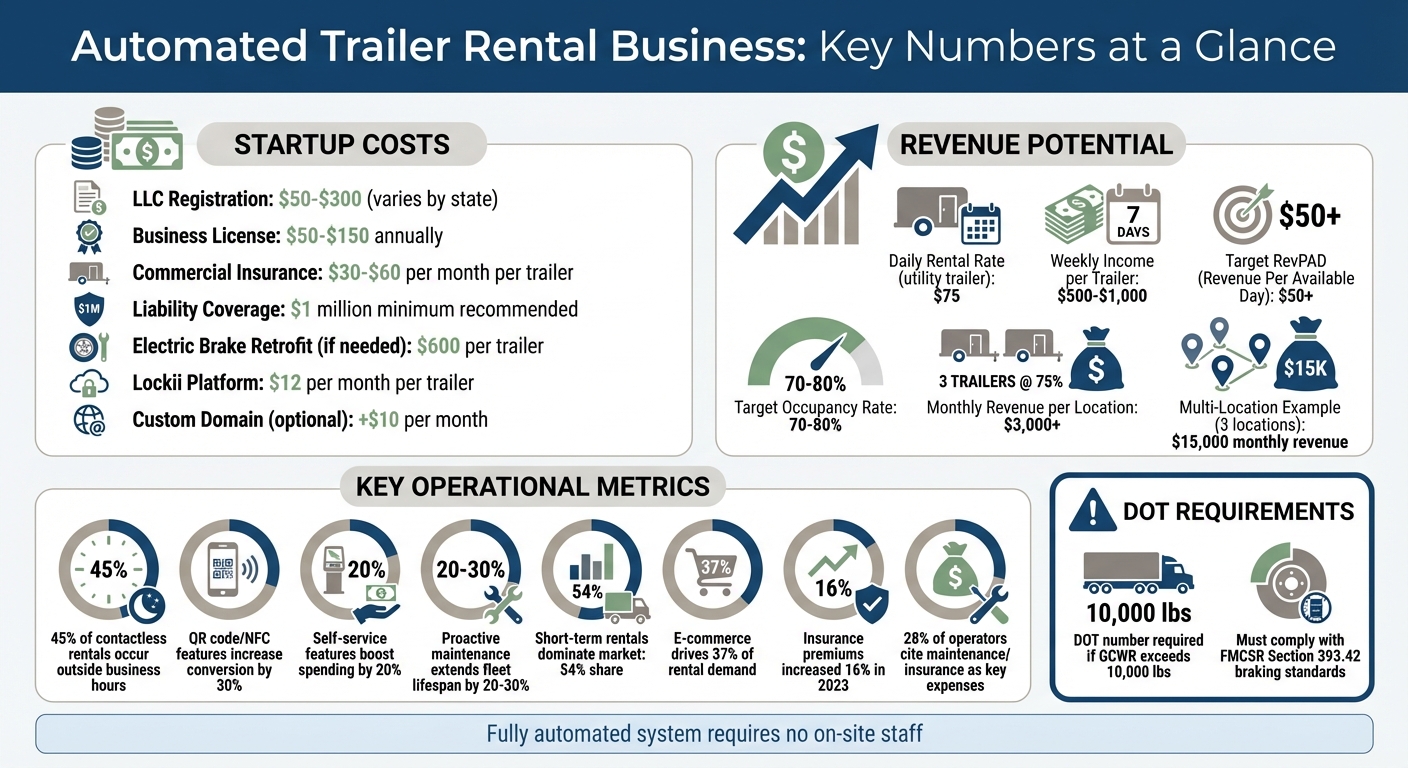
Start by forming an LLC to shield your personal assets. Filing fees vary by state, typically ranging from $50 to $300[4]. Once that's done, you'll need to apply for a free EIN (Employer Identification Number) from the IRS. The process is quick - about 15 minutes online. Most cities and counties also require a general business license, which usually costs between $50 and $150 annually[4]. To confirm the specific permits you’ll need, contact your local clerk's office.
Once your business is officially registered, the next step is securing commercial insurance.
Get Commercial Insurance
Standard auto insurance doesn’t cover trailers rented to the public. Instead, you’ll need a specialized rental policy that includes both liability and physical damage coverage. In the U.S., full coverage for trailers generally costs $30 to $60 per month per trailer[2]. To protect against accident claims, most operators carry at least $1 million in liability coverage[2].
Insurance providers often have specific requirements for renters and equipment. For example, renters are generally required to be at least 25 years old. Additionally, insurers may mandate the use of GPS trackers and smart locks to enhance security. These tools not only help recover stolen trailers but also show insurance companies that you’ve taken proper precautions, which can make claim processes easier[2].
Once insured, it’s time to address Department of Transportation (DOT) regulations for heavier trailers.
Meet DOT Requirements
If your trailer’s GCWR (Gross Combined Weight Rating) exceeds 10,000 lbs, you’ll need a DOT number and must comply with federal motor carrier regulations[3]. Julie Timberlake, a former DOT Compliance Manager at Sprint Nextel Corp., explains:
"As soon as you tow anything, even a small trailer, if the GVWR is greater than 10,000 pounds, it becomes a commercial vehicle because of its combination weight rating."[3]
Your trailer must also meet braking system standards outlined in FMCSR Section 393.42. This regulation requires a braking system that applies pressure to all wheels simultaneously[3]. If your trailer uses surge brakes, you may need to retrofit it with electric brakes, which typically costs about $600 per trailer[3]. Additionally, each trailer must be individually registered with your state’s DMV, complete with its own title and registration[4].
I Started a Rental Business With My $800 Trailer!
Step 2: Buy and Prepare Your Trailers
Now that your business is officially set up, it’s time to focus on getting your trailers ready for hassle-free, contactless rentals.
Choose the Right Trailers
Utility trailers are perfect for tasks like moving furniture, hauling landscaping debris, or transporting construction materials. On the other hand, enclosed trailers offer weather protection and added security, making them a better choice for higher-value cargo. When picking trailers, look for models that can easily integrate smart locks and GPS trackers - these are key for enabling 24/7 contactless pickups and returns. Once you’ve decided on the trailers that suit your business, make sure you arrange proper storage.
Secure a Storage Location
Your trailers need a safe, accessible storage space that complies with local zoning regulations. Most rental businesses require commercial or industrial zoning, as residential areas often restrict business-related storage or limit the number of vehicles you can park. Store your trailers on gravel or concrete to ensure adequate support. For added security, look for storage facilities with features like perimeter fencing, automated gate access, 24/7 camera surveillance, and wide aisles (20–25 feet) for easy maneuvering.
Inspect Your Trailers
Before renting out a trailer, perform a detailed safety inspection. Check the brakes, tires, lighting, and hitch thoroughly. For tires, use the "penny test" to check tread depth - if you can see the top of Lincoln’s head, it’s time for a replacement. Make sure all brake lights, turn signals, and reflectors are in working order, and tighten the lug nuts before each rental. Inspect the coupler and safety chains to ensure they’re secure and free from damage. Trailers manufactured after 1968 must have red and amber reflectors, so double-check for compliance. Keeping detailed, organized inspection records - using digital tools if possible - will help you manage multiple trailers and stay in line with federal safety standards.
Step 3: Install Smart Locks and GPS Trackers
Once your trailers are prepped and secure, it’s time to take things to the next level with automation tools. Smart locks and GPS trackers can streamline your operations by removing the need for in-person key exchanges and offering real-time fleet monitoring.
Install Igloo Home Smart Locks
Digital locks are a game-changer for automating trailer rentals. With these locks, customers can access trailers 24/7 without requiring you to be on site. When paired with rental software like Lockii, smart locks can automatically generate unique access codes for each reservation. These codes are then sent to customers via email or SMS after their identity is verified. This setup eliminates the hassle of coordinating pickups or meeting renters in person.
To get started, install a weather-resistant smart lock in a secure, tamper-proof location on the trailer. Once installed, thoroughly test the lock to ensure it works seamlessly with digital codes and is easy for customers to use.
For added peace of mind, configure your system to require identity verification before providing access codes. You can also add QR codes or NFC tags to the trailer, allowing walk-up customers to book instantly and receive an access code on the spot.
If you want to take security and efficiency even further, consider integrating GPS tracking into your system.
Add GPS Tracking (Optional)
GPS trackers, like those from Digital Matter, add an extra layer of security and operational control. These devices can confirm when a trailer is picked up or returned, send alerts for overdue bookings, and deter theft by tracking unauthorized movements. When connected to your rental platform, GPS data updates automatically, saving you from having to track everything manually.
To install a GPS tracker, choose a discreet and secure spot on the trailer - somewhere out of sight and hard to tamper with. Use the GPS data as an added verification step by releasing smart lock codes only after confirming the trailer is in the correct starting location and the renter’s identity has been verified.
Step 4: Automate Your Operations with Lockii
With your trailers now equipped with smart locks and optional GPS trackers, it’s time to integrate everything into Lockii’s platform. This step will help you simplify and automate your entire rental process.
Create Your Lockii Account
Start by visiting the Lockii website and clicking "Get Started" to set up your account. For just $12 per month per item, Lockii gives you tools for automated booking, identity verification, and maintenance tracking - all in one place. Once your account is active, you can embed booking widgets directly onto your website or use a Lockii-hosted site to manage reservations.
The next step is connecting your existing tools to create a smooth, automated workflow.
Connect Your Tools
Sync your Igloo Home smart locks with Lockii to automatically generate and send unique access codes to customers after they book. Link Stripe to process payments for bookings and add-ons like insurance. From there, automate SMS and email notifications for confirmations, lock codes, and return instructions. If you’ve installed GPS trackers, integrate them into the platform to receive alerts for overdue rentals or unauthorized movements.
This integration takes your hardware setup to the next level. The system will automatically assign trailers, generate lock codes, and send them once a renter’s identity is verified. Plus, with 24/7 contactless rentals, you won’t need to worry about coordinating manual pickups. In fact, 45% of contactless trailer rentals occur outside standard business hours[5].
Enable Self-Service Features
To make things even easier for your customers, activate the self-service portal. This allows renters to extend bookings and pay additional fees online without needing to call. You can also enable tools for documenting the trailer’s condition at the end of the rental period, such as photo uploads. Adding QR codes or NFC tags to your trailers lets walk-up customers scan, book, and instantly receive access codes - features like this can boost conversion rates by up to 30% and increase total spending by about 20%[5].
Lockii also includes a maintenance management tool that uses usage data and audit logs to schedule service for your trailers. Mario Clewlow, Operator of Hitch Haul, explained how Lockii transformed his business:
"Lockii has been a game changer for our trailer rental business. We now offer fully automated, contactless rentals. It's streamlined, secure, and exactly what our business needed to jump in front of our competitors!"[1]
Step 5: Build Your Website
Your website is the hub where customers can explore your trailers and make bookings. With Lockii, you can choose between a hosted website with ready-made templates or embedded widgets. Both options include features like real-time availability, instant checkout, and automated confirmations - all without needing any coding skills.
Set Up a Lockii Website
Lockii's hosted website option lets you get online fast. The platform offers trailer rental templates complete with booking widgets, QR/NFC functionality, and tools for managing customers. For just $10 more per month, you can connect a custom domain (like www.yourtrailerrentals.com) to give your business a polished, professional look. This online system ties everything together, creating a fully automated rental process. It handles trailer assignments, generates lock codes, and sends confirmation emails and text messages to customers.
Matt Cole, the owner of Empire Trailer Hire, shared how Lockii transformed his business operations:
Since switching to Lockii, things have gotten so much easier. I was juggling three different systems before, and now it's all in one place. It's saved me a heap of time and stress, and I can actually focus on running the business again.
With its intuitive design, the platform ensures a smooth experience for both you and your customers.
Make It Easy to Use
A mobile-friendly website is essential since many customers will make bookings while standing right by your trailers. Keep the design simple and user-friendly. Display pricing clearly, include rental policies that explain pickup and return procedures, and add a FAQ section to address common questions about insurance, extensions, and lock codes. To make browsing easier, organize trailers by type - like utility trailers, enclosed trailers, or flatbeds. If you operate in multiple locations, consider adding separate pages for each area.
Activate the self-service portal to allow customers to extend bookings and adjust pricing automatically. You can also set up a return form requiring customers to upload photos of the trailer before drop-off. This creates a digital record of the trailer’s condition, helping to resolve disputes and streamline your workflow.
Step 6: Set Prices and Launch
Set Your Rental Rates
When setting your trailer rental rates, it’s essential to strike a balance between local demand and your operating costs. Pricing will vary based on the type of trailer and its features - utility trailers generally cost less, while enclosed or specialized trailers often come with higher price tags. Keep in mind that maintenance and insurance costs are significant factors, with 28% of rental operators citing these as key expenses [6]. In fact, insurance premiums for commercial trailers saw a 16% increase in 2023 alone [6].
Be sure to account for all expenses - such as the trailer's purchase cost, insurance, maintenance, and tracker fees - when determining your pricing. Since short-term rentals dominate the market with a 54% share [6], daily and weekend rates will likely be your primary revenue drivers. Offering discounts for weekly rentals could also appeal to customers tackling longer projects. Additionally, keep an eye on local demand trends. For example, e-commerce activity fuels over 37% of trailer rental demand, especially during peak moving seasons like summer and major holidays [6].
Once your rates are set, establish clear rental policies to protect your business and provide a positive customer experience.
Create Rental Policies
Your rental policies should be straightforward and cover key areas like cancellation, refund, and late-change fees. Clearly define what qualifies as damage versus normal wear and tear, and outline how you’ll handle security deposits or charges for damages.
The rental agreement should also specify customer responsibilities, such as ensuring proper trailer hookup, adhering to weight limits, and returning the trailer in acceptable condition. To simplify operations, enable Lockii's self-service extension feature. This allows customers to extend their bookings online and pay automatically, eliminating the hassle of phone calls while ensuring you’re compensated for additional time [1]. Additionally, set up a return form that requires customers to upload photos of the trailer before drop-off. This step creates a digital record, which can help resolve disputes over damage.
With your rates and policies in place, the next step is to test your system to ensure everything runs smoothly.
Test the Rental Process
Before your official launch, put your entire rental process through a thorough test. Approach it as if you were a customer - book a trailer on your website, complete payment and identity verification, and confirm that you receive the automated emails and SMS messages with lock codes. Then, physically test the system: walk to the trailer, use the code to unlock the Igloo Home lock via Lockii, and check that the GPS tracker updates correctly on your dashboard.
Don’t forget to test edge cases, such as cancellations, failed payments, and late returns [7]. It’s also a good idea to have someone else go through the process to provide unbiased feedback. This hands-on testing ensures that your automated, scalable side hustle — powered by Lockii — works seamlessly from start to finish. As Record360 wisely points out:
"Simplicity drives consistency, and consistency is key. To benefit from inspection software, you need to follow the same process for every rental, every time" [8].
Use this testing phase to identify and fix any confusing steps or technical glitches so your system is ready for a smooth launch.
Step 7: Track Performance and Grow
Monitor Usage and Revenue
Keep a close eye on your revenue and occupancy rates with Lockii's automated tracking tools, like Booking Audit Logs and Item Audit Logs. Your dashboard gives you an overview of key metrics such as occupancy rates (aim for 70–80%) and revenue broken down by trailer type or location. For instance, renting a utility trailer at $75 per day can generate approximately $500–$1,000 in weekly income for a well-performing unit. To stay on track, review weekly revenue reports and aim for a RevPAD (Revenue Per Available Day) target of $50 or higher.
Lockii makes revenue tracking seamless by integrating directly with Stripe. If you notice weekday occupancy dipping below 60%, consider adjusting your marketing strategy or offering midweek discounts to boost bookings.
Once your revenue tracking is in place, focus on keeping your fleet in top shape.
Schedule Maintenance
Regular maintenance is key to avoiding breakdowns and keeping customers happy. Lockii's Maintenance Tracking and Damage & Issue Tracking tools simplify this process. Set up alerts based on mileage, such as every 5,000 miles, or after a specific number of rentals. High-end photos and quizzes help spot damage early, ensuring repairs are handled promptly. Plan bi-monthly inspections for critical parts like brakes, tires, and hitches. Taking a proactive approach to maintenance can extend your fleet’s lifespan by 20–30%.
Customer-reported issues are automatically logged through AI support tools, helping you prioritize repairs efficiently. You can also block trailers from being booked while they’re scheduled for service, ensuring no damaged units hit the road. This system ensures you never miss a maintenance date and keeps your fleet running smoothly.
With your fleet well-maintained, you’re ready to explore opportunities for growth.
Add More Locations
Expanding to new locations is easier with Lockii’s multi-location management features. From a single dashboard, you can handle bookings, locks, GPS tracking, and customer communications - no on-site staff required. Start small by adding 2–3 trailers at a new location, and monitor key metrics like occupancy rates, monthly revenue, and damage rates. A good benchmark for success is achieving at least 75% occupancy and generating $3,000 or more in monthly revenue per site.
For example, one Lockii user scaled from a single location to three, reaching $15,000 in total monthly revenue by replicating effective practices and using audit logs to track demand across sites. Automation tools make it possible to expand your fleet without adding significant overhead costs.
Analyze your performance data to pinpoint high-demand areas, allowing you to expand thoughtfully and maximize your return without overextending your resources.
Conclusion
By embracing contactless automation, your trailer rental side hustle can grow without the usual headaches. Using tools like smart locks and a Lockii-powered website, you can automate the entire rental process - no need for staff, manual check-ins, or constant phone calls.
Lockii becomes the backbone of your business, managing 24/7 pickups, identity verification, booking extensions, and customer support. This setup means you’re not tethered to your phone or stuck handling daily operations, giving you more time to focus on expanding your business.
Automation also helps cut costs and scale faster with automation. Since Lockii lets you manage multiple locations from one dashboard, scaling your business is simple - just add more trailers and replicate the system. There’s no need for extra staff or costly storefronts.
Whether you’re starting small with one trailer or envisioning a larger fleet, the steps are clear: handle the legal setup, equip your trailers with smart locks, integrate Lockii, and launch. With this approach, you’re ready to build a hassle-free, automated rental business powered by contactless technology.