
Best Practices for Booking Widget Integration
January 17, 2026 · 15 min read
Best Practices for Booking Widget Integration
Booking widgets allow rental businesses to accept reservations 24/7, turning website visitors into customers without manual effort. They simplify tasks like checking availability, processing payments, and preventing double bookings. This is especially important as over 50% of rental website traffic now comes from mobile devices, where users expect quick, seamless booking experiences.
To choose the right widget, focus on features like real-time availability syncing, secure payment processing (e.g., Stripe, Apple Pay), and mobile responsiveness. Advanced options like identity verification, digital lock integration, and multi-property support can automate operations entirely. Platforms like Lockii offer tools that combine these features for contactless rentals, reducing the need for staff.
Key steps for integration include embedding the widget's code on your website, customizing its appearance to match your brand, and testing for performance across devices. Strategic placement - such as in the homepage hero section or product pages - can boost conversions. Prioritize speed, security (SSL encryption), and regular updates to maintain a reliable and efficient booking system.
Takeaway: A well-integrated booking widget can streamline rentals, improve customer experience, and help businesses grow without adding complexity.
How to Choose a Booking Widget
Picking the right booking widget is all about aligning it with your business needs and future plans. Start by assessing your setup. Are you managing just one location, or do you oversee a growing operation across multiple cities? A widget that works for a single site may not cut it for a business with a larger footprint.
One key feature to prioritize is real-time availability. Your widget should sync instantly with your system to avoid double bookings and display accurate pricing [1]. Customers expect up-to-the-minute information, not outdated listings. Additionally, secure payment processing with HTTPS and SSL encryption is non-negotiable. It builds trust, especially when offering modern payment options like Apple Pay and Google Pay [1].
With so much rental traffic coming from mobile devices, mobile responsiveness is another must-have. Your widget should load quickly and work smoothly on smaller screens. Test it on an actual smartphone to ensure buttons and form fields are user-friendly.
Once you've covered the basics, dive into the features that make the booking process seamless and efficient.
Required Features
Your booking widget should handle the entire process automatically. Features like automated guest communication via email and SMS confirmations save time by eliminating back-and-forth exchanges [4]. Tools such as pre-filled URL parameters for custom landing pages can also help turn interest into completed bookings [6].
For businesses operating 24/7 without staff, features like identity verification and digital lock integration are invaluable. Platforms like Lockii enable fully contactless rentals, allowing customers to verify their identity, pay online, and receive automated access codes. This setup supports operations across multiple locations and is ideal for managing rentals like trailers, equipment, or bike fleets.
If you manage multiple properties, multi-property support is essential. Features like location tags and zip code filtering help customers find what they need quickly and easily [6].
But don’t stop at the basics - think about how the widget can grow with your business.
Growth and Flexibility
As your business expands, your widget must scale with it. Whether you're managing a handful of units or experiencing rapid growth, choose a solution that supports unlimited locations from the start. It should also integrate seamlessly with popular website builders like WordPress, Wix, Squarespace, or Webflow [1].
For businesses looking to customize beyond standard templates, API extensibility is a valuable feature [6]. As your booking volumes increase, automation becomes crucial. Integrating with tools like Stripe for payments or communication platforms can handle higher transaction volumes without adding to your workload. Platforms like Lockii also offer advanced features like GPS tracking, maintenance logs, and self-service options, making it easier to scale without hiring more staff.
If you plan to list rentals on multiple platforms, look for a widget with channel management capabilities. Real-time synchronization across all platforms ensures customers won’t face the frustration of double-booked items [1]. And if you’re targeting international markets, multi-language support can help you reach a broader audience [6].
Widget Integration Steps
Getting your booking widget live on your website involves a few technical steps, but once you grasp the basics, the process becomes manageable. Before embedding any code, ensure you've finalized your booking channel, payment provider, and terms.
Embedding and Customization
To get started, locate the unique HTML/JavaScript snippet in your dashboard. This is usually found under sections like "Website", "Widgets", or "Integrations." Embedding typically involves adding a script to the <head> section of your website and placing a placeholder in the <body> where the widget will appear.
In some cases, specific items or locations may require unique snippets, so double-check for any domain whitelisting requirements. If the widget doesn’t load after embedding, verify whether manual domain approval is needed.
Once the code is in place, you can customize the widget to align with your brand. Most platforms let you tweak primary and secondary colors using hex codes, upload your company logo, and select font styles that match your visual identity. You can also edit button text, labels, and placeholder messages to reflect your brand’s tone. For instance, you might replace "Guests" with "Adults" or change the "Book Now" button to say "Reserve Your Spot."
For advanced customization, use pre-filled URL parameters to enhance marketing campaigns. This is especially handy if you want to direct traffic to a specific rental offering. Platforms like Lockii support these configurations, making it easier for your customers to book exactly what they’re looking for without unnecessary steps.
Before going live, test the widget to ensure it works seamlessly across all devices. Confirm that it displays real-time availability, redirects correctly, and performs smoothly. Set the widget width to 100% for mobile responsiveness, and if using an iFrame, ensure a minimum height of 900–1,400 pixels to avoid internal scrollbars as the booking flow expands.
With the widget embedded and customized to match your brand, the next step is to focus on where to place it for maximum engagement.
Widget Placement
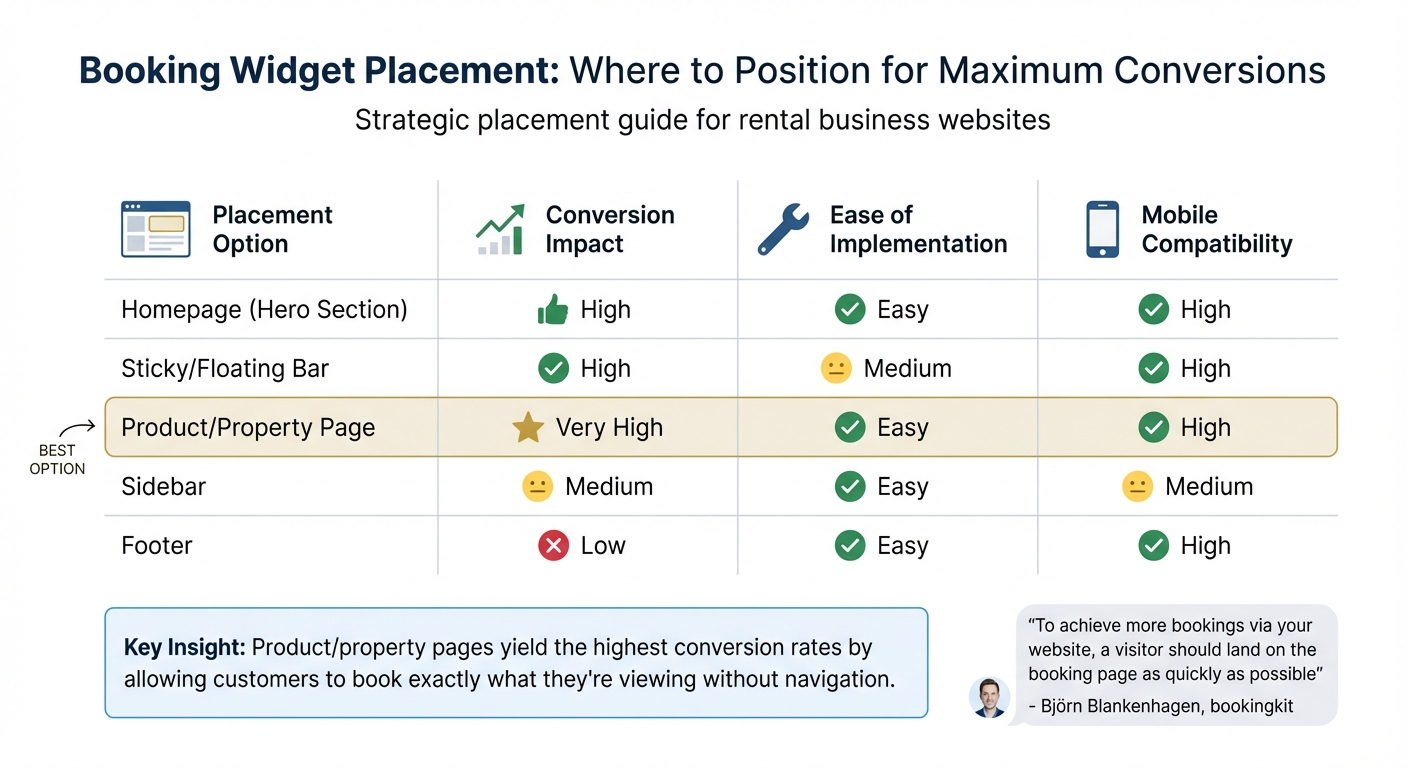
Strategic placement of your booking widget can significantly impact booking conversion rates and improve the user experience. The goal is to make booking as simple and intuitive as possible by positioning the widget where it’s most likely to catch a customer’s attention. Placing the widget in the hero section of your homepage ensures it’s immediately visible to new visitors, while sticky or floating bars keep the "Book Now" option accessible as users scroll.
For businesses offering rentals, embedding widgets directly on product or property pages often yields the highest conversion rates. This allows customers to book the exact item they’re viewing without navigating away. This approach is especially effective for businesses managing multiple rental categories, like trailers, bikes, or equipment. Additionally, a site-wide sticky bar ensures that users can start booking from any page, which is particularly useful on longer pages with more content.
"To achieve more bookings via your website, a visitor should land on the booking page as quickly as possible... include the code in as prominent a position on the page as possible." - Björn Blankenhagen, bookingkit
Avoid placing widgets near banner ads to minimize distractions. Stick to one primary widget per page to avoid confusing users - if additional calls-to-action are necessary, use simple text links instead. While footer placement is easy to implement, it typically results in low conversion rates since many visitors don’t scroll that far.
| Placement Option | Conversion Impact | Ease of Implementation | Mobile Compatibility |
|---|---|---|---|
| Homepage (Hero Section) | High | Easy | High |
| Sticky/Floating Bar | High | Medium | High |
| Product/Property Page | Very High | Easy | High |
| Sidebar | Medium | Easy | Medium |
| Footer | Low | Easy | High |
Adding a global "Book Now" button across all sub-pages ensures instant access to your booking system, making it easier for customers to book rentals on their own terms, without needing assistance.
Performance and Responsiveness
When it comes to booking widgets, performance is everything. A slow or clunky widget can turn potential customers away in seconds. With over half of website traffic for booking-reliant businesses now coming from mobile devices, ensuring a fast, smooth mobile experience isn’t optional - it’s essential. Plus, with Google's "Mobile First" policy, your mobile performance directly affects your search rankings [5].
Mobile-Friendly Design
Your widget needs to work effortlessly across all devices. This means using fluid dimensions that adjust to any screen size and leaving enough space to avoid annoying layout shifts.
"Many of our clients' websites see over 50% of their site traffic on a mobile browser... Be sure your integration works on mobile as well. When in doubt, add a fixed button that appears only on the mobile version of the site." - FareHarbor [5]
A good design ensures usability, but speed is what keeps visitors engaged. Let’s talk about how to optimize loading times.
Speed and Loading Times
Third-party widgets can add anywhere from 100 KB to 2 MB of JavaScript, which may slow your site down [8]. To keep things running smoothly, control how and when your widget loads. Use the async or defer attributes on your widget’s script tag to prevent it from blocking your main content.
"Requests for third-party embeds can get in the way of loading first-party content, so the position of a third-party script tag is important." - Addy Osmani, Katie Hempenius, and Leena Sohoni, web.dev [8]
Another trick? Use lazy loading (loading="lazy") for your widget’s iframe. This delays the widget’s load until it’s needed, saving up to 500 KB initially [8]. For widgets placed below the fold, this can dramatically improve your site’s initial load time. Always place your widget’s script tags after your main content to prioritize loading critical elements first. Tools like Lighthouse are great for spotting any speed bumps caused by your booking widget.
| Optimization Technique | Performance Impact | Implementation Method |
|---|---|---|
| Async/Defer Scripts | Reduces render-blocking | Add async or defer to <script> tag |
| Browser Lazy-Loading | Saves initial bandwidth | Add loading="lazy" to <iframe> |
| Dimension Attributes | Improves visual stability | Set width and height in HTML/CSS |
| Fluid Width (100%) | Ensures mobile fit | Set container width to 100% |
Platforms like Lockii offer embeddable booking widgets built with speed and performance in mind. These tools let rental businesses provide 24/7 self-service booking without compromising site speed or mobile usability.
Advanced Features and Automation
Once you've optimized for speed and mobile usability, it's time to tap into automation to elevate your booking widget. A fast, mobile-friendly widget is just the start - integrating advanced features like payments, identity verification, and automated communications turns it into a round-the-clock self-service powerhouse. These tools not only streamline operations but also significantly reduce the need for manual input.
Payments and Identity Verification
Incorporating secure payment options is a must for modern booking systems. Using Stripe, for instance, allows for instant transactions, automated invoices, and seamless application of security deposits or cancellation policies[9]. This ensures a smooth and secure payment process for both businesses and customers.
Adding identity verification takes things a step further by securing contactless rentals, building trust, and enhancing security. Automated systems now use OCR technology to scan IDs and match them with real-time selfies, complete with liveness checks like blinking, to prevent fraud[11]. Here's a real-world example: In 2025, a rental company managing 15 properties implemented AI-driven fraud detection. This reduced guest processing time from two hours to just five minutes and thwarted eight fraudulent attempts in six months, saving the company over $15,000[12].
"Online identity verification methods are no longer optional for booking platforms; they're must-haves... performing ID checks on all users upfront prevents fraud, ensures compliance, and builds user trust." – Casey Sullivan, Bookafy[11]
Services like Lockii combine Stripe's payment processing with robust identity verification, creating a secure and automated booking experience. This allows rental businesses to handle payments and verify customers without staff involvement, enabling fully self-service, 24/7 operations.
With secure transactions and verified identities in place, automation takes over to simplify communication and scheduling.
Automation and Real-Time Updates
Advanced booking widgets can send automated notifications through multiple channels, keeping customers informed and reducing no-shows[4]. Real-time synchronization across platforms ensures that once a booking is made, dates are automatically blocked on Google Calendar, your website, or third-party platforms[4]. For businesses with multiple locations, geolocation features can guide customers to the nearest service option seamlessly[2].
Third-party integrations further enhance functionality. Tools like Zapier can automate workflows by syncing your booking system with CRMs, accounting software, or marketing platforms[4]. Additionally, smart lock integrations (such as IglooHome) can generate time-sensitive access codes immediately after payment, enabling secure, contactless check-ins[3].
| Integration | Key Features | Operational Benefit |
|---|---|---|
| Stripe | Online/in-person payments, automated invoicing | Secure transactions and reduced manual billing[9] |
| Zapier / Automation | Workflow triggers, third-party app syncing | Increased efficiency and reduced admin tasks[4] |
| IglooHome / Smart Locks | Contactless access control, automated code generation | 24/7 check-ins with enhanced security[3] |
| Google Calendar / Zoom | Two-way schedule syncing, auto-generated meeting links | Prevents scheduling conflicts and simplifies virtual meetings[4] |
Lockii brings together embeddable booking widgets, Stripe payments, identity verification, automated messaging, IglooHome smart locks, and Zapier integration. This all-in-one solution allows rental businesses to offer a seamless self-service experience where customers can book, pay, verify their identity, and receive automated access codes - all without requiring staff intervention.
Security and Maintenance
When automation takes over bookings 24/7, safeguarding customer data and keeping your widget running smoothly becomes essential. A secure and well-maintained booking system not only builds trust but also helps you avoid costly security breaches.
Data Security and Privacy
Keeping customer information safe starts with implementing SSL/HTTPS encryption across your entire site. That little "https" lock icon in the browser isn’t just for show - it’s a trust signal for customers. Without it, browsers might flag your booking page as insecure, which could hurt both your conversion rates and SEO rankings[5].
But encryption isn’t enough. Strengthen your system with JWT-based token authentication that renews hourly, and set rate limits (e.g., up to 30 calls per hour) to block brute-force attacks[10]. Never store sensitive API credentials in plaintext or embed them in client-side code. Instead, use environment variables during development and rely on dedicated secrets management tools in production[10].
Compliance with data protection laws is non-negotiable. Take the California Consumer Privacy Act (CCPA), for instance - it applies to businesses with over $25 million in revenue or those handling data from more than 50,000 consumers. Violations can cost $2,500 for unintentional breaches and $7,500 for intentional ones[17][18]. Similarly, if you serve customers in the EU, GDPR compliance is a must. Fines can reach up to 4% of global annual revenue or 20 million EUR, whichever is higher[17][18]. Both regulations demand clear consent management, transparent privacy policies, and the ability for customers to delete their data upon request.
"Security and credit card safety are no laughing matter and your failure to protect your customers' valuable personal and payment information can result in severe penalties." – Rezgo[15]
For secure payment processing, platforms like Lockii integrate Stripe with encrypted data handling, ensuring customer data stays protected throughout the booking process. This focus on security goes hand-in-hand with seamless automation, keeping every step of the customer journey safe.
Once your security measures are in place, the job isn’t done - regular testing and updates are key to maintaining those standards.
Testing and Updates
Even with strong security protocols, ongoing testing is critical to ensure your widget remains reliable. Frequent checks verify that your widget displays accurate availability, pricing, and other key features across both mobile and desktop platforms. This includes edge cases like discount codes, minimum stay rules, and fully booked dates[14].
Delaying updates is a risk you can’t afford. As CM Alliance puts it:
"Ignoring updates is like leaving your front door unlocked. Patches fix security holes, so don't skip them."[13]
Regular security audits are essential to spot vulnerabilities before attackers do. Routine PCI scans and timely SSL certificate renewals also help maintain secure connections[15].
Before launching or updating your booking system, thoroughly test the entire customer journey - from initial interaction with the widget to payment processing and automated notifications. This helps catch potential issues before they impact actual customers[7][16]. Automatic backups are another must-have, ensuring your data stays safe in case of a security breach or update failure[13].
If your system relies on custom API integrations, monitor them closely. APIs evolve over time, so allocating resources for updates is vital to keep your widget running smoothly alongside third-party services[14]. Regular maintenance ensures your booking system stays reliable, secure, and ready for anything.
Conclusion
A well-designed booking widget can transform the customer experience, making the journey from browsing to booking smooth and straightforward. By focusing on features like on-site checkouts through iFrames or modals, aligning the widget with your brand’s look and feel, and ensuring a mobile-friendly design, you create a tool that turns casual visitors into paying customers. Since much of today's traffic comes from mobile devices, ensuring your widget performs well on smaller screens is essential.
Features like real-time syncing, secure payments through platforms such as Stripe, and strategic placement - whether in the header or footer - help convert visits into confirmed bookings while reducing manual work[1][3]. This not only simplifies your processes but also sets the stage for enhanced automation and security.
Equally important is safeguarding customer data. Using SSL encryption and conducting regular testing ensures your booking system remains secure and efficient. As Alex Hollingworth, Head of Web Dev at Arise Hotel Marketing, aptly notes:
"A beautifully designed site means very little if your booking process is clunky or confusing"[14]
Your widget should be fast, adaptable to any device, and capable of managing important features like discount codes and fully booked periods.
Lockii offers all these capabilities in one platform. Its embeddable booking widgets seamlessly integrate with your website while providing advanced tools like identity verification, SMS notifications, GPS tracking, and 24/7 self-service pickups through digital locks. This shift to self-service rentals addresses common operational questions while enhancing customer convenience. This streamlined setup allows businesses to expand to new locations with franchisable rental models that don't require extra staff or complicated workflows.
Ultimately, a reliable booking widget lays the groundwork for a rental operation that runs efficiently, converts more customers, and gives you the freedom to focus on growing your business.