
Setup Automated Self Service Bookings for your trailer rental business
January 2, 2026 · 14 min read
Setup Automated Self Service Bookings for your trailer rental business
Automating your trailer rental business lets you operate 24/7 without on-site staff. Customers can book, pay, and access trailers anytime using digital locks and GPS tracking. This reduces costs, increases revenue, and simplifies operations. Here's how to get started:
- Lockii Platform: Manage bookings, payments, and fleet tracking online. Starts at $12/month per lock, with a free trial available.
- Digital Locks: Use IglooHome products to provide secure, time-limited access codes for rentals.
- GPS Trackers: Monitor trailer locations and returns in real-time.
- Website Integration: Add booking widgets to your site for a seamless customer experience.
- Automation Tools: Enable SMS/email notifications, self-service extensions, and returns with photos.
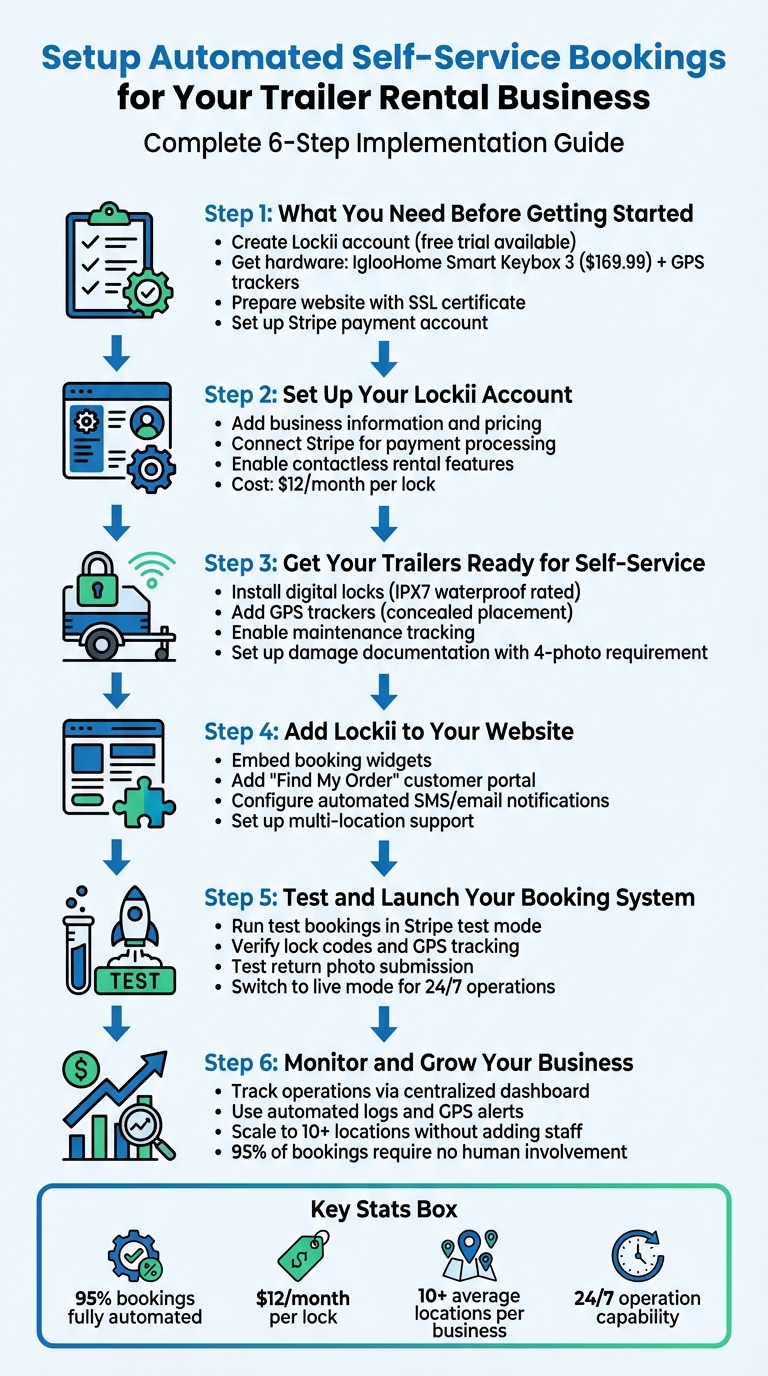
Step 1: What You Need Before Getting Started
Getting your automated trailer rental system up and running requires three essential components: a Lockii account, the necessary digital locks and GPS trackers, and a functional website. These basics are straightforward to set up but are crucial for delivering a smooth, 24/7 rental experience.
Create a Lockii Account and Choose Your Plan
Start by visiting the Lockii website and clicking on "Get Started" to create your account. The platform offers a free trial with no credit card required [3]. This trial period gives you a chance to familiarize yourself with the system and see if it aligns with your business needs.
When you're ready to fully implement the system, Lockii charges $12 per month per locked item [2]. For businesses managing larger fleets, volume discounts are available - many companies using Lockii oversee operations across 10 or more locations [1]. Since the platform is entirely online, there's no need for local installations [3]. Plus, you'll have access to 24/7 documentation and live online training sessions to guide you [2][3].
Once your account is set up, the next step is to gather the hardware needed for full automation.
Get the Required Hardware
To ensure your rental system operates smoothly, you'll need two key types of devices: digital locks and GPS trackers. For locks, Lockii integrates seamlessly with IglooHome products, which generate automated access codes for customers. The IglooHome Smart Keybox 3 is a popular option, priced at $169.99 per unit, and boasts an impressive 4.86/5 rating from 165 reviews [6]. To securely attach the keybox to your trailer, consider the IglooHome Car Mount for $62.99 [6]. If you'd like remote real-time control, you can add the IglooHome Bridge for Wi-Fi connectivity at $79.99 [6].
GPS trackers are just as important for keeping tabs on trailer locations, verifying returns, and reducing the risk of theft. Lockii supports GPS devices compatible with Telematics Guru, enabling automated location updates and return confirmations [2]. Be sure to account for battery replacements for these devices [6].
Make Sure Your Website Is Ready
With your account and hardware in place, it’s time to prepare your website. A functioning website with a domain name is essential for embedding Lockii’s booking widgets and customer portals [1]. You don’t need anything elaborate - platforms like Wix or Squarespace can get the job done [4]. What matters most is that your site is secure, so ensure it has an SSL certificate to protect customers' payment information during transactions [4].
Before integrating Lockii, organize your trailer inventory on your site. Include clear photos, details about rental durations (hourly or daily), and pricing. Additionally, set up a Stripe account since Lockii relies on Stripe for processing payments and verifying customer identities [2][3].
Step 2: Set Up Your Lockii Account
After creating your account, it's time to tailor the platform to automate rental business operations. This involves entering your business details, connecting a payment system, and enabling 24/7 contactless rental features. You'll also need to adjust your account settings to align with your business needs and activate payment integrations.
Add Your Business Information
Start by logging into your Lockii dashboard. Here, you’ll input your business details and set your pricing. For example, you can establish rental rates like $12.99 per day or $49.99 per week. Lockii supports managing multiple trailer locations under one account - on average, businesses using the platform oversee more than 10 locations [1]. If you'd like to offer customers a branded experience, you can opt for a custom domain instead of a standard Lockii link for an extra $10 per month. This section also lets you organize your trailer inventory by adding photos, detailed descriptions, and availability schedules for each unit.
Connect Payment Processing and Automations
To handle transactions, link your Stripe account directly to Lockii. Stripe not only processes payments but also verifies customer IDs using Stripe Identity. Want to streamline even more? Integrate Zapier with Lockii to create workflows for automated SMS and email notifications, ensuring your customers stay updated throughout their rental journey.
Turn On Contactless Rental Features
Enhance convenience by enabling features like automated lock codes, GPS syncing with your tracking system, self-service rental extensions, and return photo submissions. These tools make the process nearly hands-free - 95% of bookings are completed without any human involvement [1].
Step 3: Get Your Trailers Ready for Self-Service
Once you've got your automated setup in place, the next step is prepping your trailers to ensure a smooth and secure self-service rental experience. This means adding features like digital locks for secure access, GPS trackers for monitoring, and systems to track maintenance and document any damage.
Install Digital Locks and GPS Trackers
Secure access is a must for self-service rentals. Digital padlocks, such as the Igloohome Padlock 2 (designed to withstand rain, snow, and extreme temperatures with its IPX7 rating), are a great option. If your trailer uses a traditional key for its hitch lock or storage compartments, you can upgrade with a smart keybox like the Igloohome Keybox 3. These digital locks can generate temporary PIN codes during bookings, ensuring access is only available for the rental period. For added security, consider using physical immobilizers and clear identification labels. When paired with Lockii, these locks can automatically generate and deactivate PIN codes based on the booking schedule.
GPS tracking is another critical feature for theft prevention and fleet management. You can choose from several types of trackers, including battery-powered models for quick installation, hardwired trackers that connect to the trailer’s 12V/24V system, or solar-powered options. Place the tracker in a concealed spot, like under the trailer frame, where it can still maintain a strong signal. Some advanced GPS systems can monitor up to 72 satellites at once and boast a 100% recovery rate for stolen assets [7]. Once installed, you can register your GPS device on Lockii's Telematics Guru Tracking Platform. Set up geofencing around your storage areas to receive instant alerts if a trailer moves outside the designated boundaries.
| Feature | Wired Tracker (e.g., TitanLTE) | Battery Tracker (e.g., Oyster3) |
|---|---|---|
| Power Source | Trailer 12V/24V System | 3 AA Batteries |
| Update Frequency | Every 1 minute while moving | Every 5 minutes while moving |
| Installation | Requires wiring/splicing | "Slap-and-stick" / Adhesive |
| Backup | 100-day backup battery | N/A (Primary battery lasts 5 years) |
| Waterproof Rating | IP67 | IP67 |
With secure locks and real-time tracking in place, the next step is keeping your trailers in top condition by monitoring maintenance and documenting any damage.
Enable Maintenance and Damage Tracking
After securing your trailers and setting up GPS tracking, it’s time to focus on their condition. Lockii makes it easy to track maintenance and document damage. At the end of every rental, customers can be required to upload at least four photos - showing the front, back, and both sides of the trailer. These photos are automatically added to the trailer’s audit log, creating a permanent record of its condition over time.
"Capture photos and forms from every hire to keep track of item status and issues over time." – Lockii
Lockii also includes a maintenance blocking feature that prevents bookings while a trailer is undergoing repairs or routine servicing. You can set up automated reminders based on either usage frequency or specific dates, ensuring that safety inspections are never missed. Additionally, the platform’s GPS-linked returns confirm the exact drop-off location and send instant alerts if there are any issues, such as unauthorized movements or late returns. By combining photo documentation, audit logs, and GPS verification, you’ll save hours of work every week while keeping your fleet in excellent shape.
Step 4: Add Lockii to Your Website
Now that your trailers are secured and ready for tracking, it's time to integrate everything into your website. This step allows customers to book and manage their rentals seamlessly, without requiring constant input from you. Lockii's embeddable widgets and automated messaging system take care of the entire process - from the initial booking to the final return - while keeping you in the driver’s seat. Embedding these tools directly on your site will create a smooth and hassle-free experience for your customers.
Add Booking Widgets and Customer Portals
Lockii offers embeddable booking widgets that fit right into your website. These widgets let customers reserve trailers directly on your site without being redirected elsewhere. This keeps your branding front and center while ensuring you maintain control over the customer experience. To set it up, simply grab the embed code from your Lockii dashboard and paste it into your website's HTML where you want the booking calendar to appear.
You can also enhance the experience with two key self-service features: the "Find My Order" page and the customer portal. The "Find My Order" page makes it easy for customers to retrieve their booking details and lock codes by entering their email or order number. This is especially helpful for those who may have misplaced their confirmation message. The customer portal takes it a step further, letting renters extend their bookings and make additional payments online - no need for them to contact you directly. For walk-up rentals, Lockii also supports instant checkout using QR codes or NFC.
These tools integrate seamlessly with Stripe, ensuring secure payment processing and prevent fraud with identity verification. If you operate in multiple locations, the system can even guide customers to the nearest rental site, while also opening up opportunities to offer additional services.
Set Up Automated Customer Messages
Once your booking widgets are live, you can elevate the customer experience further by setting up automated SMS and email communications. Lockii simplifies this by allowing you to configure schedules for messages that keep customers informed at every stage of their rental journey. For example, messages are automatically sent when a booking is confirmed, when lock codes are generated, and when it's time to return the trailer.
"Setup email & SMS schedules to keep customers informed." – Lockii [1]
To enable this feature, connect Lockii with SMS providers like TextBelt or MessageBird, and use Resend for email communication. For more advanced workflows, you can even integrate with your existing CRM or marketing tools through Zapier. This ensures that customers receive timely updates, such as booking confirmations, pre-pickup reminders, and return instructions, all without requiring manual intervention.
| Message Type | Trigger | Includes |
|---|---|---|
| Booking Confirmation | New reservation received | Order details, pickup date, payment receipt |
| Lock Code Delivery | Stock assigned to order | Unique PIN code, trailer location, access details |
| Pre-Pickup Reminder | 24 hours before pickup | Pickup time, location address, items to bring |
| Return Instructions | Day before return due | Return location, photo requirements, extension option |
sbb-itb-eb44693
Step 5: Test and Launch Your Booking System
Before opening your automated booking system to customers, ensure every part of it works smoothly. Go through the entire rental process - from booking to return - to spot and fix any issues before they impact real users. Lockii’s straightforward setup makes this testing phase easier. Once everything checks out, you’ll be ready to offer 24/7 rentals across all your locations.
Run Test Bookings
Start by creating a test reservation on your website, acting as a customer. To avoid processing real charges, disable live payments in your Stripe account or enable test mode. Walk through every step of the booking process: fill out the reservation form, complete the identity verification, and confirm that the system generates a lock code and sends it via automated SMS and email.
Next, test the hardware in person. Visit a trailer location and use the digital lock code you received to unlock the IglooHome lock. If the code doesn’t work, check your dashboard to ensure the lock is synced with your Lockii account. Then, simulate the return process by submitting "hire end" photos and completing return quizzes. Verify that the GPS tracker updates the trailer’s location accurately and that all details are logged in your admin dashboard.
For multi-location setups, confirm that stock and pickup instructions are correctly assigned. Test the "Find My Order" page by entering your test reservation details to ensure customers can easily access their lock codes and rental information. The goal is to confirm that customers can complete the entire process without assistance. Once all tests succeed, you’re ready to launch your live 24/7 rental service.
Go Live with 24/7 Rentals
After completing your tests, it’s time to open the system to real customers. Switch your Stripe account back to live mode and remove any testing holds on your trailers. Lockii allows for unlimited orders, lock codes, and automated communications, so scaling with franchisable rental models won’t be a challenge.
Launching with Lockii means your business can run 24/7 without requiring staff on-site. For instance, customers could book a trailer at 2:00 AM on a Sunday and pick it up immediately. Businesses using Lockii for self-service operations typically manage an average of 10+ locations [1], enabling expansion without the need for additional personnel or costly office spaces. Keep an eye on your first few live bookings through the dashboard to ensure everything is running smoothly, and let your automated system handle the rest.
Step 6: Monitor and Grow Your Business
Now that your 24/7 system is live, it's time to use automated data to keep an eye on operations and push for growth. With Lockii's dashboard, you get real-time updates on every trailer across all your locations. It builds on your digital locks and GPS systems to give you instant insights. GPS tracking pinpoints trailer locations and sends alerts if something seems off, like delayed returns or unexpected movements. Each rental is logged with details like booking dates, customer interactions, maintenance records, and return conditions.
Stay on Top of Operations with Logs and Automation
Every action is logged automatically. The system tracks service history and usage for each trailer, so you can block units needing repairs directly in the platform. This ensures no customer accidentally books a trailer that's out of commission. Maintenance logs also record service dates and flag recurring issues, helping you keep your fleet safe and ready for the road.
Automated tools like GPS, return photos, and condition quizzes verify each trailer’s status upon return. Over time, these photos create a visual history, making it easier to spot damage patterns or recurring issues. With 95% of bookings requiring no human involvement [1], these tools handle most of the heavy lifting when it comes to monitoring operations, freeing you up to focus on scaling your business.
Expand Without Adding More Staff
Use the insights from your system to grow efficiently. Lockii's multi-location support makes it possible to expand without the need for additional staff. Instead of setting up large rental offices, you can place trailers at smaller, self-service lots or partner locations. The centralized dashboard lets you handle inventory, maintenance, and bookings for all locations from one interface.
Customers can easily find the nearest trailer through your website’s booking widget, which also manages cross-location rentals automatically. Since the system operates contactlessly 24/7, opening a new location is as simple as equipping trailers with digital locks and GPS trackers - no need to hire staff or worry about office hours. This approach keeps real estate and labor costs low while allowing for quick scaling. Lockii's reporting tools help you track performance across locations, so you can see which sites are driving the most revenue and decide where to grow next.
Conclusion
Setting up an automated trailer rental business is simpler than you might think. By customizing your setup - including account creation, hardware installation, and website integration - you’ll create an efficient, hands-off system. This approach eliminates the need for on-site staff, cuts down on real estate costs, and allows customers to book and pick up trailers whenever it’s convenient for them.
With 95% of bookings running smoothly without human involvement and the ability to scale beyond 10 locations, Lockii simplifies operations and paves the way for growth [1][5]. Instead of getting bogged down in daily tasks, you can focus on expanding your business.
Lockii starts at just $12 per month per lock and even offers a free trial [2][3]. The system integrates seamlessly with tools like IglooHome for digital locks, Stripe for payments and identity verification, and GPS tracking to monitor your fleet’s security and location. This setup provides everything you need to run a contactless rental business and sets the stage for scaling quickly.
Once your automated system is live, you can grow without the typical barriers of staffing or added overhead. Whether you’re opening a second location in your city or expanding across state lines, Lockii’s automated tools ensure you can scale with ease. With 24/7 access and efficient processes, your trailer rental business is ready for sustained success.