
How to connect igloohome smart locks to to trailer rental software
January 29, 2026 · 17 min read
How to connect igloohome smart locks to to trailer rental software
Want to automate your trailer rental business? Here's how to connect Igloohome smart locks to rental software for a 24/7 self-service setup.
You can manage multiple locations remotely, reduce manual work, and improve efficiency by integrating Igloohome locks with rental platforms. These locks generate offline PIN codes, ensuring secure access even in remote areas without internet. Choose one of these three methods:
- Zapier (Manual): Create and send codes manually through automated workflows.
- Lockii (Automated): Fully automate bookings, identity verification, and code delivery.
- Custom Zapier Integration: Tailor workflows using the Igloohome API for advanced needs.
Each option suits different business scales and technical expertise. Learn how to set up these integrations, avoid common pitfalls, and decide which method works best for you.
Understanding Igloohome Smart Locks and Offline Codes
Igloohome smart locks rely on a proprietary technology called algoPIN™, which functions offline, similar to how a bank token generates one-time passwords. When the lock is paired via Bluetooth, a unique algorithm is established between the lock and the cloud [7][8]. This shared "mathematical recipe" allows both the lock and the app to generate matching PIN codes.
Once the lock is paired, you can generate PIN codes remotely with a pre-set active period. These codes are recognized by the lock without requiring an internet connection. Customers receive their access PIN via text message - no app download or account setup is needed [7][10]. This is particularly useful for trailers stored in remote areas like parking lots or storage yards, where internet connectivity can be unreliable [9][10]. This offline capability is central to how Igloohome ensures secure, time-specific access to trailers.
How Igloohome Offline Codes Work
Igloohome uses "Duration" PINs, which are time-sensitive codes that work only during a customer's rental period [9]. The locks can store up to 199 PIN codes at a time and offer a battery life of 9–12 months [7][10]. Across the Igloohome ecosystem, over 75,325 access credentials are generated daily, adding up to more than 25 million annually worldwide [9].
This design sets Igloohome apart from WiFi-enabled locks that need constant connectivity or Bluetooth locks that require proximity for setup.
Limitations of Offline Codes
While offline codes offer convenience, they come with certain limitations. For instance, the lock cannot provide real-time updates about when a trailer has been accessed or returned, as it lacks the ability to communicate back to you [1][3]. To address this, GPS trackers are often used alongside the locks to monitor trailer locations and confirm pickups and returns.
Another challenge is the manual generation of codes. Without integration into rental software, each booking requires manually creating and assigning codes, which can become a bottleneck when managing multiple locations or handling high booking volumes [2]. Additionally, sending codes immediately after booking - without verifying the customer's identity - can increase the risk of theft [1][3]. Verifying customer details, such as checking a driver’s license, is a crucial step before providing access.
Stock management can also be tricky. In a manual setup, there’s a risk of assigning the same trailer to multiple customers or failing to block out a trailer undergoing maintenance [2][3]. Furthermore, once an offline code with a specific expiration date is generated, it cannot be changed remotely unless you are within Bluetooth range to re-sync the lock [7]. This highlights the importance of automated rental software as your operations grow.
Method 1: Using Zapier for Manual Code Generation
If you're looking for a way to connect your Igloohome locks to your trailer rental workflow without investing in specialized rental software, Zapier can be a practical option. While this approach is more hands-on, it allows you to create automated workflows - called "Zaps" - to handle tasks like generating lock codes and sending them to your customers when a new booking is made.
Setting Up a Zapier Account and Triggers
To get started, sign up for a free Zapier account at zapier.com. Once you're set up, you'll need to connect your Igloohome locks through the iglooconnect portal. Begin by obtaining an exchange code via the Igloohome app. Keep in mind, you'll need to purchase integration slots - one for each lock you plan to connect [14]. To authorize the connection, open the Igloohome app, go to Account Settings > iglooconnect, select your service provider, and tap "Connect" to copy your exchange code [14].
Next, create a Zap that starts with a trigger. For example, you could set the trigger to activate whenever a new booking is created in your rental software or when a new row is added to a Google Spreadsheet [13]. This trigger will kick off the workflow automatically as soon as a booking occurs, setting the stage for the next steps.
Manually Generating and Sending Codes
Once your trigger is in place, the next step is to automate the generation and delivery of lock codes. Add an action step that communicates with the Igloohome API to create a Duration PIN - a temporary 7-9 digit code that works only during the rental period [12][13]. Keep in mind that Igloohome codes must align with whole-hour time blocks. For example, if a booking runs from 2:30 PM to 5:45 PM, you'd need to set the code's validity from 2:00 PM to 6:00 PM.
It's important to note that these codes must be activated within 24 hours, or they will expire. Make sure to communicate this timing detail clearly to your customers.
To send the generated code, add another action step using an SMS service like MessageBird or TextBelt, or an email platform like SendGrid [4]. Your completed workflow will look something like this: New Booking (Trigger) → Generate Igloohome Code (Action) → Send SMS or Email (Action) [13][4].
Zapier Limitations to Consider
While Zapier offers flexibility, it does come with some notable limitations, especially as your business scales. One significant drawback is the need for manual oversight. For example, you'll often need to double-check that the correct trailer is assigned to the right customer [4].
Another issue is that PIN codes cannot be deleted through Zapier. If you need to remove a code, you'll have to do so manually via the Igloohome app. This process won't sync back to your Zapier workflow, potentially leaving gaps in your records.
Additionally, Zapier doesn't provide features like automated identity verification, GPS-confirmed returns, or inventory tracking. This lack of functionality can lead to risks such as sending codes to unverified customers or mismanaging lock assignments, increasing the potential for theft or other issues [4].
While this method can work for smaller operations, it's worth considering these challenges as your rental business grows.
Method 2: Connecting Through Lockii
Forget about manually setting up integrations with Zapier - Lockii is a dedicated tool designed to streamline your rental workflow with Igloohome locks.
Setting Up Lockii for Igloohome Integration
Start by signing up at lockii.app. Lockii connects with Igloohome without requiring extra integration slots or manual code exchanges [4].
After setting it up, link each lock to its assigned trailer. This setup simplifies managing multiple locations and boosts efficiency [2]. You can even add QR codes or NFC tags to your trailers, making it easy for walk-up customers to scan and book instantly [2].
Once you're ready, take advantage of Lockii's automated code generation and delivery features.
Automating Code Generation and Delivery
Lockii takes care of everything. When a customer books through your website widget, hosted booking page, or an on-site QR code, Lockii automatically assigns the nearest available trailer and generates a unique Igloohome PIN code. This code is valid only for the rental duration [11].
To add an extra layer of security, you can integrate digital identity verification through Stripe Identity. After verification, the access code is sent automatically via scheduled SMS and email. It's also displayed on the customer's digital confirmation page. According to Lockii, about 95% of bookings are completed without any need for human assistance [2].
At the end of the rental, customers upload photos and fill out a digital return form to confirm they've returned the trailer. If you've connected one of the 36+ supported GPS tracking providers, the system logs the pickup and return automatically. You'll also get instant alerts if a trailer is overdue or moved unexpectedly [2].
Using Offline Functionality and Multi-Location Support
Thanks to Igloohome's algoPIN™ technology, Lockii works offline, so your trailers can be parked in remote locations - like storage yards - without needing constant internet access [1]. It also supports multi-location operations with centralized audit trails. Every interaction, from identity verification to GPS-confirmed returns, is logged for full fleet visibility [1][2].
Additionally, Lockii offers self-service booking extensions. This feature allows customers to extend their rental period online and pay the additional fees automatically, reducing the need for support calls [2].
Method 3: Creating a Custom Zapier Integration
You can create a tailored Zapier integration using Code by Zapier and the Iglooaccess API to streamline your trailer rental workflow [15][16].
Building Custom Zaps for Code Automation
Start by opening the Zap editor and selecting a trigger, such as a new booking from your rental software, Google Sheets, or a custom webhook [15]. Add a Code by Zapier step, and choose either JavaScript or Python for your script [15].
In the "Input Data" section, set up keys like check_in and check_out, and map them to the booking data from your trigger step [15]. Write a script to interact with the Iglooaccess API. If coding feels daunting, you can use Zapier's "Generate with AI" feature. Simply describe your needs in plain language, like: "Generate an Igloohome offline PIN for the provided start and end dates" [15].
Your script should request an Offline PIN through the API, leveraging Igloohome's AccessAnywhere technology. This allows codes to function without requiring Wi-Fi at the trailer location [16]. Make sure to format timestamps into ISO 8601, as this is the standard required by the API [15]. After writing the script, test the step to confirm it generates a valid PIN. Then, add a final action - such as sending the code via Gmail, SMS, or WhatsApp - to complete the process [15].
Once your custom integration is set up, you’ll need to tackle some common challenges to ensure smooth operation.
Handling Zapier’s Offline Code Limitations
Custom Zapier integrations come with a few quirks when managing offline codes. For instance, Igloohome's algoPIN™ technology requires validity periods to be in whole-hour increments. This means your script should round booking times accordingly (e.g., a booking from 3:20–5:20 PM should be adjusted to 3:00–6:00 PM) [5][17].
Another important note: offline PINs must be used at least once within 24 hours of their start time, or they’ll expire [17]. Make sure to build in code regeneration and display access codes on a confirmation page that is updated to ensure reliability .
sbb-itb-eb44693
Comparing the 3 Integration Methods
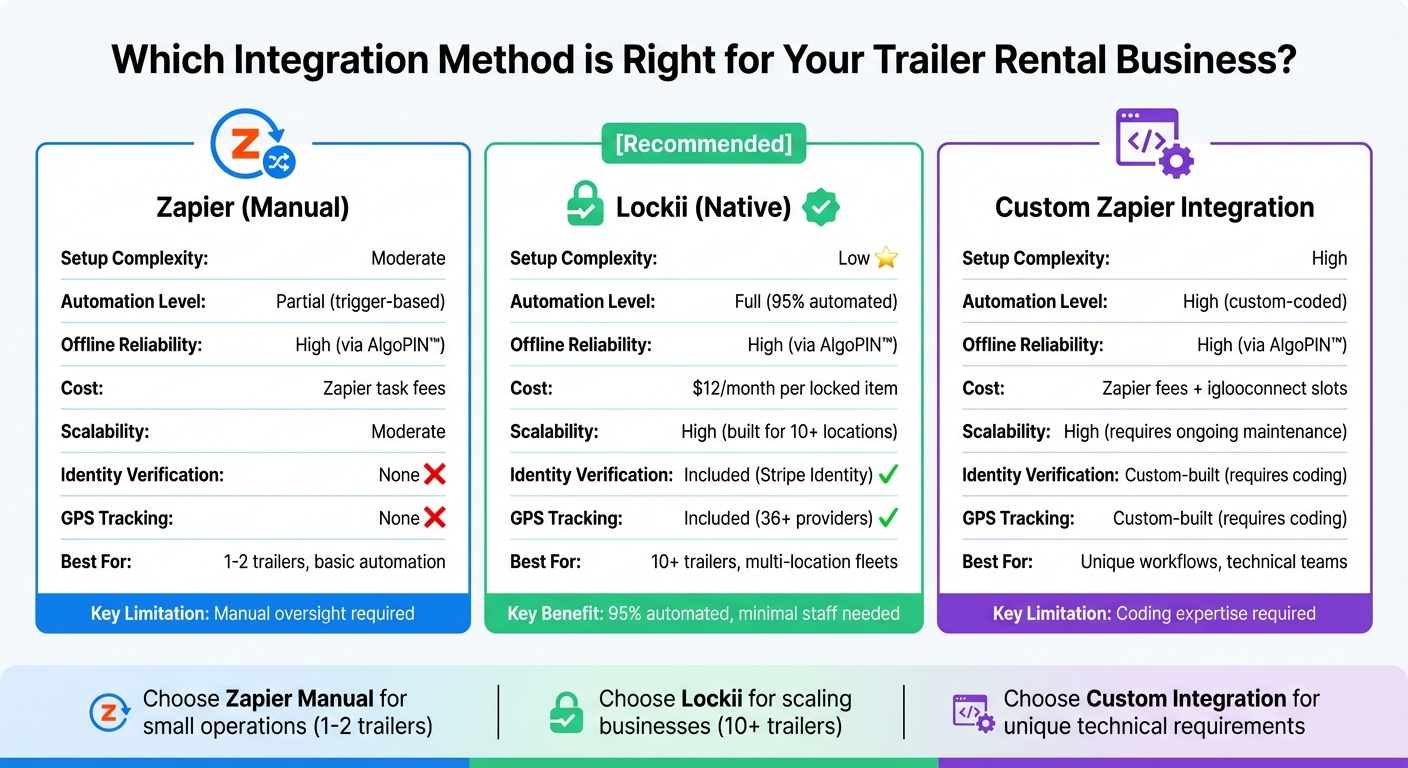
Selecting the right integration method is essential for ensuring secure and automated trailer rentals. The choice depends on your fleet size, technical expertise, and the level of automation you’re aiming for.
Pros and Cons of Each Method
Zapier Manual Integration is a good starting point if you’re managing just one or two trailers. This method involves triggering code generation when a new booking is made, then manually sending those codes to customers via email or SMS. While the setup is relatively simple, it requires constant manual monitoring. It also lacks advanced features like automated identity verification and GPS tracking, which could be a drawback for larger operations.
Lockii's Native Integration takes automation to the next level, handling almost the entire rental process with minimal manual input - reducing labor by up to 95% [2]. This option includes features such as identity verification through Stripe Identity, GPS tracking, and the ability to request return photos for delivery confirmation. It’s especially useful for fleets with 10 or more trailers, thanks to built-in multi-site support [2]. However, the monthly subscription fee per locked item may be a consideration, though volume discounts are available.
Custom Zapier Integration offers the most flexibility, allowing you to design workflows tailored to your specific needs. However, this approach requires coding expertise and regular maintenance. Additionally, you’ll need to purchase integration slots through the iglooconnect portal, with one slot required per lock [6].
Here’s a closer look at how these methods compare.
Comparison Table
| Feature | Zapier (Manual) | Lockii (Native) | Custom Zapier Integration |
|---|---|---|---|
| Setup Complexity | Moderate | Low | High |
| Automation Level | Partial (trigger-based) | Full (95% automated) [2] | High (custom-coded) |
| Offline Reliability | High (via AlgoPIN™) [18] | High (via AlgoPIN™) [18] | High (via AlgoPIN™) [18] |
| Cost | Zapier task fees | $12/month per locked item | Zapier fees + iglooconnect slots [6] |
| Scalability for Fleets | Moderate | High (built for 10+ locations) [2] | High (requires ongoing maintenance) |
| Identity Verification | None | Included (Stripe Identity) [2][4] | Custom-built |
| GPS Tracking | None | Included (36+ providers) [4] | Custom-built |
| Limitations | Manual oversight required | Monthly subscription cost | Coding expertise required |
All three methods utilize Igloohome's AlgoPIN™ technology for offline code generation. This ensures secure, time-sensitive access codes can be generated without requiring Wi-Fi at the trailer's location [18]. It’s a reliable solution even for trailers parked in remote areas.
Troubleshooting Common Connection Issues
Even with a well-configured system, technical glitches can crop up when connecting Igloohome locks to your trailer rental software. Most of these issues are tied to pairing mistakes, code generation problems, or incorrect integration settings. The upside? These are usually easy to resolve once you know where to focus.
Fixing Igloohome Offline Code Errors
One of the most frequent challenges is a failed or rejected PIN code. This often happens because the lock wasn’t paired correctly within Bluetooth range during the setup process. Igloohome locks use algoPIN™ technology, which allows them to verify codes without needing Wi-Fi.
To resolve this, re-pair the lock using the Igloohome app while standing within Bluetooth range [6][7]. Be sure to select the correct Product ID and confirm that Bluetooth is enabled. If you’re using the Slot System for integration, double-check that the Bluetooth ID and Exchange Code are entered correctly. You’ll find the Exchange Code in the "iglooconnect" tab of the Igloohome app [6].
Another common issue involves mismatched code timing. Igloohome requires PIN validity to align with whole hours. For example, if your rental software schedules a booking from 3:20 PM to 5:20 PM, the system will round it to 3:00 PM to 6:00 PM [5]. Adjust your software’s margin settings to accommodate this hourly rounding requirement [5].
A key limitation to keep in mind is that most rental software platforms don’t allow you to delete generated PIN codes. This is due to the Igloohome API, which doesn’t support code deletion [5]. To remove a code, you’ll need to do it manually through the Igloohome app. Always check the validity period of the code to ensure it’s no longer active, as the software may retain a history even after manual deletion [5].
Regularly reviewing your integration settings can help you avoid recurring problems and keep everything running smoothly across your fleet.
Maintaining a Stable Connection with Rental Software
Once you’ve addressed code-related issues, it’s important to ensure that your integration settings stay consistent to prevent connection disruptions. For integrations that rely on the iglooconnect portal, make sure you’ve purchased one integration slot for each lock [6]. Missing slots are often the culprit behind setup failures. If your integration stops working unexpectedly, go to the "Connected Services" tab in the Igloohome app, generate a new Exchange Code, and update it in your rental software portal [6].
Battery problems can also lead to PIN failures. Use your integration platform to monitor battery alerts and replace batteries before they run out [19]. If you need real-time updates beyond offline functionality, consider adding an Igloohome Bridge to connect your locks to the internet [19].
For rental software like Lockii, features such as GPS tracking and return photos offer an extra layer of reliability [1][3]. Even if you encounter lock errors, these tools provide a verifiable audit log of the trailer’s location and condition. This redundancy is especially useful for fleets operating in multiple locations.
| Issue | Likely Cause | Resolution |
|---|---|---|
| PIN generation failure | Improper pairing (lock not within Bluetooth range) | Re-pair the lock via the Igloohome app with Bluetooth enabled [6][7] |
| PIN rejected by lock | Token sync error | Re-pair the lock within Bluetooth range to sync the algoPIN token [6][7] |
| Code timing mismatch | Hourly rounding requirement | Adjust software margin settings for whole-hour PIN validity [5] |
| Cannot delete PIN | Igloohome API limitation | Delete the PIN manually via the Igloohome app [5] |
| Integration setup fails | Missing integration slot or incorrect Exchange Code | Purchase required slots and retrieve the correct Exchange Code [6] |
Best Practices for Secure and Efficient Trailer Rentals
Improving Security with Digital Locks
Igloohome locks offer a dependable solution for securing trailer rentals, even in areas where internet access might be spotty. Thanks to their offline algoPIN™ technology, these locks remain operational under harsh conditions and require minimal power to function effectively [16].
A strong security approach pairs automated identity verification with controlled access to lock codes. By confirming customer identities online during the booking process, you can reduce the risk of unauthorized use and establish a clear record of who accessed the trailer. Adding another layer of accountability, requiring return photos through your rental platform helps document the trailer's condition at drop-off. This creates a reliable audit trail for addressing potential damage or disputes.
For an extra layer of protection, GPS tracking can be used to monitor the trailer's location during returns. By cross-checking GPS data with return confirmations, you can ensure the trailer is where it should be without conducting manual inventory checks. Plus, you'll receive instant alerts if something seems off, saving time and preventing potential losses.
Once you've established strong security measures, the next step is to focus on simplifying operations through automation.
Reducing Manual Work with Automation
With digital lock operations providing a secure foundation, automation can take your rental process to the next level. Not only does it save time and cut labor costs, but it also improves the customer experience. Many companies using automation platforms successfully manage 10+ locations without needing to scale their staff proportionally [20].
Automating the rental workflow is essential for maximizing efficiency. For example, you can set up your system to automatically assign trailers, generate unique Igloohome codes, and send them to customers via email or SMS right after a booking is confirmed. Features like self-service extensions allow customers to extend rentals and pay online without needing to contact support, while maintenance blocks automatically remove trailers under repair from the available inventory. QR codes on trailers can further simplify the process, enabling instant bookings and triggering automatic code generation for on-the-spot rentals.
| Feature | Security Benefit | Efficiency Benefit |
|---|---|---|
| Identity Verification | Prevents theft and unauthorized use | Reduces the time spent on manual checks |
| GPS Tracking | Alerts you to issues with returns | Eliminates the need for manual inventory checks |
| Return Photos | Creates a record of condition and damage | Automates maintenance tracking |
| Automated Codes | Ensures access is granted only to verified users | Allows 24/7 pickup without staff involvement |
Using a rental management platform like Lockii can help you seamlessly implement these strategies. It combines enhanced security with streamlined, automated processes to make your trailer rental business both secure and efficient.
Conclusion
Integrating Igloohome smart locks with your trailer rental software ultimately depends on choosing the right method for your needs. If you're okay with manually generating codes and sending them to customers, a tool like Zapier can work, though it requires hands-on management. On the other hand, for businesses aiming to automate your rental processes, a direct integration such as Lockii provides a more streamlined approach. It automates everything from identity verification to GPS tracking and code delivery, all without requiring staff intervention.
Each method has its own advantages. Fully automated self-hire systems can handle up to 95% of bookings without human involvement [2], making it possible to operate across multiple locations - 10 or more - without needing extra staff [2]. This can save you hours of administrative work, allowing you to focus on scaling your business instead.
Before diving in, ensure your Igloohome lock models are compatible with the integration you choose. Keep in mind that all locks must first be paired via Bluetooth, and Igloohome's offline codes only work in whole-hour increments for their validity periods [5].
For trailer rental businesses, it's especially important to select integrations that handle identity checks, track returns, and verify rental conditions. These features not only protect your assets but also enable seamless 24/7 self-service rentals, boosting both security and efficiency.